When you click on links to various merchants on this site and make a purchase, this can result in this site earning a commission. Affiliate programs and affiliations include, but are not limited to, the eBay Partner Network.
Subscribing to see if this becomes successful. The only camera I'd like to add is the front one to aid with parking. Otherwise, I'll get some aftermarket back-up sensors to mount up front.
I hooked up a front camera and a rear rv camera to a toggle switch powering front or trailer cam
You install a splice harness behind the radio & press the volume button to view your cam. https://naviks.com/i-24076368-2017-2...tegory:1207148
When you have your truck in reverse to alternate between the tailgate camera and CHMSL there is obviously the dash button but do you also have a soft key on the sync screen itself as well to toggle between the two views? I would suspect if there was a button it would be above the + sign to zoom in and out.
I hooked up a front camera and a rear rv camera to a toggle switch powering front or trailer cam
You install a splice harness behind the radio & press the volume button to view your cam. https://naviks.com/i-24076368-2017-2...tegory:1207148
I have looked at that one, and I have also looked at one from Camera source that could work as well, looks like the better option than going through the work to add IMPB even thought apart from the camera feeds themselves it is only 5 more wires to wire it in.
The naviks has worked great, im rerouting the rv feed to a camera on the back of my new topper.
With this system you can watch when driving if your wife can take it! My small center off toggle
switch is by the brake pedal switch, so its out of sight.
SloeJoe...we have a couple 2017-2018 F450 Pickups XL trim that came with the tailgate camera and the CHMSL camera. They DID have a camera button on the upper dash to switch. The default was the tailgate camera.
SloeJoe...we have a couple 2017-2018 F450 Pickups XL trim that came with the tailgate camera and the CHMSL camera. They DID have a camera button on the upper dash to switch. The default was the tailgate camera.
jjw
Thanks Jerry, I am aware of the button, I was curious if the Sync 3 system also had a soft key on the screen to select between cameras like they do for the Ultimate tow system (360 degree camera) you can toggle through the views with the button on the dash or thrugh the sync 3 screen.
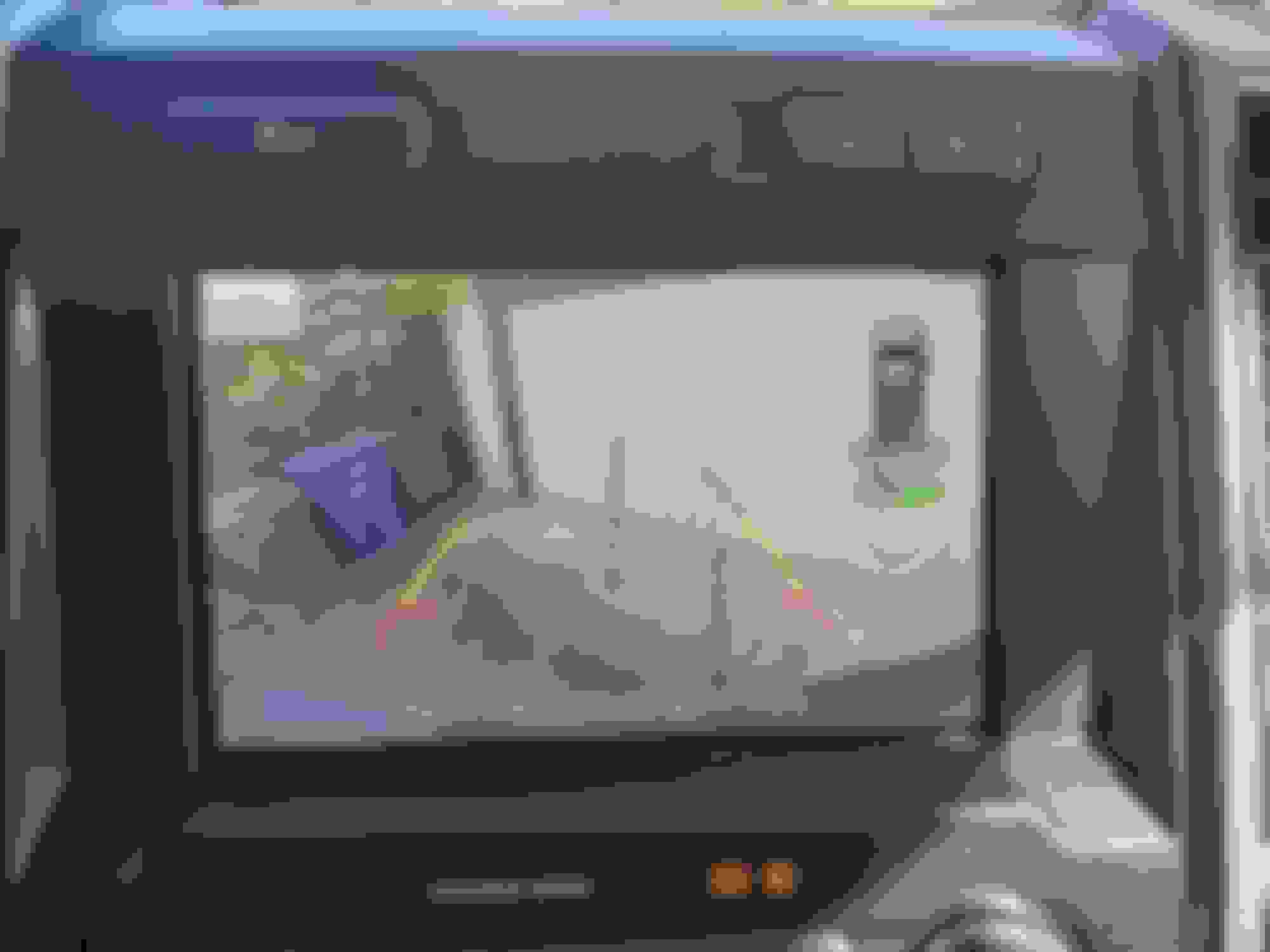
I have a 2020 F350 with Sync 3 and only the tailgate and CHMSL cameras. Here is a photo of the Sync 3 screen when backing up. As far as I can tell, I have to press the dash button to switch to the CHMSL camera.
Thanks very much, that is what I figured. The only issue I have left to figure out know is why I am getting DTC of b1330 - dc/ac. Communication error. I have also reached out to my parts guy to see if he can get us an actual current part number for the radio trim. But time and price wise the camera source or naviks. Both have options to add a second a camera. With a simple new harness that plugs into the chmsl and goes back to the above Interfaces. I am going to try building something similar to the camera source one that I can just use my upfitter switch to switch cameras.
Heinphoto have you done any work with forscan on your truck?
Last edited by Slowjoe6969; Apr 14, 2020 at 07:40 AM.
Reason: Spelling
So many questions are answered by you that I would've never had the chance to get too. Sadly it looks like its not going to be as easy as I though to just add the IPBM B and new bezel and switch. I don't have the time or patience to build a harness so I guess I wasted about 300 bucks on a jumper and CHMSL.
Don’t loose hope just yet, there are a couple aftermarket harness that could be used and you would only have to build a harness to the camera (4 wires possibly 5) then either a toggle switch or another button combination (Naviks or Rostra). Essentially that is all the IPMB is, I had it switching camera views even before I connected it to the trucks Canbus. Tentatively the radio bezel is somewhere between 300 and up (based on earlier years truck) 20 for the button and 50 for a pigtail for the switch, the aftermarket adapters pre built are pretty economically and simple to install, and they do the exact same thing just substitute one video feed for another! I suspect the video quality will actually be better than the other aftermarket cameras due to the simple fact we are using the factory cameras!
Heinphoto have you done any work with forscan on your truck?
No, not yet. I want to familiarize myself with the default "behavior" of the truck first so that I can determine if any of the settings bug me enough to warrant spending the time to figure out forscan. Unfortunately, with our shelter in place order, I am only driving the truck about once a week, so it may be a while...
I suspect the video quality will actually be better than the other aftermarket cameras due to the simple fact we are using the factory cameras!
From member reports and and a few sporadic visual comparisons shown on various threads over the last 3 years on this subforum, I'm not entirely convinced that Ford factory cameras offer the best video quality over some aftermarket (and competitive OEM) options that members have compared. Usually I maintain a "Factory is always the best vetted, best executed, best quality" opinion, but that opinion has been shaken by what I've read from members here regarding their experiences with Ford's OEM cameras.
This is subject I'm keeping my eye on, as I eventually will add a rear view camera to a lowly '19 XL.
So many questions are answered by you that I would've never had the chance to get too. Sadly it looks like its not going to be as easy as I though to just add the IPBM B and new bezel and switch. I don't have the time or patience to build a harness so I guess I wasted about 300 bucks on a jumper and CHMSL.
Boo,
Sarge
here is the switches in my F150 for the led lights, i used 1 of them in my f250 to toggle power between the front/rear cameras.
You can get a higher quality camera than ford offers.
After many hours sitting in the truck with the laptop and trying different settings, I have yet to get rid of the DTC in the body control module. Due to this error the CHMSL can be intermittent. Sometimes it works just fine, other times it flickers and cuts out. But there is good news to be had, and is going to present options that do not require new radio trim bezels, adding buttons, and modifying the factory harness to get this to work.
Depending on your skill level, and how simple or complex you want to get. There are many options out there to add camera feeds to the factory radio (This is not a comprehensive list of those) Just my research on to some of the options, and what I have learned from my attempt to get the factory IMPB up and running. For all the options I list below, will require to build one interface cable that goes from the camera to the below interface. This cable is very simple it is 4 wires, 5 if you want the park assist lines to turn on the screen (not important). I will do a write up in another post afterwards. I may be able to help members out and build this cable if your not comfortable with building it yourself, there would be a small charge to cover my costs and shipping.
One option and would be pretty seamless, the toggle button is through your steering wheel. You activate the camera by pressing the Right 'OK" button for three seconds. The installation of the Rostra 250-8420-MOD is very simple. unplug the cable from the Sync3 module and plug in there harness in-between the factory harness and the screen. plug the camera into the RCA connector and hook up power and ground for the camera. You also have the option with there kit to use a toggle switch to trigger the camera if you want. Add A Camera To Your Car's Original LCD Screen I found listings around 450-499 USD for there kit, You may find a better price by finding a local dealer on this one.
Option two, is a little simpler than the above and installs almost identically the big difference is to switch cameras it is done via a toggle switch. the toggle switch is a positive trigger. So if you have the up fitter switches in your truck, and have a free one to use. Simply run a wire in from your up fitter fuse box under the hood, and to the input wire on the adapter, or install your own toggle switch and splice the camera power wire through the toggle switch. Run the above Camera harness from the CHMSL and plug in the RCA plug, and hook up the camera power and ground. https://camera-source.com/automotive...8-display.htmlThe website lists this kit at 223, you can go with there CHMSL kit for 299
The two above options are not your only options in the market, there is a long list of options to explore. If you have spent the money for the factory CHSML as some of us have, you can use anybody's CHSML kit and just substitute the above mentioned interface camera and plug directly into anybody's install kit. You will get a factory look, and the only difference is how the camera is activated.
Some other vendors that have been mentioned in this thread, to consider is Naviks, NAv-TV. I am sure there are others as well.
Just to give everyone an idea on costs to install the IMPB into my truck and I found a used bezel and switch (200 USD, didn't order) I have spent north of 300 USD dollars to get to where I am at currently not including the factory CHMSL, which I got from a local wrecker, but it was still 180USD and I had to build the adapter harness on the back of the light to interface to my truck.
After many hours sitting in the truck with the laptop and trying different settings, I have yet to get rid of the DTC in the body control module. Due to this error the CHMSL can be intermittent. Sometimes it works just fine, other times it flickers and cuts out. But there is good news to be had, and is going to present options that do not require new radio trim bezels, adding buttons, and modifying the factory harness to get this to work.
Depending on your skill level, and how simple or complex you want to get. There are many options out there to add camera feeds to the factory radio (This is not a comprehensive list of those) Just my research on to some of the options, and what I have learned from my attempt to get the factory IMPB up and running. For all the options I list below, will require to build one interface cable that goes from the camera to the below interface. This cable is very simple it is 4 wires, 5 if you want the park assist lines to turn on the screen (not important). I will do a write up in another post afterwards. I may be able to help members out and build this cable if your not comfortable with building it yourself, there would be a small charge to cover my costs and shipping.
One option and would be pretty seamless, the toggle button is through your steering wheel. You activate the camera by pressing the Right 'OK" button for three seconds. The installation of the Rostra 250-8420-MOD is very simple. unplug the cable from the Sync3 module and plug in there harness in-between the factory harness and the screen. plug the camera into the RCA connector and hook up power and ground for the camera. You also have the option with there kit to use a toggle switch to trigger the camera if you want. Add A Camera To Your Car's Original LCD Screen I found listings around 450-499 USD for there kit, You may find a better price by finding a local dealer on this one.
Option two, is a little simpler than the above and installs almost identically the big difference is to switch cameras it is done via a toggle switch. the toggle switch is a positive trigger. So if you have the up fitter switches in your truck, and have a free one to use. Simply run a wire in from your up fitter fuse box under the hood, and to the input wire on the adapter, or install your own toggle switch and splice the camera power wire through the toggle switch. Run the above Camera harness from the CHMSL and plug in the RCA plug, and hook up the camera power and ground. https://camera-source.com/automotive...8-display.htmlThe website lists this kit at 223, you can go with there CHMSL kit for 299
The two above options are not your only options in the market, there is a long list of options to explore. If you have spent the money for the factory CHSML as some of us have, you can use anybody's CHSML kit and just substitute the above mentioned interface camera and plug directly into anybody's install kit. You will get a factory look, and the only difference is how the camera is activated.
Some other vendors that have been mentioned in this thread, to consider is Naviks, NAv-TV. I am sure there are others as well.
Just to give everyone an idea on costs to install the IMPB into my truck and I found a used bezel and switch (200 USD, didn't order) I have spent north of 300 USD dollars to get to where I am at currently not including the factory CHMSL, which I got from a local wrecker, but it was still 180USD and I had to build the adapter harness on the back of the light to interface to my truck.
I have the Naviks module and wouldn't mind adding the cargo camera to the aux-video in port on my current system so it can be viewed by pressing the power button. My main issue is it seems all of the aftermarket options don't have the camera integrated into the brake light - they are all drop cameras or a bezel that goes behind the current light which I'm not a fan of.
Does anyone know if I can purchase the OEM CHMSL brake light / camera and port the video feed into the yellow RCA input on the module?
I realize the drive lines wouldn't turn, it's more for cargo monitoring than 5th wheel hookup.
Likewise, does anyone know of any aftermarket options that look like the OEM CHMSL camera?
Rezvani's Latest Post-Apocalytic Monster Is a Ford F-150 Raptor Underneath
Slideshow: Called the Fortress, the 850-horsepower pickup combines Raptor underpinnings with military-inspired features, survival equipment, and a starting price of $285,000.