


Help to post pictures



Thread Starter
|
Hotshot


Joined: Jan 2001
Posts: 16,851
Likes: 3,070
From: SE Wisc. (the Rust Belt)
Originally Posted by ojai150
ok,....thank you,....but do you need to be an FTE member to post pics.?
Originally Posted by Aussie 53
The final question in this long running saga...lol. I do I post pictures from outside my FTE gallery.
 icon above the reply window and inserting the URL when prompted.
If you want to post an image directly from your computer, without uploading to an image hosting site, then you have to become a paying member of FTE.
When you become a paying member of FTE the "You may not post attachments" at the very bottom of the widow will change and you will be able to upload directly from your computer. Also by becoming a paid member the advertising will disappear.


Thread Starter
|
Hotshot
Joined: Jan 2001
Posts: 16,851
Likes: 3,070
From: SE Wisc. (the Rust Belt)
Originally Posted by 56panelford
Bob, was wondering what program or tool you use to do those moving images in your signature and avitar.
John
John
The avitar consists of three panels, it's a simple one. The animaitons can be made up a quite a few. The animation in my signature has 26 panels. I draw the first panel, save it as "image01.jpg" then move images slightly and then save the new image as "image02.jpg" and so on. I then import the images into Animation Shop and join them together.
Elder User
Joined: Jun 2007
Posts: 632
Likes: 4
From: North Carolina

Thanks a bunch Bob. I do better with pics also. do we need to be fee paying folks to enter pictures? I intend to join but just have not done it yet.This is a great and active site you ask a question and some nice forks always help out. Other sites you just hear the crickets chirping and no answers.
Thanks again Mike
Thanks again Mike
Thread Starter
|
Hotshot
Joined: Jan 2001
Posts: 16,851
Likes: 3,070
From: SE Wisc. (the Rust Belt)
You don't need to be a paying member to post pictures, but the pictures have to be "parked" somewhere on the internet. If you make a gallery on this site you can use the images you upload into your gallery. There are also quite a few places that let you upload image like PhotoBucket and others.
You do have to be a paying member if you want to upload directly from you computer to thread you are participating in, this is what is referred at "posting attachments" in the "Posting Rules" box below.
You do have to be a paying member if you want to upload directly from you computer to thread you are participating in, this is what is referred at "posting attachments" in the "Posting Rules" box below.

Senior User
Joined: Jul 2006
Posts: 448
Likes: 1
From: La Mesa (East San Diego)
Hi Bob,
Great post and I've used it many times successfully. I seem to be having a new problem though maybe you can help with. When I go into my cp and edit gallery, I click on "edit" and the computer closes down the entire page Explorer and all. Also, lately I am clicking on my pictures to get the Properties tab and there is no URL listed on the menu only a location. Any thoughts?
Thanks,
Dan
Great post and I've used it many times successfully. I seem to be having a new problem though maybe you can help with. When I go into my cp and edit gallery, I click on "edit" and the computer closes down the entire page Explorer and all. Also, lately I am clicking on my pictures to get the Properties tab and there is no URL listed on the menu only a location. Any thoughts?
Thanks,
Dan
Thread Starter
|
Hotshot
Joined: Jan 2001
Posts: 16,851
Likes: 3,070
From: SE Wisc. (the Rust Belt)
I just tried to edit my gallery and everything worked fine. The only problem I have is the FTE system wants to download a Java applet and from past experience I know this doesn't work, at least on my computer and I read others have the same problem. I use the manual procedure by using the drop down menu widows:
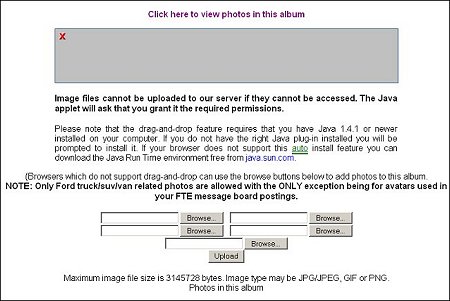
One thought is maybe your anti-virus security settings are set too high. I hate to advise anyone to screw around with those unless you know what you're doing.
As for finding the properties of images I don't have a problem with that either. I just right click and click on "properties". I have noticed FTE gallery images don't have a file suffix like .gif or .jpg after them. It must be some type of format that works with their system.
Sorry I couldn't be of more help. You submit a ticket to the FTE administrator and see if they could give you a better answer.
https://www.ford-trucks.com/support/open.php
One thought is maybe your anti-virus security settings are set too high. I hate to advise anyone to screw around with those unless you know what you're doing.
As for finding the properties of images I don't have a problem with that either. I just right click and click on "properties". I have noticed FTE gallery images don't have a file suffix like .gif or .jpg after them. It must be some type of format that works with their system.
Sorry I couldn't be of more help. You submit a ticket to the FTE administrator and see if they could give you a better answer.
https://www.ford-trucks.com/support/open.php

