






Opening Pandora's Box

Elder User
Joined: Dec 2002
Posts: 797
Likes: 1
From: UT
Since the late 90's I've always been a Kenwood fan. It don't appear they have anything comparable to the Pioneers listed above. Looking at the supported Android devices, most are considered old in the Samsung, LG, and HTC lines. I would go back to paper cups and a string before I bought a I-anything 

Thread Starter
|
Hotshot


Joined: Jan 2011
Posts: 18,849
Likes: 179
From: Puget Sound
I'm confused. I have a backup camera and I thought the lights would look cool at night/help with backing in the dark. I have an AIS to muzzle the turbo whine... why would I install anything that advertises with the word "Loud" in a starburst?
Fleet Mechanic


Joined: Aug 2010
Posts: 1,458
Likes: 156
From: Sedalia, CO

Rich, I know you said you didn't want anything "stuck on", but I thought I'd show you my setup, just in case:
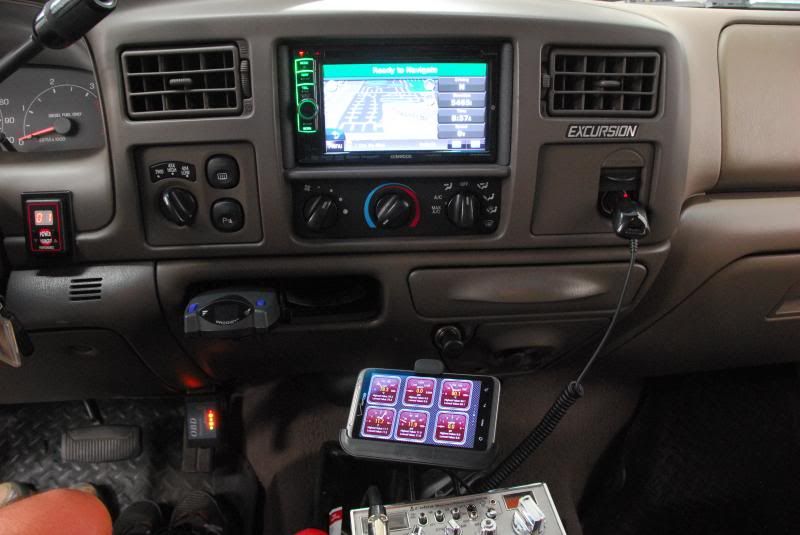
The radio is a Kenwood with Garmin navigation, with the iPod and USB interfaces in the glovebox. The CB at the bottom presents a nice flat surface for the stick-on phone mount. As you can see, I use Torque and the bluetooth module in front of the accelerator to monitor things that aren't on the A-pillar. Here's a closeup of that:

There's no magic to what I monitor, but I'll explain it, anyway:
EOT - I used it to troubleshoot a fan clutch problem, and hope to use it Saturday to demonstrate the fix.
ICP - Used when testing tunes.
Tranny temp - This is a duplicate of the A-pillar gauge, but I was using it to test the Derale thermostat.
Volts - I use it to tell me when yet another cheap chinese junk alternator from O'Reillys has failed.
EBP - I used it to demonstrate that Jody's decel tune doesn't hurt anything, and it serves to save my highest boost level, as max EBP = 2xmax boost.
Pulse width - More tune testing.
Anyway, I prefer this setup to trying to show the Torque output on the radio screen. I already have nav up there, plus whatever media I may be listening to. I want the gauges always present, without having to goof around with anything.
Mark
The radio is a Kenwood with Garmin navigation, with the iPod and USB interfaces in the glovebox. The CB at the bottom presents a nice flat surface for the stick-on phone mount. As you can see, I use Torque and the bluetooth module in front of the accelerator to monitor things that aren't on the A-pillar. Here's a closeup of that:
There's no magic to what I monitor, but I'll explain it, anyway:
EOT - I used it to troubleshoot a fan clutch problem, and hope to use it Saturday to demonstrate the fix.
ICP - Used when testing tunes.
Tranny temp - This is a duplicate of the A-pillar gauge, but I was using it to test the Derale thermostat.
Volts - I use it to tell me when yet another cheap chinese junk alternator from O'Reillys has failed.
EBP - I used it to demonstrate that Jody's decel tune doesn't hurt anything, and it serves to save my highest boost level, as max EBP = 2xmax boost.
Pulse width - More tune testing.
Anyway, I prefer this setup to trying to show the Torque output on the radio screen. I already have nav up there, plus whatever media I may be listening to. I want the gauges always present, without having to goof around with anything.
Mark
Thread Starter
|
Hotshot
Joined: Jan 2011
Posts: 18,849
Likes: 179
From: Puget Sound
That setup would work nice with an Infinity. My only problem is if it's within arm's reach, I can't see it. My cheapo reading glasses blurr the road... so it's off to the eye doc for me.
I know from experience that Jody's decel tune is a fantastic tune to have - that bad boy has saved a lot of wear on my brakes.
That "Excursion" on the dash reminds me of the Blu-Ray ads before the feature on my older Blu-Ray discs... "I already have the damn thing, why are you still advertising to me?" I know better, but I still feel compelled to yell at the screen.
I un-mounted the OBDII port and put it behind the dash, so I wouldn't risk kicking the OBDII adaptor. I've left the adaptor plugged in for long periods of time and it hasn't drained the battery, but I wouldn't want to leave it there for a month without running the truck. I did have one event where the adaptor had a scrambled brain and wouldn't communicate... so I popped the 4 plastic screws on the dash and reset the power on it. I'm thinking about a switch on the OBDII power.
I know from experience that Jody's decel tune is a fantastic tune to have - that bad boy has saved a lot of wear on my brakes.
That "Excursion" on the dash reminds me of the Blu-Ray ads before the feature on my older Blu-Ray discs... "I already have the damn thing, why are you still advertising to me?" I know better, but I still feel compelled to yell at the screen.
I un-mounted the OBDII port and put it behind the dash, so I wouldn't risk kicking the OBDII adaptor. I've left the adaptor plugged in for long periods of time and it hasn't drained the battery, but I wouldn't want to leave it there for a month without running the truck. I did have one event where the adaptor had a scrambled brain and wouldn't communicate... so I popped the 4 plastic screws on the dash and reset the power on it. I'm thinking about a switch on the OBDII power.
Fleet Mechanic

Joined: Mar 2009
Posts: 1,856
Likes: 52
From: Sacramento Delta, CA
It has a volume off switch which we have turned off. Each radar has its own bar on the display. But I thought you could try hooking the sensors to the control unit and then to your head unit. For the price, it seems like a reasonable experiment.
Thread Starter
|
Hotshot
Joined: Jan 2011
Posts: 18,849
Likes: 179
From: Puget Sound
Too bad it doesn't work on the airline headrest monitor... there's a market for that.
It's great for passengers in the vehicle (particularly the kids), but when was the last time you saw a headrest monitor, overhead monitor, or head unit with 1080P resolution? For the money, it's silly for a desktop monitor (conventional keyboards are better for this). Maybe for sitting on the couch in front of the big screen... that's about the only time I can see a 1080P output of any use.
I'm not so sure I can fill in a spreadsheet with my thumbs, or type anything that the spell checker could recognize... but I'm sure sales would be on fire with the Lilliputian demographic.
If I were to see this in the store... I'd think it interesting, but I'd move on. However, I'm a tough sell... unless it goes under Stinky's hood.
It's great for passengers in the vehicle (particularly the kids), but when was the last time you saw a headrest monitor, overhead monitor, or head unit with 1080P resolution? For the money, it's silly for a desktop monitor (conventional keyboards are better for this). Maybe for sitting on the couch in front of the big screen... that's about the only time I can see a 1080P output of any use.
I'm not so sure I can fill in a spreadsheet with my thumbs, or type anything that the spell checker could recognize... but I'm sure sales would be on fire with the Lilliputian demographic.
If I were to see this in the store... I'd think it interesting, but I'd move on. However, I'm a tough sell... unless it goes under Stinky's hood.
FTE Stories
Ford Trucks for Ford Truck Enthusiasts

Top 10 Most Expensive Ford Trucks Ever Sold on Bring a Trailer
Joe Kucinski
2027 Ford Super Duty Buyer's Guide (Every Model, Engine, & Package)
Brett Foote
Top 10 Ford Truck Tragedies
Joe Kucinski
AEV FXL Super Duty - the Super Duty Raptor Ford Doesn't Make
Brett Foote
Lobo Vs Lobo: Proof the F-150 Lobo Should Be Even Lower!
Michael S. Palmer
Ford's 2001 Explorer Sportsman Concept Looks For a New Home
Verdad Gallardo
10 Best Ford Truck Engines We Miss the Most!
Joe Kucinski
2026 Shelby F-150 Off-Road: Better Than a Raptor R?
Brett Foote
2027 Super Duty Carhartt Package First Look: 12 Things You NEED to Know!
Michael S. Palmer
Fleet Mechanic
Joined: Aug 2010
Posts: 1,458
Likes: 156
From: Sedalia, CO
Progressives - After several sets, I have glasses that I can actually wear for more than a few minutes at a time, and can drive in. Not only that, I can actually see the dash!
Stick on bifocals - I have a cheap stick-on set of bifocal lenses I use for my sunglasses. They work surprisingly well and, again, I can see the dash!
I'd still rather be young, but these two things have made me functional, and made things inside the vehicle useful again.
Mark
Thread Starter
|
Hotshot
Joined: Jan 2011
Posts: 18,849
Likes: 179
From: Puget Sound

Former Vendor
Joined: May 2013
Posts: 54
Likes: 0
Tugly, I agree with you totally (hence the reason why the seller has yet to convince us to bring these in). It is very interesting and worthy of a few minutes of consideration...but then reality sets in. It would be cool to be able to run one of those torque apps on a front head unit but in the rear, not so much. It's too expensive of a toy for limited application. And you are right, there are no 1080P headrest monitors out there just yet.

Thread
Thread Starter
Forum
Replies
Last Post
Crazyotto1
1999 - 2003 7.3L Power Stroke Diesel
68
Feb 25, 2015 12:50 PM
Flintknapper
1980 - 1986 Bullnose F100, F150 & Larger F-Series Trucks
3
Sep 1, 2010 11:54 AM