When you click on links to various merchants on this site and make a purchase, this can result in this site earning a commission. Affiliate programs and affiliations include, but are not limited to, the eBay Partner Network.
Ok I been kinda talking to tuggly (and searching for info) and figured we really need a consolidated place for this info, so well here goes, I am putting together this FAQ for those people who may be new here or in general going "What is this, how do I..." and have a place where all the common (at least what I see a lot of) questions are answered.
What is Torque?
Torque is an OBD2 performance and diagnostic tool for any device that runs the Android operating system. It will allow you to access the many sensors within your vehicles Engine Management System, as well as allow you to view and clear trouble codes
Like the more expencive scan tools like My Innova 3100 it can readtrouble codes (known as TC's from here on) and reset the Check Engine light (CEL) as well as perform other functions like pulling live data as you drive.
You indicated there are other options out there what are they?
Yes there are, there are options like ForScan (yes I can already hear the dirty comments, lets not go there), which is PC/windows based as well as options for a scan tool, like Autel's MaxiDas tool, however the Autel (think Snapon, ect) do cost, and your traditional shop scanner which also can cost up to $300 or more depending on its features, but you do have other options out there, it will just take a bit of time and searching to find out what do you the user and reader want and needs it to do!
Is it free, what is the cost? Yes the app is free, there does seem to be a paid version for $4.95 on the google play store, so I am not entirely sure of the differences but its your decision as to what to use/which to use.
Will this work with my vehicle?
That is dependent on your car, truck or SUV or even SUT, most vehicles built from 1996 and after have what is called OBDII which this will work with, via an adapter. In some rare cases vehicles that are 1995 will work, but this is a rare case. Fords use either MS CAN (propriety OBD) or J1850PWM (Legislated OBD) which should be ok, were just mainly concerned with J1850 here as that is what the SD trucks run.
Below is a diagram of the three OBDII variants, that should allow for a good idea of how each one is different
What OBD adapter do I need to use? There are a lot to pick from!
While just about any OBD adapter will work as far as the bluttooth adapters go, were mainly interested in one specific type, and that is an ELM-327 module, ELM-327 refers to the type of chip(s) that are used with in the unit (to my understanding), any thing else has a bad habit of causeing odd behaviors with our type of trucks, as the pin out between the ELM-327 and "standard" units differs, I for get which pins it is but I know that two at the minimum are swapped around.
I would suggest for those that may be concerned about the fleabay specials from china for $20 or less, grab a hold of the OBDLink MX, its a good unit, Tugly has one and lives by it, I also have this unit, while still fresh in my possession it is very nice, feels durable, and its compact enough to stay the heck out of my way, and it just does its job. also when you shut the car off (or truck) it does auto power off on its own, that alone is a BIG plus in my book, another is the security, any one wanting to cause problems, or crack it to gain access to your vehicle (lets say unlocking the vehicle) they will need to have physical access to the device first.
What are some PIDS to monitor?
While this may not be the entire 100% end all and be all list these are the ones that Tugly has posted up and are very good to be monitored if you have a SD truck with a diesel, should be more or less across the board for most diesels, but there may be minor variations and results and mileage may vary accordingly!! the list below is mainly geared to the 7.3 crowd but should be good for any diesel!
Originally Posted by Tugly
2015 brought a few key changes to the OBDII world:
The inexpensive tools at our disposal took a quantum leap with the development of FORScan. For those who are used to working with scan tools and OBDII apps, it's reasonably intuitive. For those walking in cold - not so much. FORScan has nothing to do with the need to set up PIDs, but Ford owners reading this because of a web search may be very interest in the cross-platform application.
I have noticed more and more apps are following Torque Pro's lead, by allowing for the configuration of custom/extended PIDs. Too many apps were left "unclicked" on Google Play and iTunes, and the app writers figured out why.
I have noticed a recent surge of people acquiring OBDII adapters and diving into this world of "roll your own" gauge sets. As more people get into it and learn it, so grows the knowledge base and support for even more people to get into it.
I had to piece my own list of PIDs together - finding some through scanning the truck, finding some on the web, and eventually coming up with a way to make my own "really" custom PIDs. The tricky part is to make sure the data is accurate, because scanning the vehicle gives you a sensor address - but not always the right formula to "decode" the data from that sensor.
Critical Note: Please read this first!
Never ever add a gauge while connected with the engine running... no matter how the PID came to you. The data can have an error or a typo in it, so it's best to set up your gauge off-line, then connect to the truck KOEO after everything is set correctly (to the best of your knowledge), then click "test" in the custom PID configuration menu. No data or the truck freaks out? Well... don't put that on your gauge page for sure - until you get a successful test.
One of the most common problems is the omission of the above step, so it's not one of those mattress tag warning labels. Probably the most common cause for vehicles to freak out when adding a gauge is typos. The PID address has to match the PID long name. Change one from the other, misspell the PID long name, or alter the spaces in the name - and the vehicle dash freaks out... signalling you an S.O.S. with the warning lights.
I can hear it out there - Enough fanfare and fine print already Tug! Get with the data so's I can play with my new toy.
Notes:
SAE J1850 PWM protocol.
OBDII Mode $09 support DISABLED (for apps with this option).
All PIDs here begin with 22 - this is the "mode" number. Other OBD apps will need the 22 in the Mode field, and the last four digits in the PID Number field.
Long name:Barometer
Short name: BARO
PID: 221442
Max/Min: 15.0/10.0
Unit: PSI
Equation: ((A*256)+B)*0.03625
Header: C410F1
The Min/Max values above are for realistic altitudes, but those who traverse the Rockies may see lees than 10 PSI (over 10,000 feet). If you do, you can change the Max/Min to 15.0/9.0.
Manifold Absolute Pressure
Short Name: MAP
PID: 221440
Units: PSI
Max/Min: 45.0/0.0
Equation: ((A*256)+B)*0.03625
It is important that this reads the air pressure of your altitude in PSI (same with EBP and BARO) with Key On Engine Off, then it just adds boost to that while running. [LINK]
Boost
(AKA Manifold Gauge Pressure)
Short Name: Boost
PID: 221440
Units: PSI
Max/Min: 30.0/0.0 (stock) 40.0/0.0 (performance)
Equation: (((A*256)+B)*0.03625)-[221442]
"-[221442]" subtracts the Barometric sensor (located on the PCM on some trucks, external on others) reading from the MAP reading - and this gives you just the boost pressure above atmospheric pressure.
Exhaust Back Pressure
(Absolute value)
Short Name: EBP
PID: 221445
Units: PSI
Max/Min: 55.0/0.0
Equation: ((A*256)+B)*0.03625
It is important that this reads the air pressure of your altitude in PSI (same with MAP and BARO) with Key On Engine Off, then it just adds Exhaust Back Pressure to that with engine running. [LINK]. 53 PSI is sensor limit. Exhaust or boost leaks can make this reading very jumpy during WOT tests.
Exhaust Back Pressure
(Exhaust Gauge Pressure variation)
Short Name: EGP
PID: 221445
Units: PSI
Max/Min: 30.0/0.0 (stock) 40.0/0.0 (performance and/or engine braking)
Equation: (((A*256)+B)*0.03625)-[221442]
It takes the Exhaust Back Pressure(PSI) and subtracts the device barometric pressure reading, giving you the backpressure above atmospheric pressure. Exhaust or boost leaks can make this reading very jumpy during WOT tests.
Exhaust Back Pressure
(Turbo Pressure "Delta" or "Differential" variation)
Short Name: TPD
PID: 221445
Units: PSI
Max/Min: 30.0/0.0 (stock) 40.0/0.0 (performance and/or engine braking)
Equation: (((A*256)+B)*0.03625)-[221440]
This one is fun, but it can be confusing at first. Everybody has boost, but EBP or EGP can be difficult to compare with while driving. Instead of those, you really want to know the difference in pressure between the exhaust and compressor side of the turbo - and the TPD gauge shows just that. KOEO should read zero on Boost and TPD, and this gauge will instantly show the performance of the turbo, EBPV, and any engine braking you may have.
Fuel Injector Pulse Width
Short Name: FIPW
PID: 221410
Units: ms
Max/Min: 6.0/0.0
Equation: ((A*256)+B)*.008
0.6 ms is "Standby", you need at least 1.2 ms for the injector to work, 3 ms is MAX for a stock running engine, and 6 ms is MAX for a cranking engine.
Injector Control Pressure
Short Name: ICP
PID: 221446
Units: PSI
Max/Min: 3000.0/0.0 (stock) 4000.0/0.0 (modified)
Equation: ((A*256)+B)*.57
**500 PSI is minimum before the truck will start, stock idle is about 475 on injectors with stock nozzles, about 2700-2800 is stock MAX, 700 is ICP sensor unplugged idle, and 2200 is ICP sensor unplugged while cranking.
Injector Pressure Regulator
(AKA Injector Control Pressure Duty Cycle)
Short Name: IPR
PID: 221434
Units: %
Max/Min: 100.0/0.0
Equation: A*0.39063
60% - 65% MAX (stock), but you don't want to exceed 40% - 50% at WOT. 9% - 12% is idle, with a stable reading - unstable readings here frequently indicate a problem. 14% is ICP sensor unplugged while running, and 31% is ICP sensor unplugged while cranking.
Mass Fuel Desired
Short Name: MFD
PID: 221412
Units: mg/stroke
Max/Min: Auto/0.0
Equation: ((A*256)+B)*.0625
This is not a sensor, it is a program output like IPR and FIPW. In fact, MFD controls the IPR/FIPW combination to get the fuel dosage needed at any given time. Obviously, you want this as low as possible for optimum fuel economy - but a less than 100% truck will demand a higher dosage of fuel - so the MFD climbs. I remember driving 65 MPH on the flat with no wind in a stock truck with an MFD of 20 on my AE program. I could be wrong, but I think that's a good target. That equation is dubious at best, the accuracy needs to be verified on a vehicle less modified than mine.
Engine Oil Temperature
Short Name: EOT
PID: 221310
Units: °F
Max/Min: 250.0/0.0
Equation: (((A*256)+B)/100)-40
I run about 180-190 in winter and 190-210 in summer (empty). For those still equipped with EPBVs, it can activate up to about 145-150 degrees F - it is best go easy on the throttle (on all 7.3Ls) until you get your EOT above that point. You may hear the injectors act "a little odd" as the EOT passes through 100 degrees F. For those wanting the Engine Coolant Temperature (ECT), get a separate gauge or handheld infrared/laser thermometer. You will not find it on the OBDII port.
Torque Converter Slip
Short Name: Slip
PID: 2211b8
Units: RPM
Max/Min: Max 1000.0/0.0 **
Equation: ((A*256)+B)/4
**I use this max to watch idle in gear. Torque Converter will not lock until Transmission Temp exceeds about 55 - 60 degrees F, the Engine Oil Temperature reaches a certain minimum, you are in Drive, and moving at least 35 MPH (depending on your tune and conditions).
Transmission Fluid Temperature
Short Name: TFT
PID: 221674
Units: °F
Max/Min: 250.0/0.0
Equation: ((A*256)+B)/8
230 degrees F is the limit, according to the book. It has been mentioned by the forum's resident expert that the transmission doesn't reach optimum efficiency until about 165 degrees F.
From Pikachu for OBS and some E99 trucks:
Transmission Fluid Temperature
Short Name: TFT
PID: 2211BD
Units: °F
Max/Min: 250.0/0.0
Equation: (((A*256)+B)*-0.0036)+212.98
OBD Header: C410F1
*note the 0.0036 is negative*
From djed:
Accelerator Pedal Position
Short Name: Accel Ped
Units: %
Max/Min: 100/0
Scale Factor: x1
Equation: [11]
Holy heck batman this is a lot of info!!
Yes we can under stand that, this may seem daunting to the not so technical minded folks, however this guid is being put together to try and aid in getting everyone out there (with in FTE mostly) up to par to where if you want you too can run with a "roll your own gauge set" system.
I programmed all the gauges and info, how can I be sure they will work?
Simple, after inputting the info that is required, on the bottom of your screen there will be a "test" button it is highly recommended (however not required) to hit it before moving onto the next gauge.
How will I know if my inputs are correct? While there is no 100% way to determine this 100% of the time, the best solution is suggested above, hit the test button, if your inputs are 100% spot on you should see the following message "Not connected to ECU" (as most likely your setting this up while NOT connected to the truck), if you see any other messages like "Value must be HEX or a name" or any thing similar your input/gauge needs to be rechecked and it is wise to recheck your equations.
Wait you said you need an adapter, does that mean I need another item in my already crowded truck?
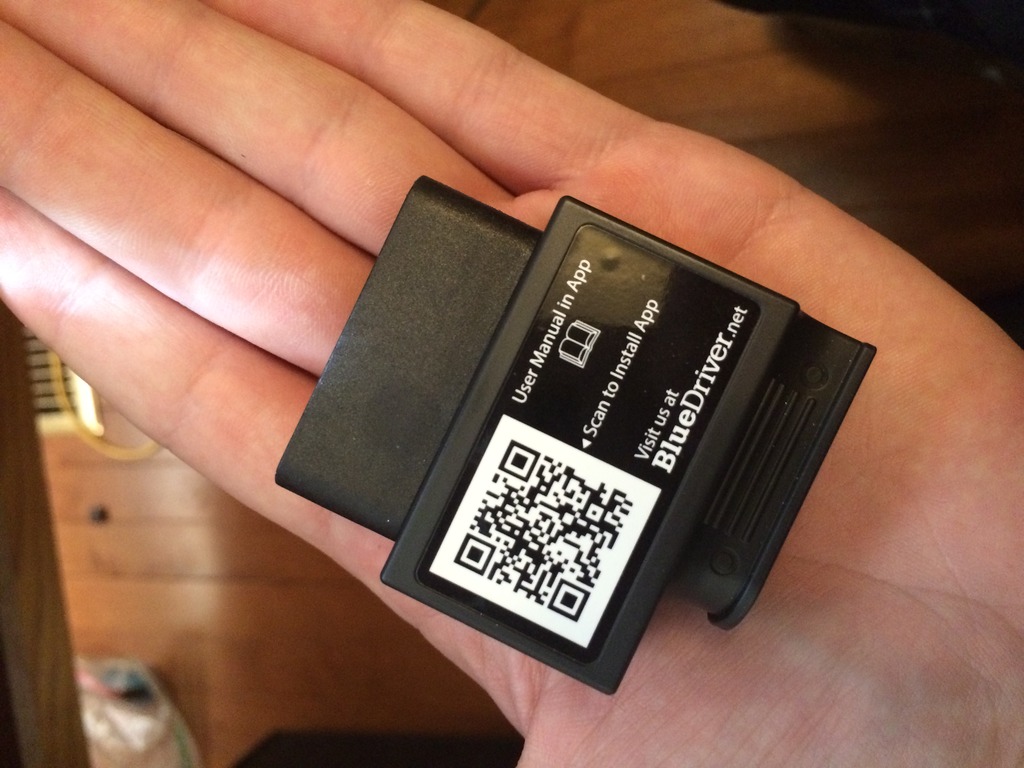
while with torque you will need an Android based system, you more or less have what you need, if your reading this on an Android tablet with MINIMUM OS of 4.0 (Kit Kat) you will be good to go, all you need is the OBD Link adapter, if you want to set this up on a Android based netbook or something similar, have at it, if able I will post a similar set up that Tugly uses, and once I get mine the way I want I will post mine, at this time I do have a set up in my Mustang using a different system but it handles what I need it do do for that vehicle. It uses the Lemur "Blue Driver" and there app for it.
(all images copyright of their respective owners)
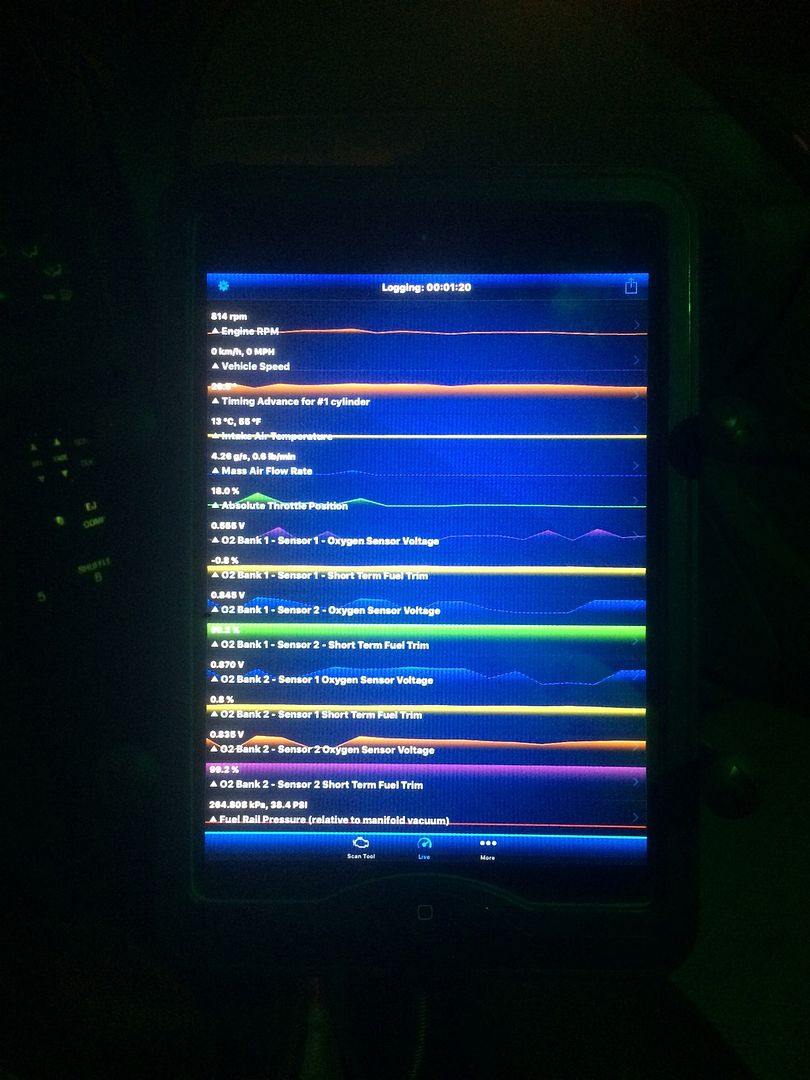
Below is the image of Tugly's set up [/QUOTE]
Here is the tablet (iPad for the stang)
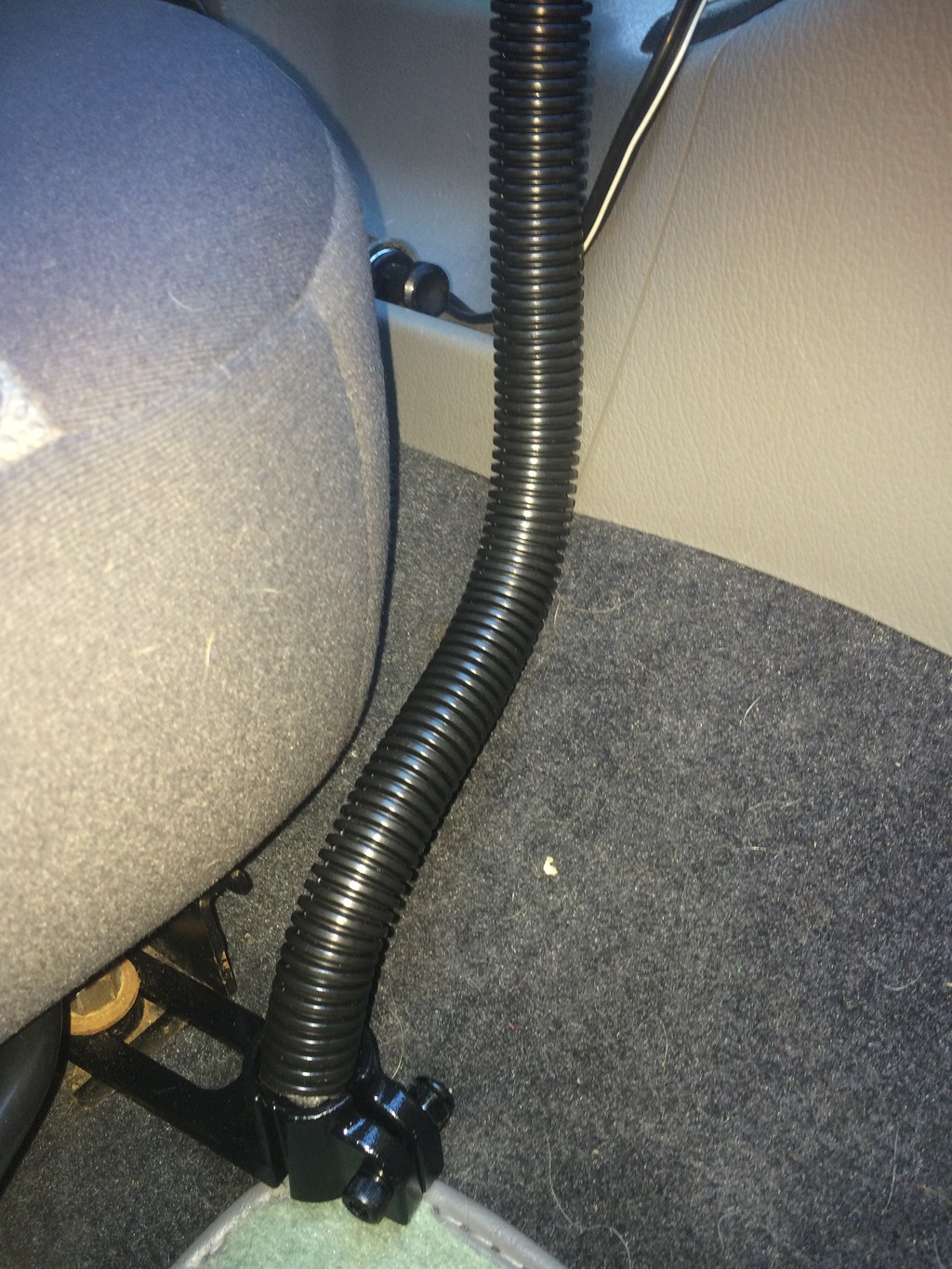
Here is the tablet mount that is currently in the mustang, it is a Ram mount universal mounting system using the 1" ball socket
Here is the adapter that the Mustang uses (will post a compairison of the truck adapter and stang adapter soon)
Now I can hear it...Jim what type of device will work best for me?? there are way too many options out there!
While I can't pick the device that will "work the best" I can at least help guide you.
You need to make sure your device at the minimum is Bluetooth capable, Android 4.0 (KitKat) or higher and a tablet, phablet (yes that is a real name), or similer type device, the brand and size and colour is up to you and your decision, also vehicle mounting is up to you also.
You could even (om theory) use a head unit that has BT and an Android OS as long as is meets the requirements above. but I would suggest for portability useing a tablet of some type, phones also will work but might be a bit on the small side if you need more then just one gauges to look at.
What about vehicle mounting? you have a nice set up, can that be adapted to my *name of car or truck and type here*?
While the solution that I am using is universal, and is movable to different cars or trucks, I would check with the manufactures web site to ensure your specific car or truck is listed, if it has a base already designed I would use that over the universal mounts, but the universal mounts work just the same.
Another option (for the more budget minded folks) would be THIS set up from Arkon, which is what Tugly is using at this time.
If you made it this far congrats! I will be doing my best to keep this FAQ up to date, and as more info is given or provided I will update accordingly!
Thanks to everyone who has contributed or will contribute to this FAQ especially Tugly!!
I've been thinking for a while that all this Torque (other android apps are available) stuff should be in a sticky at the top of the page, too many results come up with the search facility. 👍
Nice start for a FAQ! Here is the ARKON mount I bought - I've used it for devices from a smart phone all the way up to a 10" netbook: [LINK]
To clarify: The J1850 PWM protocol in our legacy trucks uses different pins in the OBDII port than the other protocols - so no amount of firmware can compensate for a lack of a hardwired connection to the vehicle. If the OBDII adapter doesn't clearly state that it supports J1850 PWM, then prepare to be disappointed when it will not connect with the vehicle.
I've been thinking for a while that all this Torque (other android apps are available) stuff should be in a sticky at the top of the page, too many results come up with the search facility. ��
I agree if we could get enough votes for this topic that would aid in getting it stickied, also be sure if it has been a help to you to rep those people who have contributed to it such as Tugly who has been very instrumental in setting this FAQ in motion!!
I agree if we could get enough votes for this topic that would aid in getting it stickied, also be sure if it has been a help to you to rep those people who have contributed to it such as Tugly who has been very instrumental in setting this FAQ in motion!!
Voting isn't what get's links added to the tech folder (we don't do individual sticky's for tech threads) it's just a moderator adding it to the tech folder.
I know I need to find time to finish renovating the tech folder thread. The earliest that can happen will be sometime after tax day, sorry guys.
Nice start for a FAQ! Here is the ARKON mount I bought - I've used it for devices from a smart phone all the way up to a 10" netbook: [LINK]
To clarify: The J1850 PWM protocol in our legacy trucks uses different pins in the OBDII port than the other protocols - so no amount of firmware can compensate for a lack of a hardwired connection to the vehicle. If the OBDII adapter doesn't clearly state that it supports J1850 PWM, then prepare to be disappointed when it will not connect with the vehicle.
Hello Rich. Have been following your info and advice on the OBD11 code reader. I am hopelessly NON tech savvy, but you gave me the courage to take the plunge ! My Android hooked up to the bafx just fine, and Torque pro did its thing. It is awesome to see info like IPR, ICP, manifold pressure, and oil temp. Sweet ! Even battery voltage, all for $22. My question is this : coolant temp won't read, and neither will trans temp. I have an E99, so I will try your custom pid# for the E99, but do you have one for the coolant ? Also, why is there no option in Torque pro for oil pressure ? I figure if anyone knows, it is you ! Thanks for all your help and advice in the past. Hoping you have some insight on this as well.
There is no way to read base engine oil pressure from the obd port; the PCM isnt aware of it. In fact, the sender for the dash gauge is nothing more than an on/off switch that closes at about 7 psi.
There is no way to read base engine oil pressure from the obd port; the PCM isnt aware of it. In fact, the sender for the dash gauge is nothing more than an on/off switch that closes at about 7 psi.
That kinda makes sense. It never seems to move, the reading stays the same regardless of rpm's. I should have figured that out a long time ago. Uh- Duh ... Thanks Pikachu.
There is no way to read base engine oil pressure from the obd port; the PCM isnt aware of it. In fact, the sender for the dash gauge is nothing more than an on/off switch that closes at about 7 psi.
By the way, I just used your equation for the E99 trans temp, and it worked ! Nice one, sir. I verified it with my mechanical guage. Very nice. Sure do appreciate your work on that. I wonder if the coolant temp needs its own equation for the E99 as well ?
Coolant temp has no signal to the PCM on automatics. Manual transmission trucks use the transmission temp input on the PCM to connect to the coolant temp sensor, and they have a different sensor to read the engine coolant temperature. I haven't searched for that PID because I don't have a manual transmission.
Coolant temp has no signal to the PCM on automatics. Manual transmission trucks use the transmission temp input on the PCM to connect to the coolant temp sensor, and they have a different sensor to read the engine coolant temperature. I haven't searched for that PID because I don't have a manual transmission.
OK thanks. Good to know. Gonna try to do that data logging thing today, and see if I can learn from that. Interesting stuff. BTW, which boost value is the most accurate to use, and does it need to be adjusted for elevation or baro, or anything like that. I don't know about that stuff.
Coolant temp has no signal to the PCM on automatics. Manual transmission trucks use the transmission temp input on the PCM to connect to the coolant temp sensor, and they have a different sensor to read the engine coolant temperature. I haven't searched for that PID because I don't have a manual transmission.
Is the PCM aware of fuel pressure, or just the duty cycle of the pump ?
Rezvani's Latest Post-Apocalyptic Monster Is a Ford F-150 Raptor Underneath
Slideshow: Called the Fortress, the 850-horsepower pickup combines Raptor underpinnings with military-inspired features, survival equipment, and a starting price of $285,000.




 also PM replied to Stewart!