



Code Reader Handheld Tool

Thread Starter
|
Mountain Pass

Joined: Aug 2010
Posts: 225
Likes: 5
From: greater Zurich area
Code Reader Handheld Tool
I have the EZ-LINK Code Reader from AutoXray with System available for Chrysler OBD-I and matching Cable. I want to upgrade this Tool for Generic OBD-II System for using it with my 97' Aerostar. Sales-Support couldn't help with my Inquiry but was forwarded to Tech-Support. From there i received the Product Numbers for both the Cable and the Upgrade. Unfortunately the Upgrade (activation by call) seem to have discontinued from Sale, whereas the Cable is still available from different sources. I need a new Code Reader Handheld Tool now, while trying to put my old shiny EZ Link on Sale. Do you have any recommendations on what Product do you use for your Aerostar with OBD II ? It should be capable to clear Codes as well.
Thanks in advance!
PS: You have a matching Tool for me to sell? I'm using PayPal.
97' XLT RWD 3.0L
Thanks in advance!
PS: You have a matching Tool for me to sell? I'm using PayPal.
97' XLT RWD 3.0L

Postmaster
Joined: Oct 2009
Posts: 3,432
Likes: 7
Aerostars need a Ford truck specific OBD-II. A cheap one can read codes, but no live data. For live data, you need a higher end unit that knows it is plugging in a Ford truck, and not a car.
If all you need is the ability to read codes, most units will do just fine. Actron, Equus, Innova, etc. all work fine. If you need the ability to read live datastream, you need to step up to an entry level pro unit, which is a lot more expensive, and cannot be found at your local parts store. I use an OTC Techforce2, also known as a Cornwell TechForce2. If you attempt to use the OTC in generic mode, it cannot read the live data either, you have to tell it what year, make model, engine, that you have so that it can read the datastream correctly.
Here is an example of a pro level scan tool.
Cornwell OWC3817 New Millenium Tech/Force 2 Diagnostic Kit Mint in Case | eBay
If all you need is the ability to read codes, most units will do just fine. Actron, Equus, Innova, etc. all work fine. If you need the ability to read live datastream, you need to step up to an entry level pro unit, which is a lot more expensive, and cannot be found at your local parts store. I use an OTC Techforce2, also known as a Cornwell TechForce2. If you attempt to use the OTC in generic mode, it cannot read the live data either, you have to tell it what year, make model, engine, that you have so that it can read the datastream correctly.
Here is an example of a pro level scan tool.
Cornwell OWC3817 New Millenium Tech/Force 2 Diagnostic Kit Mint in Case | eBay

Post Fiend
Joined: Apr 2005
Posts: 5,720
Likes: 5
From: Washington state
WB,
do you have access to a laptop PC?
if so one of the OBDII Windows scan tool software packages with USB to OBD port cable works well.
I use an AutoEnginuity package with extended code software packages for the Aero, Dodge Ram/Cummins, Honda and BMW. take it on my long vacation road trips.
ScanTool PC-based
others
Autotap OBDII Diagnostic Software
EASE - OBD2 Scan Tool, J2534 Programming, OBD2 (obd-ii) Software
OBD-II (OBD2) Scan Tool Software and Hardware - ProScan
there are free software packages on the internet and low cost interfaces on ebay also
do you have access to a laptop PC?
if so one of the OBDII Windows scan tool software packages with USB to OBD port cable works well.
I use an AutoEnginuity package with extended code software packages for the Aero, Dodge Ram/Cummins, Honda and BMW. take it on my long vacation road trips.
ScanTool PC-based
others
Autotap OBDII Diagnostic Software
EASE - OBD2 Scan Tool, J2534 Programming, OBD2 (obd-ii) Software
OBD-II (OBD2) Scan Tool Software and Hardware - ProScan
there are free software packages on the internet and low cost interfaces on ebay also

Elder User
Joined: Dec 2004
Posts: 718
Likes: 0
From: North Jersey, New Jersey
I use the Launch Creader VI. Runs about $105-130.
It's the cheapest color XGA screen handheld scan tool out there with a PID graphing function. You can graph up to 4 PIDs at once at the cost of sample rate of course.
It's the closest you'll get to a professional handheld uni directional tool without breaking the bank.
It's the cheapest color XGA screen handheld scan tool out there with a PID graphing function. You can graph up to 4 PIDs at once at the cost of sample rate of course.
It's the closest you'll get to a professional handheld uni directional tool without breaking the bank.
Postmaster
Joined: Oct 2009
Posts: 3,432
Likes: 7
The problem is the PIDs won't behave correctly on a cheaper one. If it doesn't ask you specifically what vehicle you are connecting to, then it won't display live O2 sensor data or fuel trim data. This is because the early Ford Truck OBD-II used a Ford Truck specific PID structure. If you get one that does not know it is connected to a Ford truck, it will display the LTFT% and STFT% as -100% and both O2 sensor voltages will display as 0 volts.
This is true of the PDA, Android, PC, and iOS based systems as well.
To get true PID support with all the features, you do need a scan tool that has vehicle specific reading, and actually asks you to enter the year, make, model, and engine. If it doesn't ask, it connects using global OBD-II which won't work properly.
How do I know this? I own an 1997 Aerostar 4.0L I own several code readers. The cheaper ones, including my Palm Pilot based one which uses Autotap software, do not read live PIDs correctly. If you want extended PIDs, readouts of O2 sensors and fuel trim data are essential, otherwise you might as well just stick with basic code reading. The scanner I use is one like the link above.
Again, if all you need to do is read codes, any OBD-II reader will do. If you need PIDs, you need one that has Ford truck specific PIDs and knows that it is connected to a Ford Aerostar, and not just global OBD-II or generic Ford.
This is true of the PDA, Android, PC, and iOS based systems as well.
To get true PID support with all the features, you do need a scan tool that has vehicle specific reading, and actually asks you to enter the year, make, model, and engine. If it doesn't ask, it connects using global OBD-II which won't work properly.
How do I know this? I own an 1997 Aerostar 4.0L I own several code readers. The cheaper ones, including my Palm Pilot based one which uses Autotap software, do not read live PIDs correctly. If you want extended PIDs, readouts of O2 sensors and fuel trim data are essential, otherwise you might as well just stick with basic code reading. The scanner I use is one like the link above.
Again, if all you need to do is read codes, any OBD-II reader will do. If you need PIDs, you need one that has Ford truck specific PIDs and knows that it is connected to a Ford Aerostar, and not just global OBD-II or generic Ford.
Elder User
Joined: Dec 2004
Posts: 718
Likes: 0
From: North Jersey, New Jersey
My Creader reads live upstream and downstream o2 and fuel trim on the Aero fine. I have a 96 3.0 Aero.
It even detects for the proper communication protocol during power up.
While more expensive tools like a Verus may ask vehicle year and model I wouldn't call that a hard and fast rule as to whether or not it will display the PIDs. This tool is also CAN compatible.
Most decent scan tools have manufacturer specific PIDs programmed into them. The tool also has a mini USB connector like most digital cameras have so I can upgrade the firmware from the manufacturers website.
Note these PIDs were captured after a cold start with the engine not at operating temperature.

Here's a live stream graph of the Number 1 (before the CAT) O2 warming up as shown by the rising voltage and switching from rich to lean once the sensor was warmed up:

It even detects for the proper communication protocol during power up.
While more expensive tools like a Verus may ask vehicle year and model I wouldn't call that a hard and fast rule as to whether or not it will display the PIDs. This tool is also CAN compatible.
Most decent scan tools have manufacturer specific PIDs programmed into them. The tool also has a mini USB connector like most digital cameras have so I can upgrade the firmware from the manufacturers website.
Note these PIDs were captured after a cold start with the engine not at operating temperature.
Here's a live stream graph of the Number 1 (before the CAT) O2 warming up as shown by the rising voltage and switching from rich to lean once the sensor was warmed up:
Trending Topics

FTE Community Team


Joined: Nov 2001
Posts: 1,805
Likes: 242
From: Oak Harbor, Washington

I am grateful for this discussion because I'd spent several hours reading about OBDII and 1997 Fords, trying to figure out why my STFT, LTFT, and O2 voltages were all wacko. -100% for the first two, especially.
This is apparently a problem with a lot (or all) 1997 Ford products that use OBDII. It does not pertain to 1998-on Fords, AFAICT.
I bought an ElmScan 5 Compact from Scantool.net in Dec2010. I didn't use it much until recently. Although it does use a clone chip of the real ELM 327, it seems to work well. I found later (this week) that Scantool is apparently using illegally clones of the real Elm IC for this unit, and I probably wouldn't buy another one from Scantool, based on that info alone. There are many companies producing this kind of ELM 327-based OBDII query hardware; many of the cheap ones are nearly useless, from what I've read, but there are good, reputable ones available too.
I paid $48 for it back then; it's currently $24 + shipping from Amazon.
It reports a chip rev of v1.4, which is AFAIK still the current version.
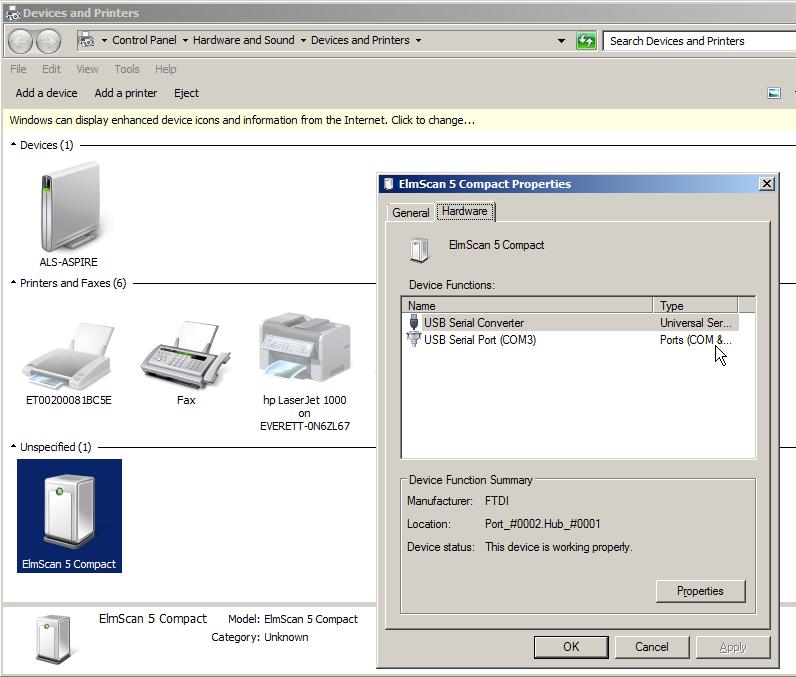
It comes bundled with the OBDWiz software with a license key, which works well enough. It's a USB version, and a USB port driver has to be installed (it's included on the CD that comes with it).
However, OBDWiz only does Global OBD queries.
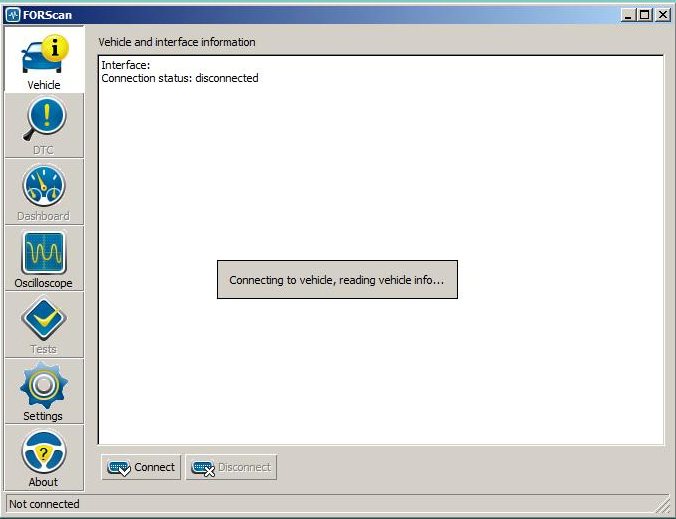
When I ran across several 1997 Ford owners with bad STFT/LTFT data from their scan tools, I realized that I needed a more-robust tool suite. I ran across a freeware app that works with my clone ELM 327 tool and my 1997 Aerostar: FORscan. It's a Ford-specific app for Windows, though Ford-clone OBD systems like Mazda etc. work with it, too.
I'm running FORscan 1.3.0 beta under W7 on an Aspire One netbook. While it takes a looong time to connect to the vehicle (about 55 seconds?), it does give fast (really fast, if you choose) updates of STFT & LTFT. Support via their forum seems to be non-existent since about May, but they're still releasing updates (1.3.0 was released this last Thursday).

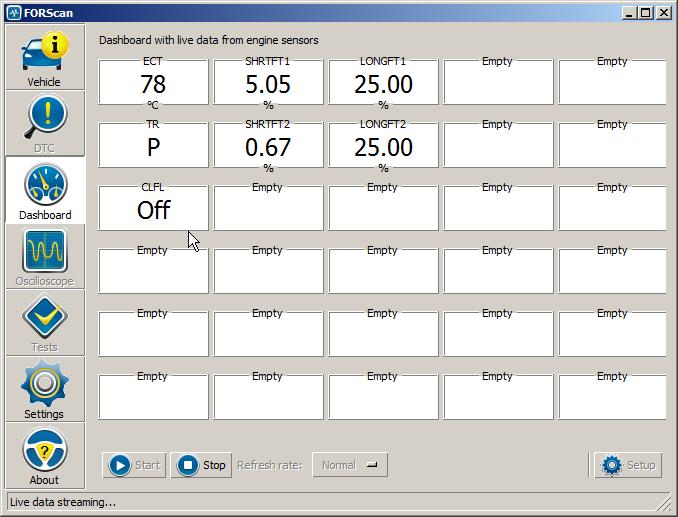
In the last pic above,
ECT = Engine Coolant Temperature (I have not figured out how to change it to Fahrenheit)
TR = Transmission Range (it's in Park)
CLFL = Closed Loop Fuel something
I have not used FORscan much, as I only got it working an hour ago. Tip: if, when you press Connect, it says "No ELM found", close the app & reopen it. Nothing else has worked here for that symptom.
To summarize, to go this route you need:
I cannot vouch for the accuracy of what it's reporting, only that on first view it seems to do more than ODBWiz.
This is apparently a problem with a lot (or all) 1997 Ford products that use OBDII. It does not pertain to 1998-on Fords, AFAICT.
I bought an ElmScan 5 Compact from Scantool.net in Dec2010. I didn't use it much until recently. Although it does use a clone chip of the real ELM 327, it seems to work well. I found later (this week) that Scantool is apparently using illegally clones of the real Elm IC for this unit, and I probably wouldn't buy another one from Scantool, based on that info alone. There are many companies producing this kind of ELM 327-based OBDII query hardware; many of the cheap ones are nearly useless, from what I've read, but there are good, reputable ones available too.
I paid $48 for it back then; it's currently $24 + shipping from Amazon.
It reports a chip rev of v1.4, which is AFAIK still the current version.
It comes bundled with the OBDWiz software with a license key, which works well enough. It's a USB version, and a USB port driver has to be installed (it's included on the CD that comes with it).
However, OBDWiz only does Global OBD queries.
When I ran across several 1997 Ford owners with bad STFT/LTFT data from their scan tools, I realized that I needed a more-robust tool suite. I ran across a freeware app that works with my clone ELM 327 tool and my 1997 Aerostar: FORscan. It's a Ford-specific app for Windows, though Ford-clone OBD systems like Mazda etc. work with it, too.
I'm running FORscan 1.3.0 beta under W7 on an Aspire One netbook. While it takes a looong time to connect to the vehicle (about 55 seconds?), it does give fast (really fast, if you choose) updates of STFT & LTFT. Support via their forum seems to be non-existent since about May, but they're still releasing updates (1.3.0 was released this last Thursday).
In the last pic above,
ECT = Engine Coolant Temperature (I have not figured out how to change it to Fahrenheit)
TR = Transmission Range (it's in Park)
CLFL = Closed Loop Fuel something
I have not used FORscan much, as I only got it working an hour ago. Tip: if, when you press Connect, it says "No ELM found", close the app & reopen it. Nothing else has worked here for that symptom.
To summarize, to go this route you need:
- A hardware adapter that plugs into the OBDII port and utilizes an Elm 327 IC to interface to the vehicle. Older ones were serial interface to your PC; newer ones are either USB or Bluetooth
- A Windoze port driver for the Elm device, that provides the USB<->Com port emulation. In general, this comes with the Elm device
- FORscan software
I cannot vouch for the accuracy of what it's reporting, only that on first view it seems to do more than ODBWiz.
FTE Stories
Ford Trucks for Ford Truck Enthusiasts

10 Best Ford Truck Engines We Miss the Most!
Joe Kucinski
2026 Shelby F-150 Off-Road: Better Than a Raptor R?
Brett Foote
2027 Super Duty Carhartt Package First Look: 12 Things You NEED to Know!
Michael S. Palmer
10 Most Surprising 2026 Ford Truck Features!
Joe Kucinski
Top 10 Ford Trucks Coming to Mecum Indy 2026
Brett Foote
5 Best / 5 Worst Ford Truck Wheels of All Time
Joe Kucinski
Ford Super Duty: 5 Things Owners LOVE, 5 Things They LOATHE!
Joe Kucinski
Every 2026 Ford Truck Engine RANKED from WORST to FIRST!
Michael S. Palmer
The Best F-150 Deal of Every Trim Level (XL through Raptor)
Joe Kucinski
FTE Community Team
Joined: Nov 2001
Posts: 1,805
Likes: 242
From: Oak Harbor, Washington
FORScan doesn't seem to be able to display the freeze frame data, that's a serious detraction, so you'd want to use some other ELM-compatible software to get that. Since I already have a licensed version of OBDWiz, that serves for me.

Thread
Thread Starter
Forum
Replies
Last Post
scholzee
1997 - 2006 Expedition & Navigator
4
Jan 11, 2005 06:28 PM