



Ford Wireless Keypad (Works Great)

Elder User
Joined: Oct 2007
Posts: 706
Likes: 0
From: Montreal,Canada
You can probably do a search for key cod on FTE.
There's whole tread about it,with some numbers you have too press in to keypad.
Should work for you also cause you have 5 buttons on it .
Do your search and don't give up.
There's whole tread about it,with some numbers you have too press in to keypad.
Should work for you also cause you have 5 buttons on it .
Do your search and don't give up.
Cargo Master

Joined: Apr 2006
Posts: 3,215
Likes: 7
From: WV
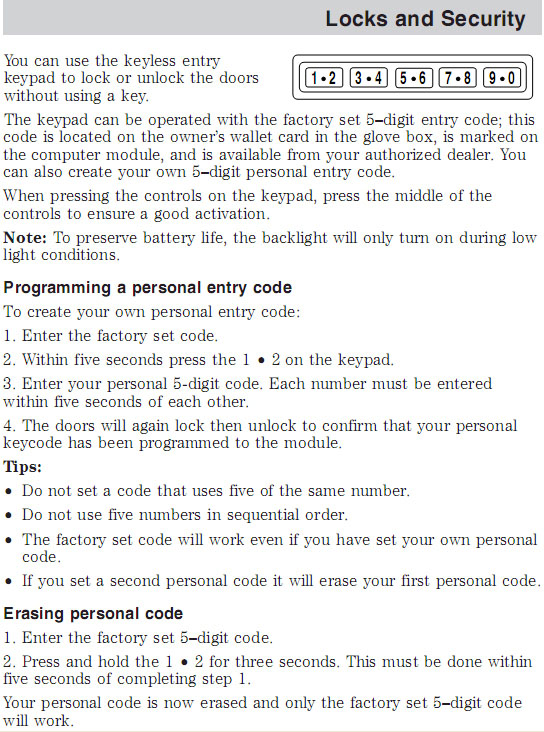
Here's a screenshot from the pdf version of my owner's manual. This text is related to the keyless unit that comes with the truck, as opposed to the wireless add-on unit like you and I have. However, as near as I can tell the instructions are the same. I added a custom code using these instructions after I bought my truck.
Hope this helps....
Hope this helps....

New User
Joined: Mar 2010
Posts: 3
Likes: 0
@1975StroppeBaja. THANKS! Unfortunately the instructions seem to require that "master factory code" to do anything......but I will try anyway.
Any chance the code is printed on the BACK of the unit??? I could remove it from the car and check.
OR.....what if i opened it up and took out the internal battery for a day or so. do you think the master code would be erased?? although even if it was...not sure how to create a new one.
@ZBIGBIG19TH I will try a search for "key code" and see what i get. I wonder if there is a list of all the "master codes" somewhere. Perhaps the manufacturer only has so many and they keep using them..............OR....maybe each one is unique, in which case there would be thousands of possibilities, and i think the unit LOCKS itself for a minute or two if you enter the wrong code 3 times in a row or something.......so GUESSING would take a LONG time...
Anyway, THANKS for the help. I am willing to try anything to get it to work, so if anyone has any other ideas.......PLEASE let me know. Thanks
-Slick
Any chance the code is printed on the BACK of the unit??? I could remove it from the car and check.
OR.....what if i opened it up and took out the internal battery for a day or so. do you think the master code would be erased?? although even if it was...not sure how to create a new one.
@ZBIGBIG19TH I will try a search for "key code" and see what i get. I wonder if there is a list of all the "master codes" somewhere. Perhaps the manufacturer only has so many and they keep using them..............OR....maybe each one is unique, in which case there would be thousands of possibilities, and i think the unit LOCKS itself for a minute or two if you enter the wrong code 3 times in a row or something.......so GUESSING would take a LONG time...
Anyway, THANKS for the help. I am willing to try anything to get it to work, so if anyone has any other ideas.......PLEASE let me know. Thanks
-Slick
Cargo Master
Joined: Apr 2006
Posts: 3,215
Likes: 7
From: WV
Only thing I could think of is maybe contact a Ford dealer (Ed aka partsguyed.com on here) might be able to help you if its possible.
Here's a link to Ed's profile page:
Ford Truck Enthusiasts Forums - View Profile: partsguyed.com
Maybe somewhere in the world there's a list of these units and their serial numbers and their master codes? Seems like a long shot though.
Cargo Master
Joined: Apr 2006
Posts: 3,215
Likes: 7
From: WV
OK... I did a little googling around about this and found some info that may or may not be helpful.
First, I found a post on a different forum that gives some hope, but not sure if it really works or not.....
Also, in that same thread, someone posted up the instructions for these wireless keypads. An exerpt from that manual gives a little less hope, unfortunately
Maybe give the first thing a try and if that doesn't work and your car happens to be prior to the 2003 date, there might be a chance of getting it from some where in the car...? Someone may know some good places to look..?
Also, I snagged a copy of the instructions and posted them here:
http://www.frontiernet.net/~slray/04...keypaddiag.pdf
Good luck!
<!-- / message --><!-- sig -->
First, I found a post on a different forum that gives some hope, but not sure if it really works or not.....
Originally Posted by someone on another forum
I had a problem with programming my wireless key pad and here is what i did to fix it. First u need to get all the key fobs that go to the truck. put your key in the ignition and turn it to the on position(don't start the truck) go from off to on 8 times. on the 8th time (in the on position) the doors will lock and unlock to confirm you are in the program mode. hit the lock button on each fob after each key fob it programmed the locks will lock. do this to all the key fobs. now to program the wireless remote type in any 5 digit code you want. the locks will also give u a conformation they respond to the new pad. once everything is programmed then turn the truck off and take the key out. you can test all the fobs and then enter your code on the key pad.. they all should work. here is a fyi if u press the last 2 buttons on the keypad it will lock the doors on the truck also after u out in the 5 digit code the drivers door will unlock if u hit the 3 button after the 5 digit code it will then unlock all the doors. good luck hope this helps.
Originally Posted by the instructions
If the master code or owner selectable code is lost or forgotten, the GFA RF keypad must be replaced. These codes are not stored in any vehicle module (with the exception of 2004 F-Super Duty vehicles produced prior to 12/3/2003).
Also, I snagged a copy of the instructions and posted them here:
http://www.frontiernet.net/~slray/04...keypaddiag.pdf
Good luck!
<!-- / message --><!-- sig -->

New User
Joined: Apr 2011
Posts: 2
Likes: 0
I found it like this
YouTube - ‪ford keyless entry module‬‏
I`ve got F-250 -05
Jari
YouTube - ‪ford keyless entry module‬‏
I`ve got F-250 -05
Jari

New User
Joined: Oct 2011
Posts: 5
Likes: 0
Zingnut. I know this is a old thread but was the wireless keypad entry just like the one in the link below? Also, how hard is it to install? Thanks, Bob
OEM FORD FACTORY DOOR LOCK KEYLESS ENTRY KEYPAD | eBay
OEM FORD FACTORY DOOR LOCK KEYLESS ENTRY KEYPAD | eBay
New User
Joined: Oct 2011
Posts: 5
Likes: 0
I bought and installed the wireless keypad on my 2011 F-150 I was talking about in my last post. It works great but now I have another problem. I've had the doors unlock themselves with the truck just sitting in the driveway!!! This has happen 4-5 times now and I'm wondering if this remote is what is causing it. I took back to my dealer today and they could not find any shorts or anything else that would cause it. I have also had a remote start added to my truck by a audio/electronic dealer but I've had that for 6 months now and my problems only started 2-3 weeks ago.
FTE Stories
Ford Trucks for Ford Truck Enthusiasts

10 Best Ford Truck Engines We Miss the Most!
Joe Kucinski
2026 Shelby F-150 Off-Road: Better Than a Raptor R?
Brett Foote
2027 Super Duty Carhartt Package First Look: 12 Things You NEED to Know!
Michael S. Palmer
10 Most Surprising 2026 Ford Truck Features!
Joe Kucinski
Top 10 Ford Trucks Coming to Mecum Indy 2026
Brett Foote
5 Best / 5 Worst Ford Truck Wheels of All Time
Joe Kucinski
Ford Super Duty: 5 Things Owners LOVE, 5 Things They LOATHE!
Joe Kucinski
Every 2026 Ford Truck Engine RANKED from WORST to FIRST!
Michael S. Palmer
The Best F-150 Deal of Every Trim Level (XL through Raptor)
Joe Kucinski
Fleet Owner


Joined: Aug 2010
Posts: 21,253
Likes: 1,656
From: Reynoldsburg, Ohio
I bought and installed the wireless keypad on my 2011 F-150 I was talking about in my last post. It works great but now I have another problem. I've had the doors unlock themselves with the truck just sitting in the driveway!!! This has happen 4-5 times now and I'm wondering if this remote is what is causing it. I took back to my dealer today and they could not find any shorts or anything else that would cause it. I have also had a remote start added to my truck by a audio/electronic dealer but I've had that for 6 months now and my problems only started 2-3 weeks ago.
If that's the case good thing they also don't have remote start---talk about poor gas mileage!

New User
Joined: Oct 2011
Posts: 5
Likes: 0
My wireless unit did come with a Master Code on a laminated card but I changed the code after I got it going to my own personal code. I took it to Ford dealer and they could not find anything wrong but said it could be something with the remote start causing it. Took it back to the dealer who installed my remote start and they check all wiring and re-did all connections. Two hours after I got home I checked it and sure enough it was unlocked! So I took dental floss and removed the wireless keypad and stuck it in the house. Three hours later and it was unlocked once again! My directions for the wireless keypad are identical to that shown by 1975StroppeBaja. I guess my next option is to get the dealer that installed my remote start to unhook it and take it back to Ford. Whew!!!

Thread
Thread Starter
Forum
Replies
Last Post
