When you click on links to various merchants on this site and make a purchase, this can result in this site earning a commission. Affiliate programs and affiliations include, but are not limited to, the eBay Partner Network.
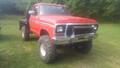
All..............been here a few times before for answers on my 2004 but now have joined up.....since... I just bought a 1978 F-250 4X4 with the floor stick shift. Will be a total restoration and why not I am 78 years old and need a fun project. Work 6 days a week building airplanes and figured I will donate at least 4 hours a day on the 250.
Howdy Ranger.............will do Sir if I can figure out how to do it. Pretty good at turning wrenches and been fixing airplanes for 60 years, but computers sometimes throw me.
Originally Posted by ranger140892
Welcome, Joe! Please post some photos of your truck.
Being a paid subscriber seems to make attaching a pic way easier for me anyway. I too am an A&P and not a computer guy. So I go with that is the easiest for me...as far as computer stuff. I can not figure it out the way the above directions say to do it.
Appreciate the reply and help. Will look at the way to add pics. FYI...I did not know there is a state chapter and did not know how to be a paid member. Suppose I will find out all these things shortly.
Good for you being an A&P. My son also is an A&P for the last 35 years and about to get his I.A. Got 6 great guys working for me and one spectacular paint/fiberglass guy. All I have to do is see if I can turn them loose on the 250 when we have a break in airplanes...which probably never be. Have 4 in the hangar right now in various stages of build and another 5 waiting to come in.
Regards........Joe.
Maybe this will help? I use the 1st way and it works great. The 3rd way I just can't figure it out. 1. How do I attach a file to a post? To attach a file to your post, you need to be using the main 'New Post' or 'New Thread' page and not 'Quick Reply'. To use the main 'New Post' page, click the 'Post Reply' button in the relevant thread.
On this page, below the message box, you will find a button labelled 'Manage Attachments'. Clicking this button will open a new window for uploading attachments. You can upload an attachment either from your computer or from another URL by using the appropriate box on this page. Alternatively you can click the Attachment Icon to open this page.
To upload a file from your computer, click the 'Browse' button and locate the file. To upload a file from another URL, enter the full URL for the file in the second box on this page. Once you have completed one of the boxes, click 'Upload'. Once the upload is completed the file name will appear below the input boxes in this window. You can then close the window to return to the new post screen.
2. What files types can I use? How large can attachments be?
In the attachment window you will find a list of the allowed file types and their maximum sizes. Files that are larger than these sizes will be rejected. There may also be an overall quota limit to the number of attachments you can post to the board. I think now days they auto resize?
3. How do I add an image to a post?
If you have uploaded an image as an attachment, you can click the arrow next to the 'Attachment Icon' and select it from the list. This will be inserted into your post and can be located where you want it displayed.
To include an image that is not uploaded as an attachment and is located on another website, you can do so by copying the full URL to the image, (not the page on which the image is located), and either pressing the 'Insert Image' icon or by typing [img] before the URL and [/img] after it, ensuring that you do not have any spaces before or after the URL of the image. You can insert pictures from your albums (?) in this way too.
Go to far top of L/H side, top of screen, See the blue line, click on "user CP" now that opened, scroll down the L/H side list to Paid subscriptions. Boom you are there.
WOW...al three threads were awesome and full of info..........will use....thanks again.
PS: when where you a Chopper Crew Chief/Door Gunner?
I was there in 65 & 66, with the First Cav, shot down 9 times but only one Purple Heart.
Welcome home. It was a little later in life, like from 86-to 2006 but I was in Somalia, Desert Shield/Storm. OIF in 03. Afghanistan as a contractor CE/DG on Russian Mi-17's in 06-09. Iraq in 2012. Now back in Afghanistan on Blackhawks.
I am a proud to be one of "the man in the doorway".
Great video honoring Door Gunners. I was surprised to see me in the video. Go to 39 seconds. The photo of the Huey with infantry jumping out on a mountain top...."IS ME"....I painted that HEADHUNTER 39 on the nose. Thanks for sending.
I loved all 20 years of it. I was with 10 Mtn for Somalia. We operated out of Kismayo. And to stay on subject, I remember a few 2wd Dent's running around there.
Rezvani's Latest Post-Apocalyptic Monster Is a Ford F-150 Raptor Underneath
Slideshow: Called the Fortress, the 850-horsepower pickup combines Raptor underpinnings with military-inspired features, survival equipment, and a starting price of $285,000.







 NEW GUY