



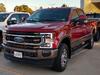


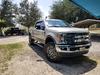


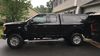
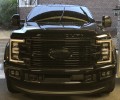
Painted two bar grille
Senior User
Joined: Jun 2017
Posts: 130
Likes: 1
I photoshopped a platinum grill in caribou color on the same KR.
Not my best work, but gives you an idea......

Elder User
Joined: Jun 2017
Posts: 505
Likes: 2
From: Southeastern, USA
That would look better with the Caribou on the top bar and the white on the bottom.
FTE Stories
Ford Trucks for Ford Truck Enthusiasts

Top 10 Most Expensive Ford Trucks Ever Sold on Bring a Trailer
Joe Kucinski
2027 Ford Super Duty Buyer's Guide (Every Model, Engine, & Package)
Brett Foote
Top 10 Ford Truck Tragedies
Joe Kucinski
AEV FXL Super Duty - the Super Duty Raptor Ford Doesn't Make
Brett Foote
Lobo Vs Lobo: Proof the F-150 Lobo Should Be Even Lower!
Michael S. Palmer
Ford's 2001 Explorer Sportsman Concept Looks For a New Home
Verdad Gallardo
10 Best Ford Truck Engines We Miss the Most!
Joe Kucinski
2026 Shelby F-150 Off-Road: Better Than a Raptor R?
Brett Foote
2027 Super Duty Carhartt Package First Look: 12 Things You NEED to Know!
Michael S. Palmer
Senior User
Joined: Jun 2017
Posts: 130
Likes: 1
Good start man! What program are you using? I use Pixelmator on my MacBook Pro ( Pixelmator Pro). When I open up a picture, I start with adding a "duplicate layer".
To select the paint color, I use the "eye dropper" which is a color selector. Look at your picture carefully to see where the sun is hitting your object, and click on the shade you want (also, you can pick the solid color in the brush setting, along with the size of brush you want to use.
Then go to your paint brush and adjust the "opacity" so you can change the color, but still see the body lines through it. Click to start painting, but I have to keep it pressed down, with one hand, while I am painting with the other, it's ok if you happen to go outside the lines, I will show you how to fix that. You can adjust the opacity depending on how light and dark you want the paint.
Once everything is painted, I cleanup all the overages that should not have paint on it. Click on the "eraser", and move this around to clean up the image. Since we have already added a duplicate layer, this cleaning will only erase the painting we did.
For example, paint the Ford emblem all at once, then zoom in, and erase what you don't need painted. All of this works best with the largest pixel pictures you can get, especially when you zoom in, keeps the pixels small and workable instead of big blocks of ****.
Once you have finished painting and are ready to save it, click on the "layers" tab, and then click on "merge layers". Then click on save, and it should give you multiple options. I use the JPEG version.
Have fun with it, and let me know if you have any questions. I can also explain how to add items to the picture, for example how to change rims, or add extra lights.
Senior User
Joined: Jun 2017
Posts: 130
Likes: 1
Nice work man!


Senior User
Joined: Nov 2017
Posts: 240
Likes: 1
From: Cumming, GA
I like the caribou grille but I'd make the ford Logo the same caribou and the background white

Thread
Thread Starter
Forum
Replies
Last Post
Martin.Auto-Image
1997 - 2003 F150
7
Mar 13, 2007 08:34 PM