


65 F250 decode


Thread Starter
|
Freshman User
Joined: Jun 2013
Posts: 33
Likes: 0
65 F250 decode
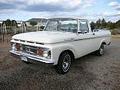
Greetings to all from Fairbanks. Almost 40 degrees today. Gorgeous! Thinking we've made it thru another one. Time to resume my quest for a slick and I think I've found a keeper. A little assistance with the decode would be appreciated.
F250DR699978
Color WM
Body AB81
Trans N
Axle 24
DSO 74
F250DR699978
Color WM
Body AB81
Trans N
Axle 24
DSO 74

Ford Parts Specialist
Joined: Nov 2006
Posts: 88,826
Likes: 790
From: Simi Valley, CA

Greetings to all from Fairbanks. Almost 40 degrees today. Gorgeous! Thinking we've made it thru another one. Time to resume my quest for a slick and I think I've found a keeper. A little assistance with the decode would be appreciated.
F25DR699978 / W.B. 129 / COLOR: WM / MODEL: Omitted / BODY: AB81 / TRANS: N / AXLE: 24 / MAX GVW LBS: Omitted / CERT NET HP: 172 / RPM: 4000 / DSO: 74
F25DR699978 / W.B. 129 / COLOR: WM / MODEL: Omitted / BODY: AB81 / TRANS: N / AXLE: 24 / MAX GVW LBS: Omitted / CERT NET HP: 172 / RPM: 4000 / DSO: 74
D = 352 2V
R = San Jose CA Assembly Plant.
699978 = 1965, assembled June 1965.
129" Wheelbase.
WM: W = Medium Blue / M = Wimbledon White.
AB81: AB = Medium Blue Crush Vinyl & Medium Blue Cody Pattern Woven Plastic / 81 = 81B Custom Cab.
N = New Process 435 4 Speed Manual Transmission.
24 = Dana 60 Rear Axle / 4.10-1 / No Limited Slip / 5,200 lbs. Rear Axle Capacity.
172 net HP @ 4,000 RPM
74 = Seattle WA Ford District Sales Office, where the original selling dealer ordered the truck from.
VIN contains 11 digits, you typed 12. I eliminated the zero.
May 26/27 2013, stayed at the Westmark Hotel 2 nights while on a 15 day Yukon/AK Cruise Tour. It was warm in Fairbanks, but 2 days before, it was colder than a well diggers *** in Dawson City.
Thread Starter
|
Freshman User
Joined: Jun 2013
Posts: 33
Likes: 0
Thank you for the prompt reply.
Everything on this truck checks out so far and I think she'll be coming home with me soon .Snow's still too deep to mess with moving her now.Will post pics when I get her.
ND, you are a gentleman and a scholar.( so few of us left.....)
Everything on this truck checks out so far and I think she'll be coming home with me soon .Snow's still too deep to mess with moving her now.Will post pics when I get her.
ND, you are a gentleman and a scholar.( so few of us left.....)
Post Fiend
Joined: Sep 2006
Posts: 14,325
Likes: 14
From: Island Southeast Alaska
Aint no body like ND left. He is one of a kind.
Welcome to FTE from another Alaskan.
Could we see some pictures? Here is how.
But I got ta say becoming a supporter is the fastest and easiest way to post pics right from
your whatever pad/cell thing or home computer.
Few of us look in the users Gallery or album as you can see by your recent visitors.
Quote:
Originally Posted by 76f350spercamprspeal
Welcome to FTE, Best Damn Forum EVER!
------------------------
Here's How to Post Pictures:
1. Login to FTE.
2.Click User CP (In the Top Left Hand Corner)
3.(On the Left, There will be a list, The 5th Option Down, will say "Pictures & Albums) Click That.
4.Then, Click Add Album, Enter a title, and description, if ya want to.
5. Click Upload Pictures, Then click Browse, Locate the Files of your truck. (You can add 3 files at a time)
5. Click Upload.
6. Add a description to the individual pictures, then click save.
7. Add more files if ya want.
8. Click The Picture you want to post, it will give you two codes at the bottom, Right Click The Second one (It say's BB Code, Then Say's [IMG]http:blahblahblah...[/IMG])
Then, Once that is highlighted, Right Click, Then Copy, Then Paste it into your post.
You can add up to 30 Images in one FTE Post.
If, Ya need any help, Don't hesitate to ask.
Quote:
Originally Posted by old_dan
You can also go to the "Garage" tab and start an album right here on FTE. After you post pictures to an album, we can look in your album, but you'll also be able to "insert a picture" by pasting in a link to the picture in your album.
It seems awkward, but whenever you "insert a picture" to one of these threads, the forum is looking for the picture somewhere on the web (which is always available) rather than from somewhere on your hard drive (which isn't always available).
Quote:
Originally Posted By Jolly Roger Joe
Welcome to FTE!
Go to Image hosting, free photo sharing & video sharing at Photobucket and sign up for a free account. Then create an album for your truck. Upload any pics you want to post on FTE to that album. Have this album open on your computer when you want to post pics on FTE.
While you're making a post on FTE, select the pic you want to post from your Photobucket album. When the large version of the pic is open, right mouse click on it and select "View Image Info". The image info will be highlighted and will look something like this:
The best photos and videos | Photobucket
Copy that highlighted info (right click / copy).
When you have the spot in your post where you want the pic to be placed, select the "Insert Image" icon at the top of the post (looks like a mountain) and paste (right click / paste) the image info you copied in the highlighted box (just shows "http://" when it opens).
Your pic will be placed in the post.
Hope that helps.
Here's a tutorial Bob put together: https://www.ford-trucks.com/forums/67...-pictures.html Bob's link is not working. Can someone in the know tell me why?
How to upload pictures to the FTE Forums. - YouTube. Thanks Sam Rusty_Old_F250. Best we can find is that this video was done by Gundown64
Welcome to FTE from another Alaskan.
Could we see some pictures? Here is how.
But I got ta say becoming a supporter is the fastest and easiest way to post pics right from
your whatever pad/cell thing or home computer.
Few of us look in the users Gallery or album as you can see by your recent visitors.
Quote:
Originally Posted by 76f350spercamprspeal
Welcome to FTE, Best Damn Forum EVER!
------------------------
Here's How to Post Pictures:
1. Login to FTE.
2.Click User CP (In the Top Left Hand Corner)
3.(On the Left, There will be a list, The 5th Option Down, will say "Pictures & Albums) Click That.
4.Then, Click Add Album, Enter a title, and description, if ya want to.
5. Click Upload Pictures, Then click Browse, Locate the Files of your truck. (You can add 3 files at a time)
5. Click Upload.
6. Add a description to the individual pictures, then click save.
7. Add more files if ya want.
8. Click The Picture you want to post, it will give you two codes at the bottom, Right Click The Second one (It say's BB Code, Then Say's [IMG]http:blahblahblah...[/IMG])
Then, Once that is highlighted, Right Click, Then Copy, Then Paste it into your post.
You can add up to 30 Images in one FTE Post.
If, Ya need any help, Don't hesitate to ask.
Quote:
Originally Posted by old_dan
You can also go to the "Garage" tab and start an album right here on FTE. After you post pictures to an album, we can look in your album, but you'll also be able to "insert a picture" by pasting in a link to the picture in your album.
It seems awkward, but whenever you "insert a picture" to one of these threads, the forum is looking for the picture somewhere on the web (which is always available) rather than from somewhere on your hard drive (which isn't always available).
Quote:
Originally Posted By Jolly Roger Joe
Welcome to FTE!
Go to Image hosting, free photo sharing & video sharing at Photobucket and sign up for a free account. Then create an album for your truck. Upload any pics you want to post on FTE to that album. Have this album open on your computer when you want to post pics on FTE.
While you're making a post on FTE, select the pic you want to post from your Photobucket album. When the large version of the pic is open, right mouse click on it and select "View Image Info". The image info will be highlighted and will look something like this:
The best photos and videos | Photobucket
Copy that highlighted info (right click / copy).
When you have the spot in your post where you want the pic to be placed, select the "Insert Image" icon at the top of the post (looks like a mountain) and paste (right click / paste) the image info you copied in the highlighted box (just shows "http://" when it opens).
Your pic will be placed in the post.
Hope that helps.
Here's a tutorial Bob put together: https://www.ford-trucks.com/forums/67...-pictures.html Bob's link is not working. Can someone in the know tell me why?
How to upload pictures to the FTE Forums. - YouTube. Thanks Sam Rusty_Old_F250. Best we can find is that this video was done by Gundown64

Thread
Thread Starter
Forum
Replies
Last Post
MightyF100
1961 - 1966 F-100 & Larger F-Series Trucks
6
Dec 26, 2014 08:42 PM
Squirrel987
1961 - 1966 F-100 & Larger F-Series Trucks
16
May 14, 2014 03:29 PM
th3 gunslin9er
1961 - 1966 F-100 & Larger F-Series Trucks
7
Aug 14, 2013 06:15 PM


