


SYNC compatibility w/iphone 5s?

Thread Starter
|
More Turbo
Joined: Sep 2013
Posts: 596
Likes: 23
From: Watson
Thanks Antonio, 'preciate you putting in some time on Christmas Eve 
Unfortunately, something's "off" with either my phone or SYNC or both: My SYNC menu doesn't give me the option to "enable" my MAP profile, it's just On or Off. I selected On but it didn't seem to make any difference.
Perhaps that's a shortcoming with my current iphone4s, I've got no bluetooth specific notifications menu that I can find..?
But, again, I'm pretty much resigned to the fact that my current 4 doesn't support text messaging via SYNC, I'm just trying to confirm if the 5s does, or if not, which AT&T carrier phones do?
Unfortunately, something's "off" with either my phone or SYNC or both: My SYNC menu doesn't give me the option to "enable" my MAP profile, it's just On or Off. I selected On but it didn't seem to make any difference.
Perhaps that's a shortcoming with my current iphone4s, I've got no bluetooth specific notifications menu that I can find..?
But, again, I'm pretty much resigned to the fact that my current 4 doesn't support text messaging via SYNC, I'm just trying to confirm if the 5s does, or if not, which AT&T carrier phones do?

Hotshot
Joined: Nov 2013
Posts: 10,107
Likes: 96
From: Hempstead, TX
Hopefully, I will slow down enough within the next few days to try out the tips to see if the 5s will work or not on my Sync with MFT. I will certainly post the results when I find out. I've just been very busy with work and holiday preps lately.
Hotshot
Joined: Nov 2013
Posts: 10,107
Likes: 96
From: Hempstead, TX
Wait this says we can
http://support.ford.com/sync-technol...touchAttention, iPhone users! We’re happy to announce that SYNC can now read your text messages aloud to you while you're driving. Please note, to use this feature you must be running your SYNC with MyFord Touch system on software version 3.5.
If your iPhone is running a more recent version of iOS 6 (e.g., 6.1.3), it may support this new text messaging capability without requiring much set-up effort. First, follow the steps below to see if your iPhone can work with SYNC to read your text messages aloud.
- See more at: How to allow SYNC to receive text messages from your iPhone | MyFord Touch | Ford.com
Attention, iPhone users! We’re happy to announce that SYNC can now read your text messages aloud to you while you're driving. Please note, to use this feature you must be running your SYNC with MyFord Touch system on software version 3.5.
If your iPhone is running a more recent version of iOS 6 (e.g., 6.1.3), it may support this new text messaging capability without requiring much set-up effort. First, follow the steps below to see if your iPhone can work with SYNC to read your text messages aloud.
http://support.ford.com/sync-technol...touchAttention, iPhone users! We’re happy to announce that SYNC can now read your text messages aloud to you while you're driving. Please note, to use this feature you must be running your SYNC with MyFord Touch system on software version 3.5.
If your iPhone is running a more recent version of iOS 6 (e.g., 6.1.3), it may support this new text messaging capability without requiring much set-up effort. First, follow the steps below to see if your iPhone can work with SYNC to read your text messages aloud.
- See more at: How to allow SYNC to receive text messages from your iPhone | MyFord Touch | Ford.com
Attention, iPhone users! We’re happy to announce that SYNC can now read your text messages aloud to you while you're driving. Please note, to use this feature you must be running your SYNC with MyFord Touch system on software version 3.5.
If your iPhone is running a more recent version of iOS 6 (e.g., 6.1.3), it may support this new text messaging capability without requiring much set-up effort. First, follow the steps below to see if your iPhone can work with SYNC to read your text messages aloud.
Thanks for the links bironacad.


Freshman User
Joined: Feb 2013
Posts: 37
Likes: 0
From: Ontario, Can
Ok truckers, I am happy to report that I finally slowed down for a few minutes after getting home from work today and tried the instructions above. I am running the latest update on Sync w/MFT and the latest iOS on my iPhone 5s. After following the steps listed in the second hotlink above, my Sync now reads my texts. It was really simple to do. Anybody with questions about what I did, feel free to PM.
Thanks for the links bironacad.
Thanks for the links bironacad.
Thread Starter
|
More Turbo
Joined: Sep 2013
Posts: 596
Likes: 23
From: Watson
I've also got an update along these same lines:
After double checking what Antonio advised trying, my truck now also reads my iphone 4s texts to me, after notifying a new message has arrived!!
But not everything is gravy, for some weird reason, it always shows the contact as UNKNOWN even they they're coming from contacts in my phonebook
So I can't reply to them. A step further, I now get "message sent successfully" pop-ups when I choose a contact in my phonebook and send them one of those generic "call me" messages, but they never receive it
EO- are you able to reply to those texts? And your contact comes up correctly?
After double checking what Antonio advised trying, my truck now also reads my iphone 4s texts to me, after notifying a new message has arrived!!
But not everything is gravy, for some weird reason, it always shows the contact as UNKNOWN even they they're coming from contacts in my phonebook
So I can't reply to them. A step further, I now get "message sent successfully" pop-ups when I choose a contact in my phonebook and send them one of those generic "call me" messages, but they never receive it
EO- are you able to reply to those texts? And your contact comes up correctly?
Hotshot
Joined: Nov 2013
Posts: 10,107
Likes: 96
From: Hempstead, TX
BlackBeest, I only had a few minutes to play with it after work yesterday evening. During that time, I only sent a quick test text from my work phone (old flip phone) to my iPhone, after completing the setup steps outlined previously. My test text was simply "Test Test", as flip phones suck at texting. I didn't try to reply back. I will do some more investigation when I get more time.

Cargo Master

Joined: Aug 2010
Posts: 3,229
Likes: 64

In terms of the muting issue, you can bypass that by changing the audio output source of your phone. With iOS 7, you should be able to pull up command center (swiping up from the bottom of the screen) and see the chosen output method. When your phone is synced to the truck, it will say the output is via SYNC bluetooth. If you change the output to "iPhone", you will be able to hear the message tones. This will not affect your ability to make phone calls over bluetooth and the truck's speakers. It's a stupid system, but I do this every day and it works fine for me. If you want to stream music through SYNC, you'll have to switch the output back to "SYNC."
FTE Stories
Ford Trucks for Ford Truck Enthusiasts

Top 6 Best Deals Available on New Fords & Lincolns Right Now
Brett Foote
This Hennessey Takes the Expedition Tremor's Off-Roading Capability to the Next Level
Verdad Gallardo
Top 10 Fords at 2026 Carlisle Ford Nationals
Joe Kucinski
3 Best / 3 Worst Parts of Modern Ford Ownership
Brett Foote
10 Amazing Upgrades That Solve Common Ford Truck Owner Headaches
Pouria Savadkouei
Every 2026 Ford Engine Explained
Brett Foote
10 Ugly Ford Trucks That We Still Kinda Love
Joe Kucinski
10 Things Every Truck Owner NEEDS (2026 Edition)
Michael S. Palmer
Rezvani's Latest Post-Apocalyptic Monster Is a Ford F-150 Raptor Underneath
Verdad Gallardo
Tuned

Joined: Jun 2013
Posts: 344
Likes: 5
From: North Shore MA
That's weird, I've never had that problem. Does SYNC indicate that you lost Bluetooth connectivity? It should pop up with a message right when it happens.
Tuned
Joined: Jun 2013
Posts: 344
Likes: 5
From: North Shore MA
I've also got an update along these same lines: After double checking what Antonio advised trying, my truck now also reads my iphone 4s texts to me, after notifying a new message has arrived!! But not everything is gravy, for some weird reason, it always shows the contact as UNKNOWN even they they're coming from contacts in my phonebook So I can't reply to them. A step further, I now get "message sent successfully" pop-ups when I choose a contact in my phonebook and send them one of those generic "call me" messages, but they never receive it EO- are you able to reply to those texts? And your contact comes up correctly?
But not everything is gravy, for some weird reason, it always shows the contact as UNKNOWN even they they're coming from contacts in my phonebook So I can't reply to them. A step further, I now get "message sent successfully" pop-ups when I choose a contact in my phonebook and send them one of those generic "call me" messages, but they never receive it EO- are you able to reply to those texts? And your contact comes up correctly?
Thread Starter
|
More Turbo
Joined: Sep 2013
Posts: 596
Likes: 23
From: Watson
I've got the factory touchscreen in my '11, and a typical iphone4s. The text message button option was in my SYNC menu from before my most recent attempt at updating, so I can only assume its factory
As I relayed before, I'm now able to voice-request incoming text messages read to me, and I do get the chime and envelope telling me a new message has arrived, but that's about as far as it goes.
The contact info comes through as UNKNOWN so I can't reply, and even when I manually input a recipient and send one of the system messages, they don't get it, even tho I get the "message sent successfully" bubble.
TBH, tho, really, the incoming message notification was all I was really after, so I'm gonna "let" work upgrade me to the 5s, and I'll try a SYNC update again when I leave the truck for some other repairs here someday soon. Right now I'm having outgoing phone call issues

Official Ford Rep
Joined: Jul 2013
Posts: 474
Likes: 0
If your vehicle is running the most current version of software, the MAP Profile settings will be about 3 pages down in your Advanced phone menu options. Make sure you're heading to your Phone menu, selecting settings, then tapping on the Advanced button on this screen. I connected my Galaxy S4 just now to a demo unit we have on the floor and was able to send/receive a text message from myself using SYNC.
Antonio
Tuned
Joined: Jun 2013
Posts: 344
Likes: 5
From: North Shore MA
Hi lwk362393, If your vehicle is running the most current version of software, the MAP Profile settings will be about 3 pages down in your Advanced phone menu options. Make sure you're heading to your Phone menu, selecting settings, then tapping on the Advanced button on this screen. I connected my Galaxy S4 just now to a demo unit we have on the floor and was able to send/receive a text message from myself using SYNC. Antonio
Thread Starter
|
More Turbo
Joined: Sep 2013
Posts: 596
Likes: 23
From: Watson
Thanks, good to hear
lw- I took some pics of my screens earlier, maybe they'll help. Press the big phone button on the RH side of the screen, should pop this up:

Press the settings menu there on the left, should take you to this:

Press the Text Msg Notification menu, should get just two options, On or Off. Obviously you want this On.
Return to previous menu and press the page down arrows there on the right, two times, should take you to here:
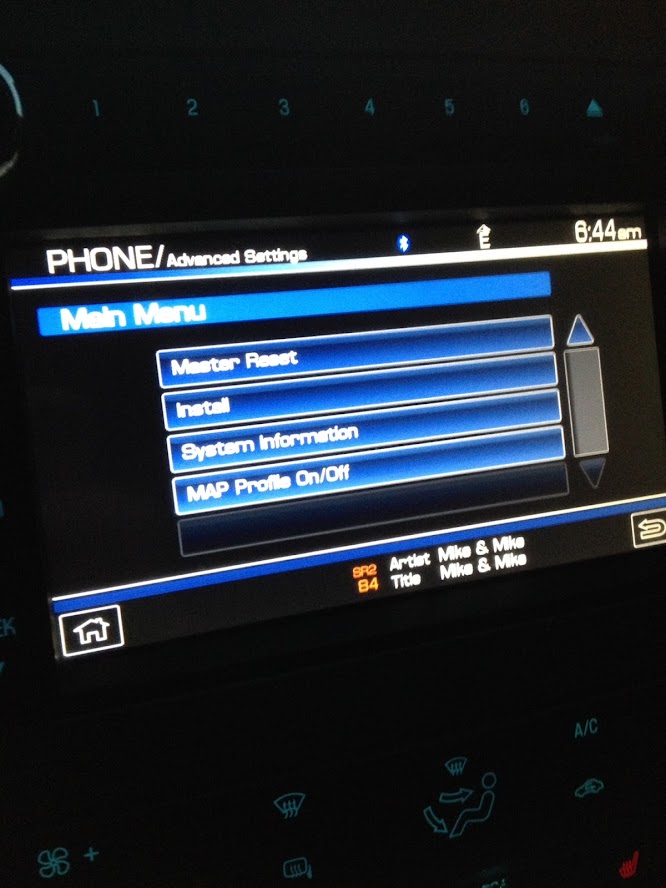
Press the MAP Profile On/Off menu, only two options, On or Off, again, you want it On.
That's it as far as the truck-side is concerned, you can back out to the home screen.
On my iphone4s, and I had to be connected to the truck via bluetooth, for this: in the Bluetooth menu, click on Sync, should pop this up:

That "show notifications" option wasn't there when I wasn't connected to the truck. Swipe it over to On and you should start getting the alerts that new messages have arrived, and voice-request them read to you.
That's as far as I've got, hope it helps
Press the settings menu there on the left, should take you to this:
Press the Text Msg Notification menu, should get just two options, On or Off. Obviously you want this On.
Return to previous menu and press the page down arrows there on the right, two times, should take you to here:
Press the MAP Profile On/Off menu, only two options, On or Off, again, you want it On.
That's it as far as the truck-side is concerned, you can back out to the home screen.
On my iphone4s, and I had to be connected to the truck via bluetooth, for this: in the Bluetooth menu, click on Sync, should pop this up:
That "show notifications" option wasn't there when I wasn't connected to the truck. Swipe it over to On and you should start getting the alerts that new messages have arrived, and voice-request them read to you.
That's as far as I've got, hope it helps