


Compass problem Searched but no answer


Thread Starter
|
Junior User
Joined: Nov 2006
Posts: 87
Likes: 0
Compass problem Searched but no answer
Before I get blasted, I have searched for every compass thread I can find and have not seen an answer to this issue.
New to me 2008 F250 lariat. When I go into the zone change menu it wont toggle between the different zones. It is stuck on zone 9 and I am in zone 5. I tried to calibrate the compass via driving in circles in but nothing worked. Anyone know how I can get it to select the right zone and calibrate?
New to me 2008 F250 lariat. When I go into the zone change menu it wont toggle between the different zones. It is stuck on zone 9 and I am in zone 5. I tried to calibrate the compass via driving in circles in but nothing worked. Anyone know how I can get it to select the right zone and calibrate?
Laughing Gas
Joined: May 2009
Posts: 908
Likes: 2
From: Covina, CA.
The following should work.
Compass zone/calibration adjustment
Originally Posted by Owners_Guide
Compass zone/calibration adjustment
- Determine your magnetic zone by referring to the zone map.
- Turn ignition to the RUN position.
- Start the engine.
- From the SETUP menu, press and release the RESET control until the message center display changes to show the current zone setting (XX).
- Press and release the RESET control repeatedly until the correct zone setting for your geographic location is displayed on the message center.
The range of zone values are from 1 to 15 and “wraps” back to 1. - To exit the zone setting mode, and to “lock in” your change:
- press and release the SETUP control or,
- press INFO control to exit or,
- wait 4 seconds and the zone will be “locked in”.
- Press the RESET control to start the compass calibration function.
- Slowly drive the vehicle in a circle (less than 3 mph [5 km/h]) until the CIRCLE SLOWLY TO CALIBRATE display changes to CALIBRATION COMPLETED. It will take up to five circles to complete calibration.
- The compass is now calibrated.
Thread Starter
|
Junior User
Joined: Nov 2006
Posts: 87
Likes: 0
I think I found my problem. I am missing the box that mounts behind the rearview mirror. I looked and the wire harness is just a bare plug not plugged into anything. Does anyone know what that part is called or what I need to buy to get it fixed? Can someone snap a pic of theirs so I can see how it is mounted?


MMNC (SS)(Ret)


Joined: Mar 2004
Posts: 11,607
Likes: 151
From: SE Georgia

I've got 2 of them in my garage. I even have a auto-dim mirror if you need that as well (looks like you already have that option though.
1 is from a 2006 Taurus. the other is from my 2006 Lariat F-250.
I just put a new 2011 mirror into my truck (with camera) that has the compass built in.
1 is from a 2006 Taurus. the other is from my 2006 Lariat F-250.
I just put a new 2011 mirror into my truck (with camera) that has the compass built in.
MMNC (SS)(Ret)
Joined: Mar 2004
Posts: 11,607
Likes: 151
From: SE Georgia
I'll shoot you a PM in a second about getting it from Point A (me) to Point B (you).
Ford uses 2 types of mirror mounts. The part glued to the windshield is the same no matter what. It's the part on the mirror that is different.
below are pics of what I'm talking about.
Ford uses 2 types of mirror mounts. The part glued to the windshield is the same no matter what. It's the part on the mirror that is different.
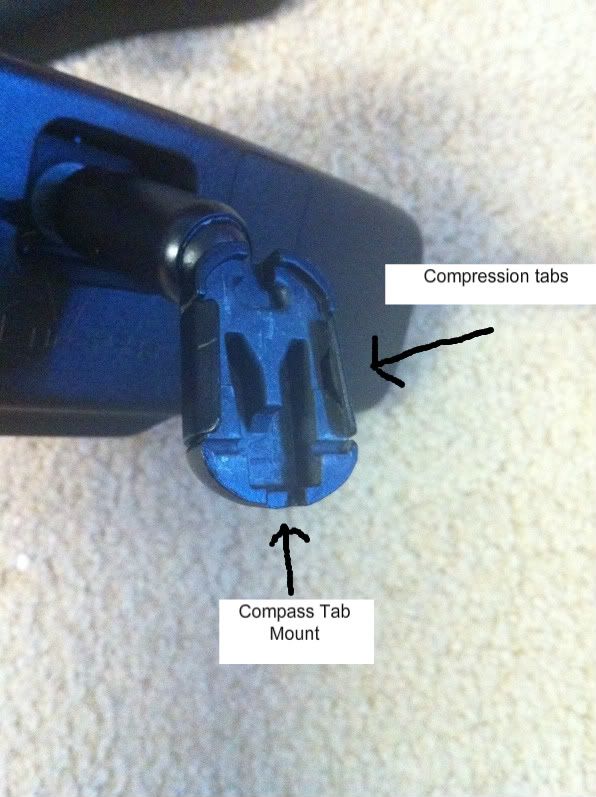
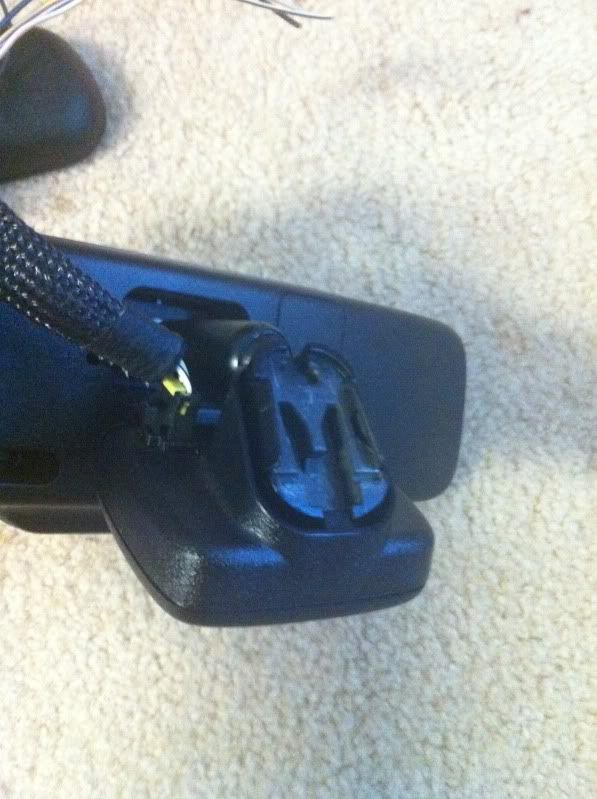
Type 1: Compression Mount. 2 thin metal wedges enclose the windshield clip. very easy to get on/off
Type 2: Mirror piece slides onto the windshield clip, then there is a little metal tab that keeps the mirror from coming loose. Requires using a tiny screwdriver to release the metal tab, then the whole thing slides up and off. not so easy to get off.
To install the compass module:Type 2: Mirror piece slides onto the windshield clip, then there is a little metal tab that keeps the mirror from coming loose. Requires using a tiny screwdriver to release the metal tab, then the whole thing slides up and off. not so easy to get off.
You have to pop off the rear-view mirror from the clip that is glued to the windshield.
Type 1: a small indention is on the bottom of the mirror mount. The compass housing snaps on using that 1 tab/clip.
Type 2: The mirror mount has 2 indentions on either side. The Compass housing has 2 tabs that snap into those indentations on the mirror mount.
Then you simply clip the mirror back onto the windshield tab.Type 1: a small indention is on the bottom of the mirror mount. The compass housing snaps on using that 1 tab/clip.
Type 2: The mirror mount has 2 indentions on either side. The Compass housing has 2 tabs that snap into those indentations on the mirror mount.
below are pics of what I'm talking about.
Type 1
You can see how the 2 wedges compress against the windshield clip. Notice the single indentation on the mount
Here is the whole mirror with the compass installed
You can see how the 2 wedges compress against the windshield clip. Notice the single indentation on the mount
Here is the whole mirror with the compass installed
Type 2
See the 2 indentations on the side, and you can see the tracks for the windshield clip to slide on...and the metal retention tab.
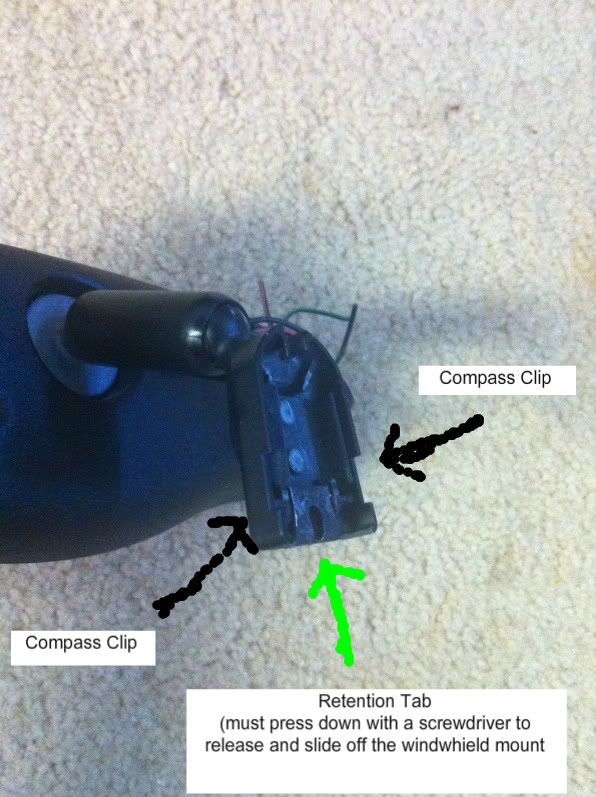
See the 2 indentations on the side, and you can see the tracks for the windshield clip to slide on...and the metal retention tab.

Thread
Thread Starter
Forum
Replies
Last Post
cdnalpina
Excursion - King of SUVs
10
Sep 22, 2014 04:43 PM


