




How To: install an OEM Navigation Unit in 07 Expedition

Thread Starter
|
Senior User
Joined: Oct 2007
Posts: 142
Likes: 0
How To: install an OEM Navigation Unit in 07 Expedition
I wanted to add a navigation unit to my expedition and I preferred the stock look in the dash. I reeaaaally considered going aftermarket just for the added benefits and perks of those units but the real deal breaker for me was at the time that I was looking (I actually did this install in June of 2008), there was not a company that made an adapter for the aftermarket HU to work with the rear DVD system (there is one now though). I bought my unit off of ebay for about $900 for the unit, oem antenna, and it was programmed to my vehicle. They can be had cheaper now, but at that time that was about the going rate.
FYI, all 06-08 non-sync Ford/Lincoln/Mercury nav units will work in any of those three makes. The one big deal to look out for is the subwoofer plug. Some of them do not have these plugs, so if you have a sub, be sure to get one with that plug as well. Usually the units have to be programmed to show your vehicle logo(ford, lincoln, etc) at startup, as well as all other things (dvd, sirius, line in, etc). You might get lucky and buy one off of ebay that is programmed for your exact specifications, but usually they have to be programmed. A lot of dealerships cant do this but it is cheaper anyways to send it off to get it done. There is a business on ebay that offers the programming for $85. You send it off and they send it back usually next day. The company name is H&H distributors. The guys there are very helpful. I was going to use them for my programming but I bought mine from a dealership on ebay that offered the programming. I actually was able to get an 06 unit so that i had the MUTE button that worked and not a dummy PHONE button, but he programmer at the dealership changed out the buttons so that I could have the chrome rings from an 08.
1)First of all, I am not responsible for any damage that you may cause your vehicle trying to follow these instructions. Don't blame me, I am just trying to help you out.
2)You are supposed to disconnect the negative battery terminal anytime that you work on your car. I did not but if you are really, really **** about safety then you can go ahead and do that.
3)You are going to have to take off the dash piece that surrounds your factory radio. I have seen posts where people put their thumbs into the cigarette lighter and just pull out.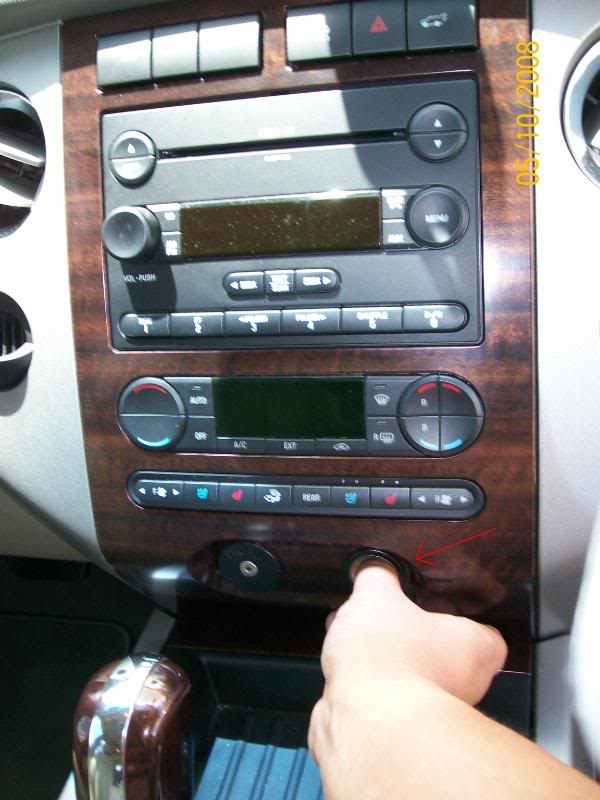
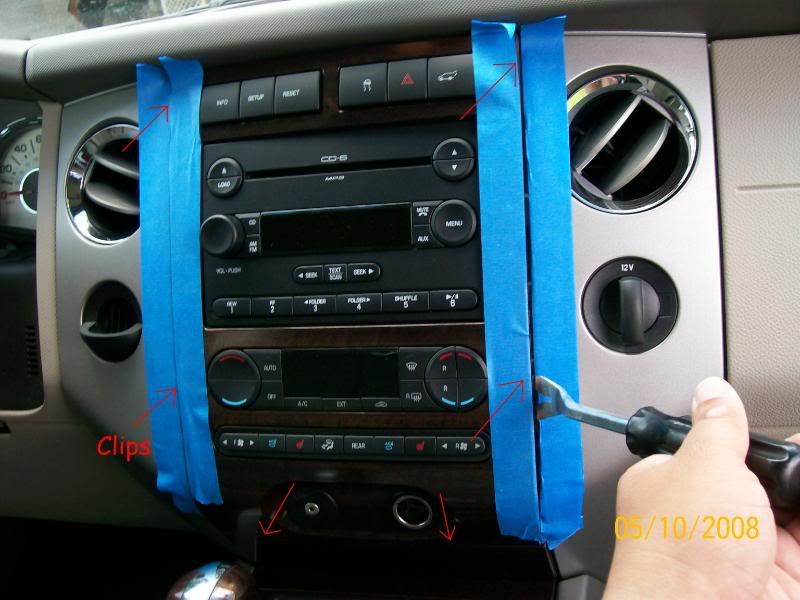
This did not work for me because it felt like it was going to break. I tried another method. I taped off the edges of the dash piece and the dash using painters tape (less residue), be sure ti put the tape down into the crevice between these two pieces as well. I then used a door panel puller and pried the piece off at the 6 clips. This worked much better for me.
 .
.
I did not take the piece completely off as I could not disconnect the wiring harness that is attached. No big deal though as you can work around it.
4)The radio is bolted in with 4 bolts. I am sorry that I did not document the size, but hopefully you can figure it out Take out those 4 bolts and it slides right out.
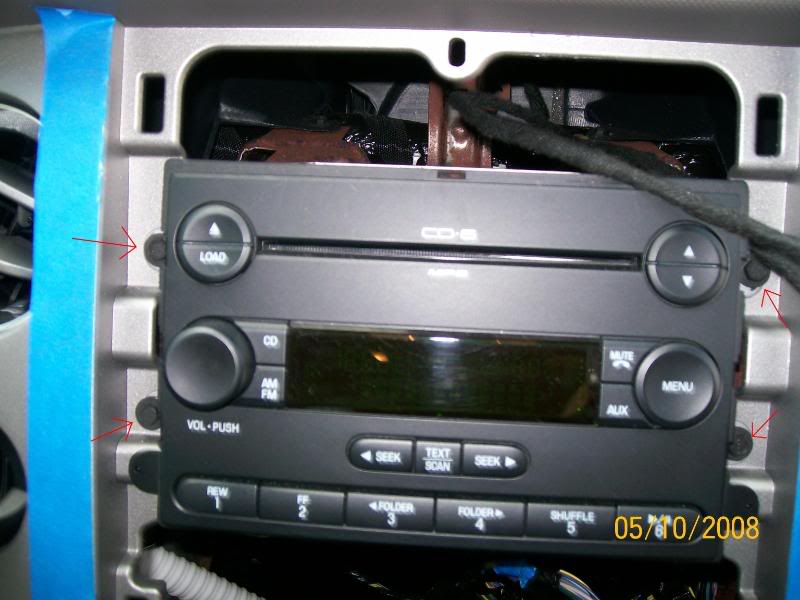
Undo the harnesses from the back and VOILA! You have a big hole in your dash.
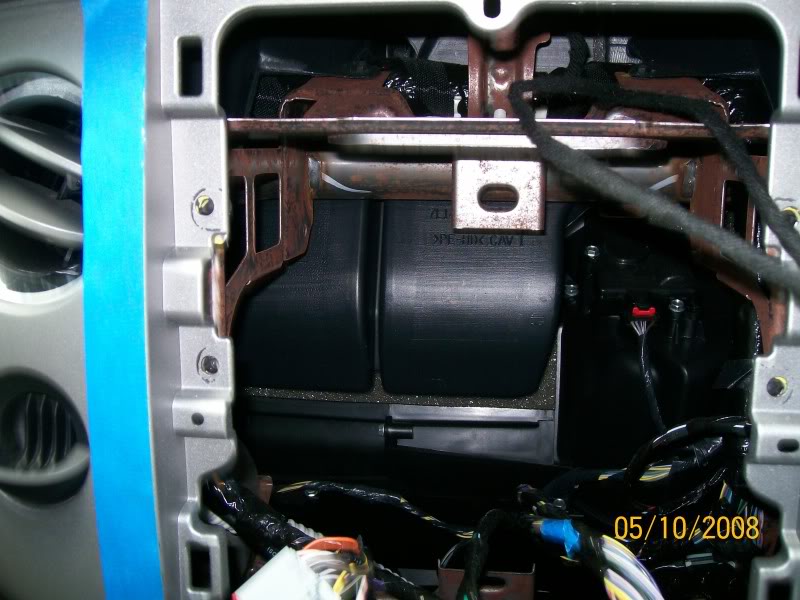
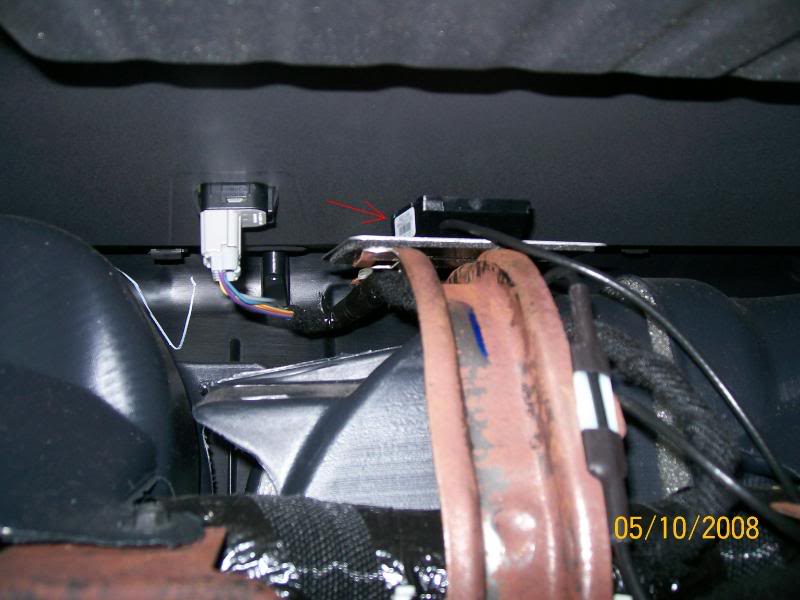
5)Next you have to mount the navigation antenna. This place where I mounted mine is a common place that the F150 guys use. It works great and I have never had a problem. My antenna is an OEM antenna and came with my nav unit. OEM and aftermarket can be found on ebay pretty cheap. They have double sided tape to put anywhere you want. I mounted mine on the big rusty looking bracket that is dead center behind the radio.
6)Time for the new nav unit to go back in. Plug in all of the harnesses that you disconnected from the radio in addition to the nav antenna that you just installed. You should hear a click and/or feel that it is a solid connection. Slide the nav unit in using the alignment tabs.
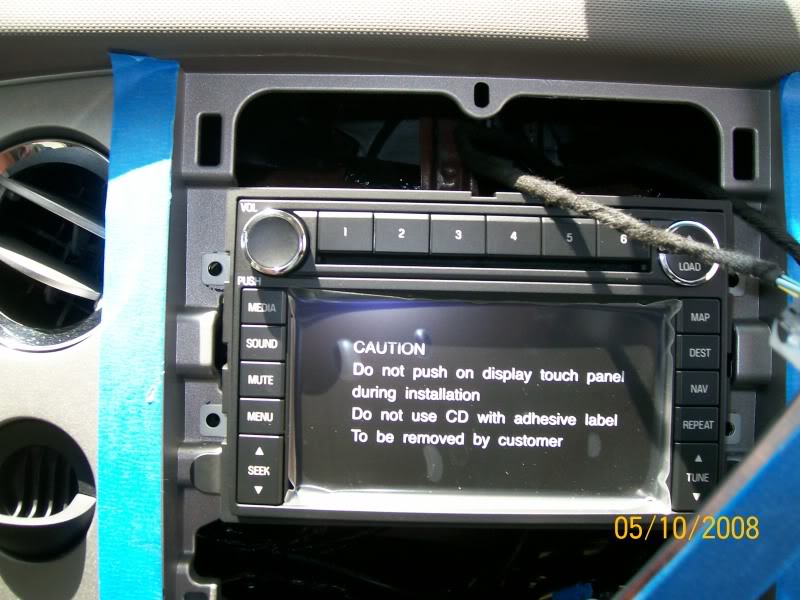
Bolt down the 4 bolts and it is in. I went ahead and tested it out at this step to make sure that it was getting power and to make sure that my new car was not going to blow up.
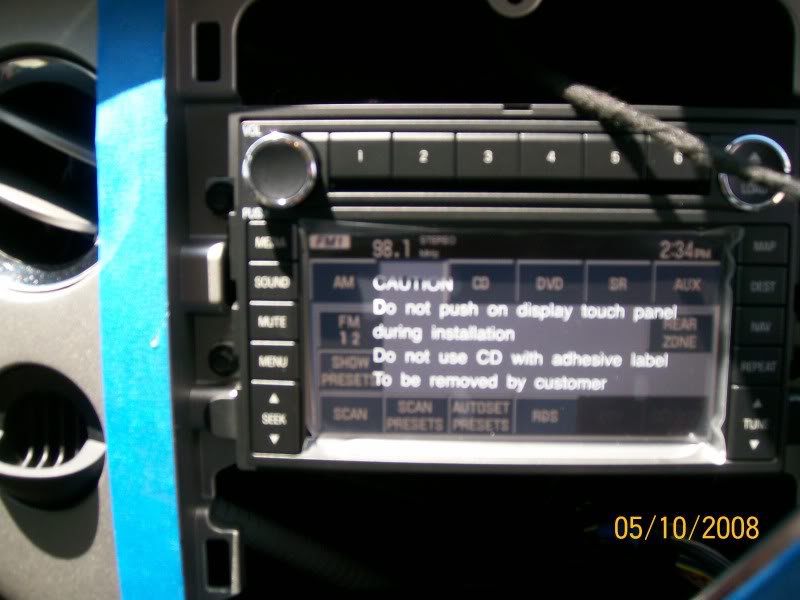
7)It is in and now all that is left is to replace the dash piece. Line it up using the alignment tabs and push it back in where the clips are. Now it is installed! Remove the tape and power up the unit. Install the Nav DVD and it will start an install process. It tells you not to mess with it until it is finished. LISTEN to it. After that, follow the instructions and you are finished.
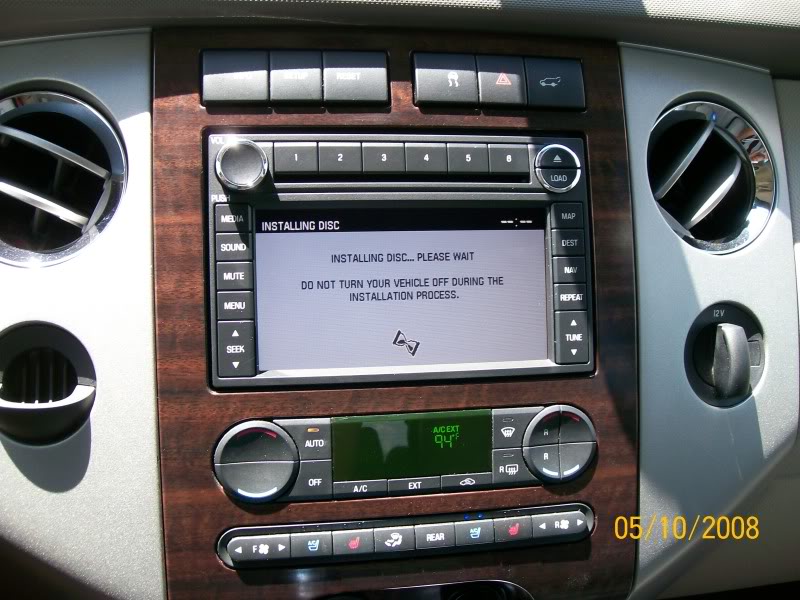
8)Program your radio stations and enjoy. This install took me about 15-20 minutes and that includes taking about 25 or so pictures. Very easy install.
************************************************** *****
If you want to use the factory nav unit without the driving restrictions, here are the instructions (from wiingnut here on FTE). Use at your own risk. I have done this and it works great.
1. Take vehicle outside and agree to nav instructions. The gps needs to know its position.
2. Push hard nav button (on right side of radio). Go to your address book. Pick any of one of your saved addresses. Now that address is highlighted, look to right and push soft edit button. You will now see name of saved address.
3. Clear name of saved address and type in F-DEVELOP ON
(make sure to put space between DEVELOP and ON).
4. Now look to the upper left corner and you will see the word ADDRESS. Place your finger directly under the A and hold. If you do this right, the screen should change to the map screen.
5. Now push your hard menu button (on left side of radio). Across top of radio push soft SECURITY button. You have now entered security screen. You will see nothing in the bottom right most corner of nav screen. Push your finger and hold in that position till the screen changes.
6. You now have entered a parameter screen. Locate DRIVING RESTRICTIONS release. When you push the button it should change to driving restrictions stop. Exit the screen by pushing the soft BACK button.
7. Congrats you have just programmed your factory nav radio. NOTE: Every time you turn your vehicle off, you will need to repeat steps 5 & 6.
Good luck and enjoy. If you choose to monkey around with your other parameters, do so at your own risk. I will not be responsible for your dealer service call. If you have any further questions, please pm me and I will do my best to help. This programming sequence should work for only the so called first generation navs. It will not work in the MY09, second generation. This has been used to reprogram many MY 07 and MY 08 Ford vehicles.
************************************************** ************
Stay tuned: My next mod will be installing a lockpick and OEM reverse camera that displays on the navigation unit.
FYI, all 06-08 non-sync Ford/Lincoln/Mercury nav units will work in any of those three makes. The one big deal to look out for is the subwoofer plug. Some of them do not have these plugs, so if you have a sub, be sure to get one with that plug as well. Usually the units have to be programmed to show your vehicle logo(ford, lincoln, etc) at startup, as well as all other things (dvd, sirius, line in, etc). You might get lucky and buy one off of ebay that is programmed for your exact specifications, but usually they have to be programmed. A lot of dealerships cant do this but it is cheaper anyways to send it off to get it done. There is a business on ebay that offers the programming for $85. You send it off and they send it back usually next day. The company name is H&H distributors. The guys there are very helpful. I was going to use them for my programming but I bought mine from a dealership on ebay that offered the programming. I actually was able to get an 06 unit so that i had the MUTE button that worked and not a dummy PHONE button, but he programmer at the dealership changed out the buttons so that I could have the chrome rings from an 08.
1)First of all, I am not responsible for any damage that you may cause your vehicle trying to follow these instructions. Don't blame me, I am just trying to help you out.
2)You are supposed to disconnect the negative battery terminal anytime that you work on your car. I did not but if you are really, really **** about safety then you can go ahead and do that.
3)You are going to have to take off the dash piece that surrounds your factory radio. I have seen posts where people put their thumbs into the cigarette lighter and just pull out.
This did not work for me because it felt like it was going to break. I tried another method. I taped off the edges of the dash piece and the dash using painters tape (less residue), be sure ti put the tape down into the crevice between these two pieces as well. I then used a door panel puller and pried the piece off at the 6 clips. This worked much better for me.
I did not take the piece completely off as I could not disconnect the wiring harness that is attached. No big deal though as you can work around it.
4)The radio is bolted in with 4 bolts. I am sorry that I did not document the size, but hopefully you can figure it out
Take out those 4 bolts and it slides right out.Undo the harnesses from the back and VOILA! You have a big hole in your dash.
5)Next you have to mount the navigation antenna. This place where I mounted mine is a common place that the F150 guys use. It works great and I have never had a problem. My antenna is an OEM antenna and came with my nav unit. OEM and aftermarket can be found on ebay pretty cheap. They have double sided tape to put anywhere you want. I mounted mine on the big rusty looking bracket that is dead center behind the radio.
6)Time for the new nav unit to go back in. Plug in all of the harnesses that you disconnected from the radio in addition to the nav antenna that you just installed. You should hear a click and/or feel that it is a solid connection. Slide the nav unit in using the alignment tabs.
Bolt down the 4 bolts and it is in. I went ahead and tested it out at this step to make sure that it was getting power and to make sure that my new car was not going to blow up.
7)It is in and now all that is left is to replace the dash piece. Line it up using the alignment tabs and push it back in where the clips are. Now it is installed! Remove the tape and power up the unit. Install the Nav DVD and it will start an install process. It tells you not to mess with it until it is finished. LISTEN to it. After that, follow the instructions and you are finished.
8)Program your radio stations and enjoy. This install took me about 15-20 minutes and that includes taking about 25 or so pictures. Very easy install.
************************************************** *****
If you want to use the factory nav unit without the driving restrictions, here are the instructions (from wiingnut here on FTE). Use at your own risk. I have done this and it works great.
1. Take vehicle outside and agree to nav instructions. The gps needs to know its position.
2. Push hard nav button (on right side of radio). Go to your address book. Pick any of one of your saved addresses. Now that address is highlighted, look to right and push soft edit button. You will now see name of saved address.
3. Clear name of saved address and type in F-DEVELOP ON
(make sure to put space between DEVELOP and ON).
4. Now look to the upper left corner and you will see the word ADDRESS. Place your finger directly under the A and hold. If you do this right, the screen should change to the map screen.
5. Now push your hard menu button (on left side of radio). Across top of radio push soft SECURITY button. You have now entered security screen. You will see nothing in the bottom right most corner of nav screen. Push your finger and hold in that position till the screen changes.
6. You now have entered a parameter screen. Locate DRIVING RESTRICTIONS release. When you push the button it should change to driving restrictions stop. Exit the screen by pushing the soft BACK button.
7. Congrats you have just programmed your factory nav radio. NOTE: Every time you turn your vehicle off, you will need to repeat steps 5 & 6.
Good luck and enjoy. If you choose to monkey around with your other parameters, do so at your own risk. I will not be responsible for your dealer service call. If you have any further questions, please pm me and I will do my best to help. This programming sequence should work for only the so called first generation navs. It will not work in the MY09, second generation. This has been used to reprogram many MY 07 and MY 08 Ford vehicles.
************************************************** ************
Stay tuned: My next mod will be installing a lockpick and OEM reverse camera that displays on the navigation unit.

MMNC (SS)(Ret)


Joined: Mar 2004
Posts: 11,602
Likes: 148
From: SE Georgia

very nice man...I didn't even consider going with the OEM Nav Unit. wish I did now. I really like my JVC AVX820...but OEM stuff always looks better to me.
couple of questions for you. I might put the OEM Nav unit into my Expy and throw the JVC into my car...hmmm
1. Does the Nav unit play DVD's for the rear entertainment system?
2. Can output a movie for the rear screens, but listen to the radio on the speakers?
3. How good is the Nav function?
Also, wonder how hard it would be to wire a Pie Adapter and get bluetooth to work with it?
couple of questions for you. I might put the OEM Nav unit into my Expy and throw the JVC into my car...hmmm
1. Does the Nav unit play DVD's for the rear entertainment system?
2. Can output a movie for the rear screens, but listen to the radio on the speakers?
3. How good is the Nav function?
Also, wonder how hard it would be to wire a Pie Adapter and get bluetooth to work with it?
Thread Starter
|
Senior User
Joined: Oct 2007
Posts: 142
Likes: 0
1. Does the Nav unit play DVD's for the rear entertainment system?
2. Can output a movie for the rear screens, but listen to the radio on the speakers?
3. How good is the Nav function?
Also, wonder how hard it would be to wire a Pie Adapter and get bluetooth to work with it?
2. It cannot output a movie directly, but just like the cd/mp3 radio, you can turn the headphones on for the RES and listen to the radio through the speakers.
3. The Nav function works great. Of course like every other one, it is never completely up to date, and you have to buy a new nav dvd every couple of years . They update the dvd about once a year but they list what regions were updated, so I do not buy a new one unless my region is included in the update.
I have no idea on the PIE adapter.
Thread Starter
|
Senior User
Joined: Oct 2007
Posts: 142
Likes: 0
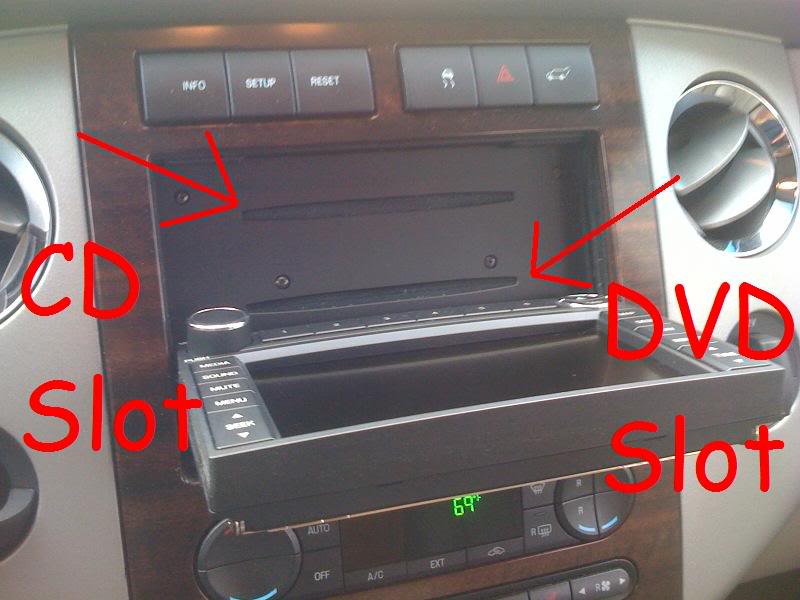
Yes the Nav DVD has to be in for the navigation to work. These are not hard drive based. But it goes in a different slot than your cd for the cd changer, so it does not take one of the 6 slots. The face of the nav unit actually folds down to insert the nav dvd. You never have to open it again unless you are inserting a new nav dvd.
Yes, you can listen to music while the navigation is being used. The music actually turns really low while the "talking lady" gives you your next direction. Then the music volume automatically goes back to where it was.
Yes, you can listen to music while the navigation is being used. The music actually turns really low while the "talking lady" gives you your next direction. Then the music volume automatically goes back to where it was.

New User
Joined: Apr 2010
Posts: 5
Likes: 0
Install
I am about to do this to my 09 Expedition, did you have an amp to install as well? if so where did you mount it? No changes to the steering wheel controls? do they work still?
Trending Topics

Freshman User
Joined: Apr 2010
Posts: 26
Likes: 0
Very nice - thanks for the post. We just purchased a 07 Expy Limited White Sand which already has the NAV. I was a littled concerend with the rusted frame throughout the underneath of the dash etc. Looking at your pics it looks to be a common issue?
We already have the NAV but I purchased a VR3 Backup camera and I am contiplating where it install the camera and monitor. Your post helps with removing the radio cover. I will start a seperated post as not to hijack yours with additional questions on the camera install.
We already have the NAV but I purchased a VR3 Backup camera and I am contiplating where it install the camera and monitor. Your post helps with removing the radio cover. I will start a seperated post as not to hijack yours with additional questions on the camera install.
FTE Stories
Ford Trucks for Ford Truck Enthusiasts

AEV FXL Super Duty - the Super Duty Raptor Ford Doesn't Make
Brett Foote
Lobo Vs Lobo: Proof the F-150 Lobo Should Be Even Lower!
Michael S. Palmer
Ford's 2001 Explorer Sportsman Concept Looks For a New Home
Verdad Gallardo
10 Best Ford Truck Engines We Miss the Most!
Joe Kucinski
2026 Shelby F-150 Off-Road: Better Than a Raptor R?
Brett Foote
2027 Super Duty Carhartt Package First Look: 12 Things You NEED to Know!
Michael S. Palmer
10 Most Surprising 2026 Ford Truck Features!
Joe Kucinski
Top 10 Ford Trucks Coming to Mecum Indy 2026
Brett Foote
5 Best / 5 Worst Ford Truck Wheels of All Time
Joe Kucinski

Senior User
Joined: Jun 2006
Posts: 406
Likes: 0
Jay, he added the Pioneer unit which has an onboard amp. The 09+ expy has the hard drive based navi made by Clarion. If you go with the new unit, you will need the unit, 4 channel amp, a jumper harness, and an antenna. If you have SYNC in you car, you will already have the steering wheel controls and mirror mic. With a few minor changes to the controls and mic, you will have one sweet system. I can't help you with purchasing the unit itself, but I can help with the jumper harness and the programming. If you are interested, PM me and I can shoot you a price.

New User
Joined: Oct 2007
Posts: 14
Likes: 0
From: Rochester, NY
awesome writeup, thanks! could you tell me what the seller's ID was on ebay so I can see if he has anything similar up for bid now? i really want to do this, I am going to be trading my '04 for an '07 and this is one of the things the new one doesn't come with. thanks!
Thread Starter
|
Senior User
Joined: Oct 2007
Posts: 142
Likes: 0
I do not have the name of the seller where I bought mine, but here is another place selling the nav unit. antenna, new 8p dvd and programming at $600 right now.
05 06 07 08 Ford Lincoln Mercury navigation gps oem: eBay Motors (item 120574185251 end time May-31-10 09:42:09 PDT)
05 06 07 08 Ford Lincoln Mercury navigation gps oem: eBay Motors (item 120574185251 end time May-31-10 09:42:09 PDT)
Senior User
Joined: Jun 2006
Posts: 406
Likes: 0
awesome writeup, thanks! could you tell me what the seller's ID was on ebay so I can see if he has anything similar up for bid now? i really want to do this, I am going to be trading my '04 for an '07 and this is one of the things the new one doesn't come with. thanks!
New User
Joined: Oct 2007
Posts: 14
Likes: 0
From: Rochester, NY
I guess I need 25 posts or more to PM so I guess I'll have to talk here... how much do you want for it? and thanks for the info everybody!
Senior User
Joined: Jun 2006
Posts: 406
Likes: 0