




Posting pictures in threads?
Moderator

Joined: Dec 2003
Posts: 97,592
Likes: 2,008
From: Saskatoon, Saskatchewan

Looks like it all may depend on what programs you have on computers.
I know I have some program on computer that prevents me from putting pictures in my posts but yet I can send these same pictures in my emails....
I know I have some program on computer that prevents me from putting pictures in my posts but yet I can send these same pictures in my emails....

Senior User
Joined: Jul 2006
Posts: 448
Likes: 1
From: La Mesa (East San Diego)
GUYS, GUYS, GUYS!!!! I JUST GOT IT TO WORK...TRY ALL THIS STUFF
1. I went back and did a re-download of JAVA and it's JSE 6 Update 5
Java Technology
2. Turned off the pop up swatter (as usual)
3. Left the Norton 360 ON
4. Went to User CP
5. Clicked Edit Gallery (it stayed and the gallerys showed up this time)
6. Rolled down to Browse and it worked
7. Selected the photo I wanted and clicked on open (as usual)
8. When completed clicked "Download"
9. Located photo to attach in gallery and clicked on [Forum code - For displaying image in forum posts] Copy the URL...BUT NOTE, do not copy the "http://" on the code with the rest of the URL - the "http://"is already in the space youare going to paste the code and if you have it twice it doesn't work.
10. Go to the thread and use "Advanced" instead of "post quick reply"
11. Where you want to insert the photo, click th elittle landscape icon in th emenu bar and the window for the photo URL opens. Paste the URL (without the http://) behind the existing http:// in the box.
12. The box closes and you will see the URL code in your response between two end caps like this "[img]"
13. Hit submit reply and it works.
Dennis and Edd together helped with this and when I was griping at Dennis, it worked for the first time. So the moral of th estory is if you want to try to fix the photo posting problem, I would re download your JAVA programs and gripe at Dennis
Here watch:
 [/IMG]
1. I went back and did a re-download of JAVA and it's JSE 6 Update 5
Java Technology
2. Turned off the pop up swatter (as usual)
3. Left the Norton 360 ON
4. Went to User CP
5. Clicked Edit Gallery (it stayed and the gallerys showed up this time)
6. Rolled down to Browse and it worked
7. Selected the photo I wanted and clicked on open (as usual)
8. When completed clicked "Download"
9. Located photo to attach in gallery and clicked on [Forum code - For displaying image in forum posts] Copy the URL...BUT NOTE, do not copy the "http://" on the code with the rest of the URL - the "http://"is already in the space youare going to paste the code and if you have it twice it doesn't work.
10. Go to the thread and use "Advanced" instead of "post quick reply"
11. Where you want to insert the photo, click th elittle landscape icon in th emenu bar and the window for the photo URL opens. Paste the URL (without the http://) behind the existing http:// in the box.
12. The box closes and you will see the URL code in your response between two end caps like this "[img]"
13. Hit submit reply and it works.
Dennis and Edd together helped with this and when I was griping at Dennis, it worked for the first time. So the moral of th estory is if you want to try to fix the photo posting problem, I would re download your JAVA programs and gripe at Dennis
Here watch:
[/IMG]
Thread Starter
|
Tuned
Joined: Nov 2007
Posts: 474
Likes: 1
From: Thirroul, Australia
Thanks to Walston I can now post a picture in a thread. Even though it's not the conventional way it is still a picture. I still wonder why some of us can't post a picture the way we use too before the changes happen.

New User
Joined: Mar 2008
Posts: 10
Likes: 0
From: Topaz Lake, Nevada
Post pix in thread
Thanks
Cargo Master


Joined: Aug 2004
Posts: 2,575
Likes: 36
From: Greenville, SC

I think you need to be a supporting member to do that. It costs ~$20 per year.
FTE Stories
Ford Trucks for Ford Truck Enthusiasts

10 Things Every Truck Owner NEEDS (2026 Edition)
Michael S. Palmer
Rezvani's Latest Post-Apocalyptic Monster Is a Ford F-150 Raptor Underneath
Verdad Gallardo
Top 10 Most Expensive Ford Trucks Ever Sold on Bring a Trailer
Joe Kucinski
2027 Ford Super Duty Buyer's Guide (Every Model, Engine, & Package)
Brett Foote
Top 10 Ford Truck Tragedies
Joe Kucinski
AEV FXL Super Duty - the Super Duty Raptor Ford Doesn't Make
Brett Foote
Lobo Vs Lobo: Proof the F-150 Lobo Should Be Even Lower!
Michael S. Palmer
Ford's 2001 Explorer Sportsman Concept Looks For a New Home
Verdad Gallardo
10 Best Ford Truck Engines We Miss the Most!
Joe Kucinski
New User
Joined: Mar 2008
Posts: 10
Likes: 0
From: Topaz Lake, Nevada
Gallery photos
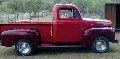
I just now followed the instructions in the drop down menu at the top of the page under "Galleries" and was given all the instruction on how to create and edit a gallery. My F600 is now posted on the gallery. Following the instruction on "Codes to post" gives instructions on to cut and paste from the applett to include photo as a thumbnail or full size. It worked for me!


 [/IMG]


New User
Joined: Mar 2008
Posts: 10
Likes: 0
From: Topaz Lake, Nevada
Is Java working?
Don
The latest version of Java must be working in order to follow all the steps. You can use the "Drag and Drop" Java window or the "Browse" option below if your browser doesn't support "Drag and Drop". After selecting the photo you want and pressing "Upload" button another Java Applet window will appear to allow you to copy and paste a URL that starts and ends with IMG. Copy and paste the whole string into your thread message. It will show as a string on your computer but when posted the picture will appear.
I'm new to the forum and wasn't clear on how to do it, but following the instructions under the "Galleries" menu worked for me. I'll be posting more pictures in the future. Based on some of the pictures I've seen here I know that my bits and pieces can result in a beautiful truck.
The latest version of Java must be working in order to follow all the steps. You can use the "Drag and Drop" Java window or the "Browse" option below if your browser doesn't support "Drag and Drop". After selecting the photo you want and pressing "Upload" button another Java Applet window will appear to allow you to copy and paste a URL that starts and ends with IMG. Copy and paste the whole string into your thread message. It will show as a string on your computer but when posted the picture will appear.
I'm new to the forum and wasn't clear on how to do it, but following the instructions under the "Galleries" menu worked for me. I'll be posting more pictures in the future. Based on some of the pictures I've seen here I know that my bits and pieces can result in a beautiful truck.