



steps to setup gallery

Thread Starter
|
Elder User
Joined: Jul 2006
Posts: 545
Likes: 0
From: Lockport, NY
steps to setup gallery
do not know if this was done yet. i did not see one, and i have seen a few post asking this very question.
so here is a 7 step how to with pictures.
first read the stickies in this forum
User Gallery & Picture Display Help
first you will need to click on your User CP

second you need to click on edit gallery

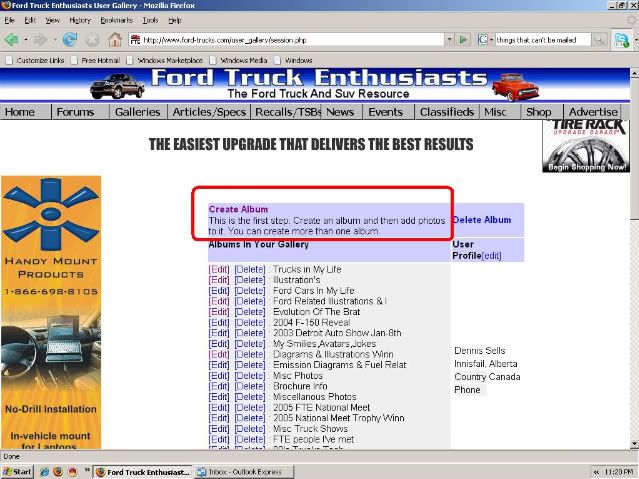
third you need to click on create album if you do not have one yet
* or click on edit album if you have one setup with out pictures.
* during process you may be ask to allow java scripting
* click yes/ continue ( depends on operation system)

fourth you need to fill in information

fourth continued
now scroll down the page
here you see 5 boxes labeled choose .
* click on one for each photo you want to upload.
*if more than file repeat for additional photos.

Fifth you you can click "click here to view album" see previous picture
or go to one of your post click on your user name

sixth if using your user name you will click "view gallery"

seventh there you go you create your gallery

so here is a 7 step how to with pictures.
first read the stickies in this forum
User Gallery & Picture Display Help
first you will need to click on your User CP

second you need to click on edit gallery

third you need to click on create album if you do not have one yet
* or click on edit album if you have one setup with out pictures.
* during process you may be ask to allow java scripting
* click yes/ continue ( depends on operation system)

fourth you need to fill in information

fourth continued
now scroll down the page
here you see 5 boxes labeled choose .
* click on one for each photo you want to upload.
*if more than file repeat for additional photos.

Fifth you you can click "click here to view album" see previous picture
or go to one of your post click on your user name

sixth if using your user name you will click "view gallery"

seventh there you go you create your gallery

Thread Starter
|
Elder User
Joined: Jul 2006
Posts: 545
Likes: 0
From: Lockport, NY
just to add
just thought i would add this also
for the clickable image links go to this thread
Photobucket 101
thanks gluff
for the clickable image links go to this thread
Photobucket 101
thanks gluff

Postmaster
Joined: Mar 2004
Posts: 4,375
Likes: 5
From: seattle
Im trying to create my gallery...posted info on the truck and all, clicked create gallery and it was done. There was nowhere lower to scroll anything down as the pictorial above illustrates. Im at a total loss as to what to do...
Please advise...
- cs65
Please advise...
- cs65

New User
Joined: Jan 2008
Posts: 0
Likes: 24
Trending Topics

Senior User
Joined: Mar 2004
Posts: 234
Likes: 0
FTE Stories
Ford Trucks for Ford Truck Enthusiasts

3 Best / 3 Worst Parts of Modern Ford Ownership
Brett Foote
10 Amazing Upgrades That Solve Common Ford Truck Owner Headaches
Pouria Savadkouei
Every 2026 Ford Engine Explained
Brett Foote
10 Ugly Ford Trucks That We Still Kinda Love
Joe Kucinski
10 Things Every Truck Owner NEEDS (2026 Edition)
Michael S. Palmer
Rezvani's Latest Post-Apocalyptic Monster Is a Ford F-150 Raptor Underneath
Verdad Gallardo
Top 10 Most Expensive Ford Trucks Ever Sold on Bring a Trailer
Joe Kucinski
2027 Ford Super Duty Buyer's Guide (Every Model, Engine, & Package)
Brett Foote
Top 10 Ford Truck Tragedies
Joe Kucinski
Thread Starter
|
Elder User
Joined: Jul 2006
Posts: 545
Likes: 0
From: Lockport, NY
after you click on your gallery you want to set up scroll to bottom and you will see this

from there browse for your images, or paste link to post pictures
EDIT: image is click able for more clarity

from there browse for your images, or paste link to post pictures
EDIT: image is click able for more clarity
Thread Starter
|
Elder User
Joined: Jul 2006
Posts: 545
Likes: 0
From: Lockport, NY
Sorry for the mishap
my photobucket got hacked, here is an updated how to
steps to setup gallery
do not know if this was done yet. i did not see one, and i have seen a few post asking this very question.
so here is a 7 step how to with pictures.
first read the stickies in this forum
User Gallery & Picture Display Help
first you will need to click on your User CP
<center>

</center>
second you need to click on edit gallery
<center>

</center>
third you need to click on create album if you do not have one yet
* or click on edit album if you have one setup with out pictures.
* during process you may be ask to allow java scripting
* click yes/ continue ( depends on operation system)
</br.><center>

</center>
fourth you need to fill in information
<center>

</center>
fourth continued
now scroll down the page
here you see 5 boxes labeled choose .
* click on one for each photo you want to upload.
*if more than file repeat for additional photos.
<center>

</center>
Fifth you you can click "click here to view album" see previous picture
or go to one of your post click on your user name
<center>

</center>
sixth if using your user name you will click "view gallery"
<center>

</center>
seventh there you go you create your gallery
<center>

</center>
steps to setup gallery
do not know if this was done yet. i did not see one, and i have seen a few post asking this very question.
so here is a 7 step how to with pictures.
first read the stickies in this forum
User Gallery & Picture Display Help
first you will need to click on your User CP
<center>

</center>
second you need to click on edit gallery
<center>

</center>
third you need to click on create album if you do not have one yet
* or click on edit album if you have one setup with out pictures.
* during process you may be ask to allow java scripting
* click yes/ continue ( depends on operation system)
</br.><center>

</center>
fourth you need to fill in information
<center>

</center>
fourth continued
now scroll down the page
here you see 5 boxes labeled choose .
* click on one for each photo you want to upload.
*if more than file repeat for additional photos.
<center>
</center>
Fifth you you can click "click here to view album" see previous picture
or go to one of your post click on your user name
<center>

</center>
sixth if using your user name you will click "view gallery"
<center>

</center>
seventh there you go you create your gallery
<center>

</center>

Thread
Thread Starter
Forum
Replies
Last Post
blprenge
User Gallery & Picture Display
8
Dec 9, 2003 02:49 PM