


How to "install" avitar ??


Thread Starter
|
Posting Guru
Joined: Oct 2003
Posts: 1,552
Likes: 0
From: Adams,CO.
How to "install" avitar ??
I thought the avitar was part of the gallery, but I can now see that a gallery is not even needed to have the avitar show up on a post. I have an avi pic in my gallery but never could figer it out. Would somebody smarter than me please enlighten me.
DumDum (jon)
DumDum (jon)

Hotshot


Joined: Jan 2001
Posts: 16,875
Likes: 3,118
From: SE Wisc. (the Rust Belt)
Jon,
Click the "User CP" in the blue bar above.
This window will open:
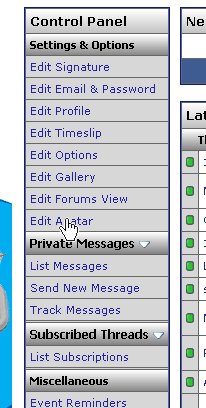
Click on "Edit Avatar"
A window with this table will open:
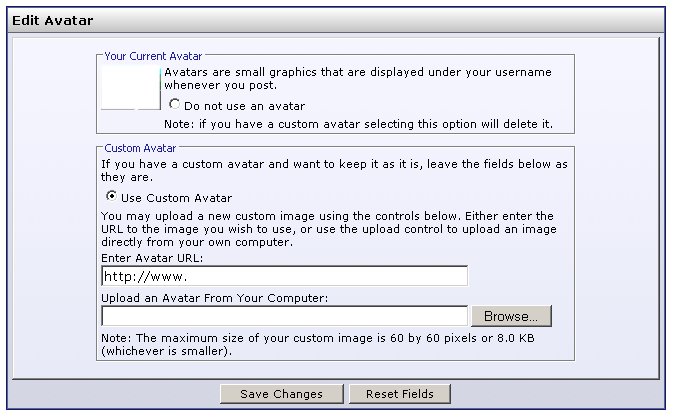
You can either use an existing image on the net by filling in the proper URL in the window under "Enter Avatar URL:" or upload an image from your computer using clicking on the "Browse" button, this will open a window with your computer files. Search your files for the image you want to use and click "Open" which will return you to the previous window. Click "Save Changes" and you're set.
The image you want to use has to be a small image, as stated at the bottom of the second screen, "Note: The maximum size of your custom image is 60 by 60 pixels or 8.0 KB (whichever is smaller)."
Click the "User CP" in the blue bar above.
This window will open:
Click on "Edit Avatar"
A window with this table will open:
You can either use an existing image on the net by filling in the proper URL in the window under "Enter Avatar URL:" or upload an image from your computer using clicking on the "Browse" button, this will open a window with your computer files. Search your files for the image you want to use and click "Open" which will return you to the previous window. Click "Save Changes" and you're set.
The image you want to use has to be a small image, as stated at the bottom of the second screen, "Note: The maximum size of your custom image is 60 by 60 pixels or 8.0 KB (whichever is smaller)."
Thread Starter
|
Posting Guru
Joined: Oct 2003
Posts: 1,552
Likes: 0
From: Adams,CO.
Thank you very much Bob. I think I can do it now that I am wide awake. I just need to find something lower file size. Most of my pics are 380 KB. Never did notice the "edit avatar" field there. I be blind and dumb at times. Oh well.......
Thanks again, Jon.
Thanks again, Jon.

Logistics Pro

Joined: Feb 2005
Posts: 3,952
Likes: 117
From: Upper Left Coast
Jon,
There's no problem with your pictures. Just resize them.
Go HERE for a great photo editing application. Completely free. They don't even bug you to register and if you do they don't bug you after that either!
This page just about sums it up! http://www.gimp.org/about/introduction.html
I'm going to go out on a limb and assume that you are using MS Windows........
If that's true go to http://www.gimp.org/windows/
Cheers,
Rick
There's no problem with your pictures. Just resize them.
Go HERE for a great photo editing application. Completely free. They don't even bug you to register and if you do they don't bug you after that either!
This page just about sums it up! http://www.gimp.org/about/introduction.html
I'm going to go out on a limb and assume that you are using MS Windows........
If that's true go to http://www.gimp.org/windows/
Cheers,
Rick
Originally Posted by CIAF
Thank you very much Bob. I think I can do it now that I am wide awake. I just need to find something lower file size. Most of my pics are 380 KB. Never did notice the "edit avatar" field there. I be blind and dumb at times. Oh well.......
Thanks again, Jon.
Thanks again, Jon.
Last edited by HT32BSX115; Nov 24, 2007 at 10:22 PM.






