


paint design software

Thread Starter
|
Freshman User
Joined: Oct 2002
Posts: 28
Likes: 0
From: lancaster usa
 paint design software
Dose any one know where I can get some software that i can use on the computer, put a picture of my truck on it and then paint it diffrent colors to see what I like, I know that ITS OUT THEIR BUT i HAVE NOT BEEN ABLE TO FIND IT YET Hope some one can help

Senior User
Joined: Apr 2003
Posts: 330
Likes: 0
I do believe that the house of kolor program does not allow you to use a picture of your vehicle. I think that they have a few street rods on it and those are what you are able to put the paint on to see what it would look like.

Junior User
Joined: Mar 2003
Posts: 85
Likes: 0
my wife is pretty good with adobe photodeluxe.that is until we got a new computer and lost the install disk. she could take a digital photo,change the paint,wheels,stance,add graphics,tint the windows.just a thought........i think the photodeluxe was about$80 a few years back,may be cheaper now,but it is by far the best photo editing software that we've found.

Posting Guru
Joined: Nov 2001
Posts: 2,156
Likes: 5
From: Akron Ohio
https://www.ford-trucks.com/user_gal...8&albumid=8266
I did those using adobe photoshop I paid the $700 for the program if you have a fairly simple request let me know. -4speed
I did those using adobe photoshop I paid the $700 for the program
if you have a fairly simple request let me know. -4speed

Senior User
Joined: Oct 2001
Posts: 276
Likes: 0
From: Spokane USA
Paint scheme software
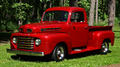
Costco has a good deal on a product called Adobe Photoshop Elements. I recall it to be around $60. It is basically a streamlined version of Photoshop, and has been my workhorse software for doing just what you want to do in importing a digital photo and changing the colors. It takes a while to get used to all that you can do with it. I usually do a cutting process to divide the various surfaces apart, and then start using different colors on the parts, which are then reassembled to show the outcome.
Bob in Spokane.
Bob in Spokane.
Elder User
Joined: Dec 2003
Posts: 586
Likes: 0
From: East Palestine, Ohio

How long did it take you to do this. my oldest son is big into digital photography and photoshop. I would like to 2 tone mine but not sure what color combo to do. I thought about red and silver.
Trending Topics
Posting Guru
Joined: Nov 2001
Posts: 2,156
Likes: 5
From: Akron Ohio
it took me like 10mins. A couple of sugestions. First, the picture will only come out as nice as the original. The bigger the pic the better. There is a photoshop tutorial online with the name photoshop junkie(google it) he does specfic car stuff so it easy. -4speed
FTE Stories
Ford Trucks for Ford Truck Enthusiasts

3 Best / 3 Worst Parts of Modern Ford Ownership
Brett Foote
10 Amazing Upgrades That Solve Common Ford Truck Owner Headaches
Pouria Savadkouei
Every 2026 Ford Engine Explained
Brett Foote
10 Ugly Ford Trucks That We Still Kinda Love
Joe Kucinski
10 Things Every Truck Owner NEEDS (2026 Edition)
Michael S. Palmer
Rezvani's Latest Post-Apocalyptic Monster Is a Ford F-150 Raptor Underneath
Verdad Gallardo
Top 10 Most Expensive Ford Trucks Ever Sold on Bring a Trailer
Joe Kucinski
2027 Ford Super Duty Buyer's Guide (Every Model, Engine, & Package)
Brett Foote
Top 10 Ford Truck Tragedies
Joe Kucinski
Senior User
Joined: Feb 2004
Posts: 346
Likes: 0
From: Raleigh, NC
A word or three on file types.
The best type to use would be one that does not compress the file (like .tiff, or .tif). The reason being, that if the image is saved repeatedly it will still have all the original information in each pixel. TIFF files can be large depending upon the resolution of the image.
If you use JPEG, remember that it is a compressed format (adjustable). Every time you save the image, information in some of the pixels is lost forever. Repeated savings of the image can, and will, change your image beyond repair, I see it all the time.
What I typically do is to first save my images as TIFF's. If I make changes to the image, I then save it with a new filename (maybe add a # to the end of the filename), or maybe change it to a JPEG depending upon what I want to do with it. I will always have the original unmolested TIFF to fall back on and use again later for something else.
Many imaging programs like to use their own unique file types which is just fine if you want to use that program all the time. The problem is that the image might not be compatible with other imaging programs and therefore can not be opened. I suggest you stick with the more common filetypes whenever possible for that reason (TIFF, JPEG, GIF, etc.).
Fox
The best type to use would be one that does not compress the file (like .tiff, or .tif). The reason being, that if the image is saved repeatedly it will still have all the original information in each pixel. TIFF files can be large depending upon the resolution of the image.
If you use JPEG, remember that it is a compressed format (adjustable). Every time you save the image, information in some of the pixels is lost forever. Repeated savings of the image can, and will, change your image beyond repair, I see it all the time.
What I typically do is to first save my images as TIFF's. If I make changes to the image, I then save it with a new filename (maybe add a # to the end of the filename), or maybe change it to a JPEG depending upon what I want to do with it. I will always have the original unmolested TIFF to fall back on and use again later for something else.
Many imaging programs like to use their own unique file types which is just fine if you want to use that program all the time. The problem is that the image might not be compatible with other imaging programs and therefore can not be opened. I suggest you stick with the more common filetypes whenever possible for that reason (TIFF, JPEG, GIF, etc.).
Fox

Junior User
Joined: Feb 2005
Posts: 70
Likes: 0
Pedalman...
Google a shareware program called CBN Selector 2.1. It does EXACTLY what you're looking for! I'm still learning how to use it, but so far it seems like a pretty cool program. The only problem is I can't figure out if there's a way to do anything other than solid colors (i.e. metal flake, frosted, powder coat, etc.). Anyway, check it out, it's worth a look!---77chief
Google a shareware program called CBN Selector 2.1. It does EXACTLY what you're looking for! I'm still learning how to use it, but so far it seems like a pretty cool program. The only problem is I can't figure out if there's a way to do anything other than solid colors (i.e. metal flake, frosted, powder coat, etc.). Anyway, check it out, it's worth a look!---77chief

Thread
Thread Starter
Forum
Replies
Last Post
LARIAT 85
1980 - 1986 Bullnose F100, F150 & Larger F-Series Trucks
51
Dec 15, 2016 10:14 AM
Mr Powerstroke
1967 - 1972 F-100 & Larger F-Series Trucks
4
Jan 6, 2016 06:26 AM
Gertie-The '49 F2
1948 - 1956 F1, F100 & Larger F-Series Trucks
8
Nov 7, 2015 01:19 PM
