


Fog Light Mod

Senior User
Joined: May 2005
Posts: 245
Likes: 0
From: Rochester, NY
I guess you could do it all either under the hood or under the dash... no need to go through the firewall.
Find the wire that goes to the fogs, put a relay on it that is powered whenever the key is in the on position... done. You may also want to put a toggle switch on it in case you ever want them off for some reason.
Find the wire that goes to the fogs, put a relay on it that is powered whenever the key is in the on position... done. You may also want to put a toggle switch on it in case you ever want them off for some reason.

Junior User
Joined: Dec 2004
Posts: 98
Likes: 0
Problem
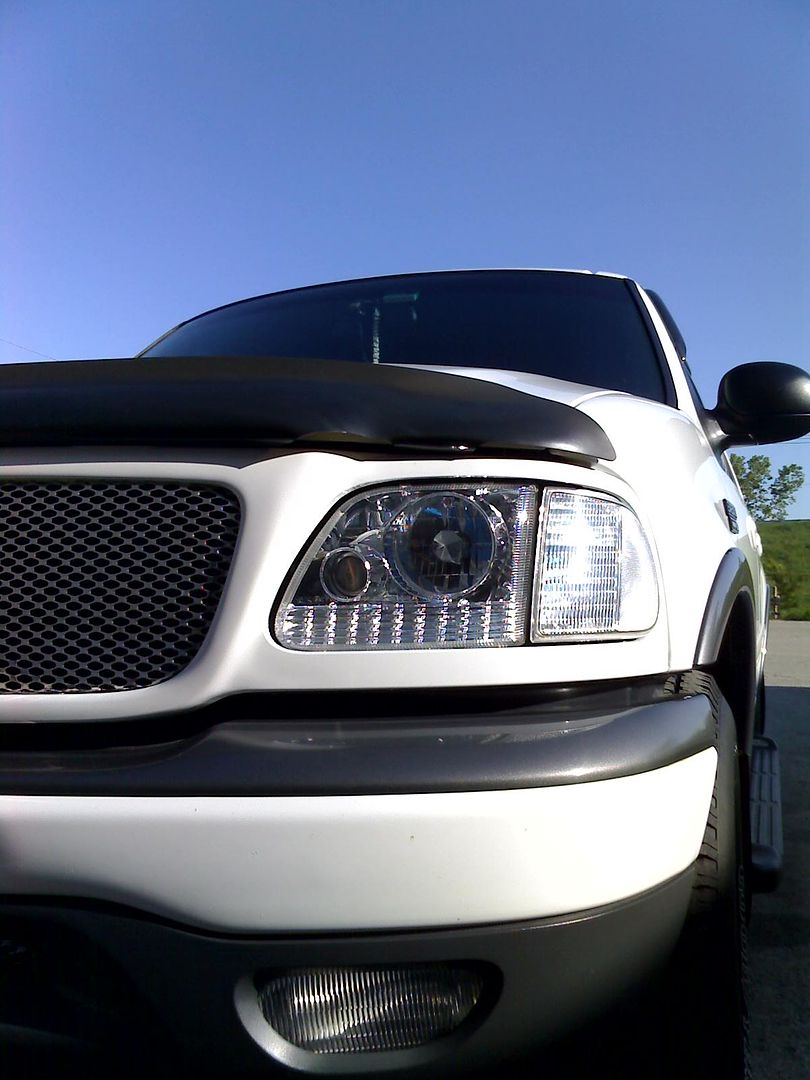
Ok I have 2000 Ford Expedition ... It has APC PROJECTOR HEADLIGHTS which I connected to PARKING LIGHTS so everytime I put Parking Light ON Projectors turn ON also.
I just did the MOD with FOG LIGHTS (Connected wire #5 with wire #12 ) so FOG LIGHTS turn on when i turn on PARKING LIGHTS. Now my problem is that my PROJECTORS won't COME ON? what might be the PROBLEM please let me know?!
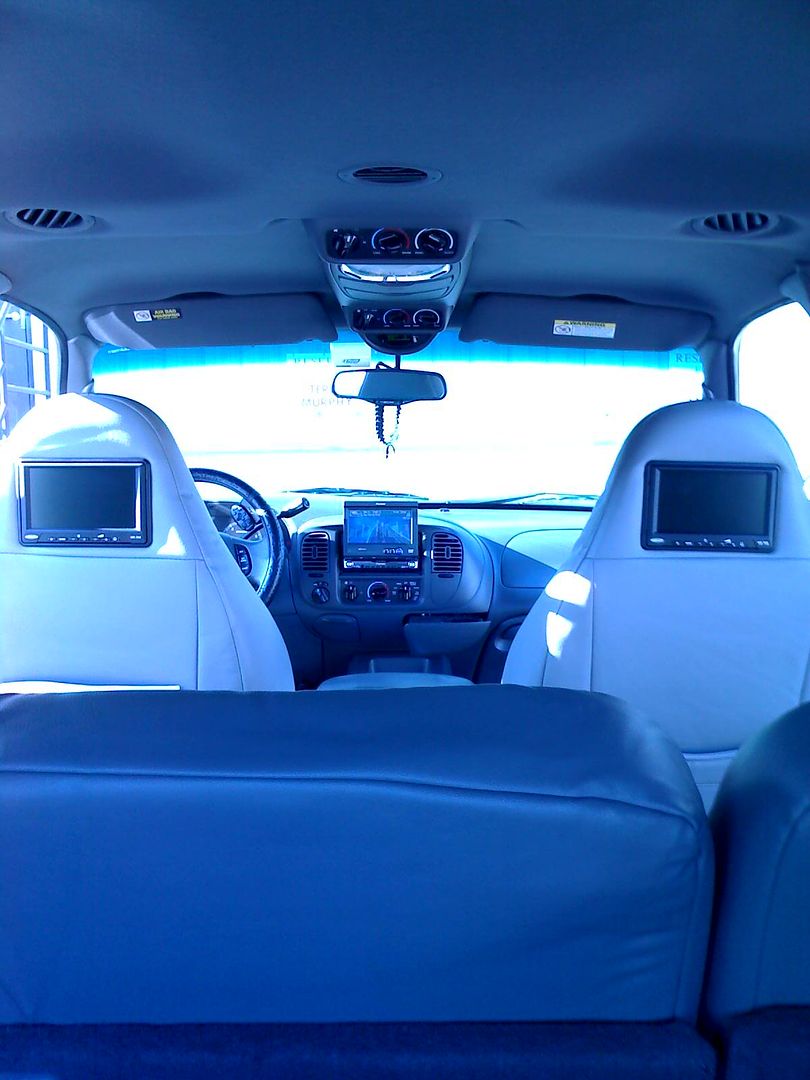
Pic of my EXP INSIDE:
I just did the MOD with FOG LIGHTS (Connected wire #5 with wire #12 ) so FOG LIGHTS turn on when i turn on PARKING LIGHTS. Now my problem is that my PROJECTORS won't COME ON? what might be the PROBLEM please let me know?!
Pic of my EXP INSIDE:
Last edited by scarface78; Dec 11, 2006 at 10:32 AM.

Freshman User
Joined: Mar 2003
Posts: 42
Likes: 0
From: Seattle
Hi-beam/fug cut off?
This is good stuff to know, thanks for the input. While doing this mod, does any one know how to alter the fact when Hi-Beams are on, the fogs turn off? I imagine it is just a matter of by-passing a relay switch.
Thanks,
Thanks,
Junior User
Joined: Dec 2004
Posts: 98
Likes: 0
Ok I have 2000 Ford Expedition ... It has APC PROJECTOR HEADLIGHTS which I connected to PARKING LIGHTS so everytime I put Parking Light ON Projectors turn ON also.
I just did the MOD with FOG LIGHTS (Connected wire #5 with wire #12 ) so FOG LIGHTS turn on when i turn on PARKING LIGHTS. Now my problem is that my PROJECTORS won't COME ON? what might be the PROBLEM please let me know?!
ANYONE !!!!
I just did the MOD with FOG LIGHTS (Connected wire #5 with wire #12 ) so FOG LIGHTS turn on when i turn on PARKING LIGHTS. Now my problem is that my PROJECTORS won't COME ON? what might be the PROBLEM please let me know?!
ANYONE !!!!

New User
Joined: Mar 2004
Posts: 11
Likes: 0
From: Dayton, OH
Help with fog light mod.
Ok, I just tried this mod, but my connectors have 11 wires and no white/black wire. Not sure which wires to splice. I think I need the brown wire with something else. Not real good at reading electrical diagrams. I have the light switch with fog lights feature, not autolamps switch therefore I have no white/black wire. Please help. Attached are pictures of my wire connections.
Thanks
Thanks
Junior User
Joined: Dec 2004
Posts: 98
Likes: 0
FTE Stories
Ford Trucks for Ford Truck Enthusiasts

10 Things Every Truck Owner NEEDS (2026 Edition)
Michael S. Palmer
Rezvani's Latest Post-Apocalyptic Monster Is a Ford F-150 Raptor Underneath
Verdad Gallardo
Top 10 Most Expensive Ford Trucks Ever Sold on Bring a Trailer
Joe Kucinski
2027 Ford Super Duty Buyer's Guide (Every Model, Engine, & Package)
Brett Foote
Top 10 Ford Truck Tragedies
Joe Kucinski
AEV FXL Super Duty - the Super Duty Raptor Ford Doesn't Make
Brett Foote
Lobo Vs Lobo: Proof the F-150 Lobo Should Be Even Lower!
Michael S. Palmer
Ford's 2001 Explorer Sportsman Concept Looks For a New Home
Verdad Gallardo
10 Best Ford Truck Engines We Miss the Most!
Joe Kucinski
New User
Joined: Mar 2004
Posts: 11
Likes: 0
From: Dayton, OH
Good news, I figured it out using this post on F-150:
Modifying The Headlight Switch On A '97 Ford F-150 To Allow Fog light Operation W/O Headlights
--------------------------------------------------------------------------------
This page details the steps I took to modify the headlight switch on a '97 Ford F-150 to allow operation of the fog lights with the headlight switch in the PARKING LIGHT position. This truck does not have auto-lights. The procedure involves two separate tasks; one mechanical and one electrical.
--------------------------------------------------------------------------------
Mechanical
Step One: Remove the headlight switch from the dash following the procedure outlined below.
First, rotate the headlight switch to the headlight AND fog light ON position as shown... (note: for clarity, the headlight switch has already been removed from the vehicle... just follow along, it will all make sense in the end)
--------------------------------------------------------------------------------
Next, pry the **** off with a small screwdriver inserted in the notch under the switch plate below the heel of the handle as shown...
--------------------------------------------------------------------------------
Then, rotate the **** 180 degrees from it's previous position and re-install it...
--------------------------------------------------------------------------------
Now, push in on and rotate the **** counter-clockwise two clicks until the heel of the **** points to the off position and the **** is fully seated, like so...
--------------------------------------------------------------------------------
Finally, turn the **** clockwise as far as it will go and hold it there while gently pulling outward on the switch (this retracts the locking tab on the back of the switch and allows the switch to be removed from the panel)
--------------------------------------------------------------------------------
Here's what's happening behind the dash... this picture shows the locking tab protruding from the left side of the switch before the last clockwise turn of the ****...
--------------------------------------------------------------------------------
... and here you see how the locking tab retracts and allows removal of the switch when you turn the **** fully clockwise...
--------------------------------------------------------------------------------
Once the switch has been removed from the dash, unplug the wires and bring it inside to the workbench for disassembly. Begin by opening the case of the switch by prying the housing up and over the retainer tabs... there are six of them, three on each side... so I used toothpicks to hold the case open on one side while I released the tabs on the other side... Be careful, there is a spring-loaded pin inside. Don't worry, I'll show you how to put it back in later, just be sure you don't lose it! (NOTE: after the two halves are separated slightly and it seems you can go no farther, squeezing the tab on the end of the **** shaft eases removal)
--------------------------------------------------------------------------------
Here is the switch separated... (the spring-loaded pin is the white thing at the lower left hand corner of the circuit board, pointing to approximately seven o'clock)
--------------------------------------------------------------------------------
Here is the inside view of the clear plastic "cup" as seen from the backside of the faceplate... within this cup you will notice the "ramp" upon which the spring-loaded pin rides. Notice also the rounded "W" shape contours of the inside walls of this cup... each peak is a detent, or stop, that is felt as the headlight switch is turned. The first detent, (on the right in this picture), is the OFF position... the middle detent (where the toothpick points) is the PARK position... and the left-most detent is the ON position. Notice how the "ramp" begins it's decline at the PARK position and bottoms out at the ON position, this ramp is what mechanically prevents the **** from being pulled out to the fog light position until the switch is turned to the headlight ON position. I used the flexible shaft attachment on my Dremel tool, with a small carbide bit, to grind down the contour of this ramp...
--------------------------------------------------------------------------------
Here is a view of the modified ramp... notice how now the ramp begins it's descent from the first, or OFF position detent (on the right), and bottoms out by the time it reaches the middle, or PARK position detent... this will mechanically allow the **** to be pulled out for fog light operation in the PARK position... a small shelf was left for the pin to rest on in the OFF position so that the switch will automatically ride up the ramp and cause the fog lights to turn off when the headlight switch is turned to the OFF position. Notice also the small (3/8") hole that was drilled in the casing just above the OFF position detent (not present in the previous photo), this hole facilitates re-assembly of the switch housing...
--------------------------------------------------------------------------------
Now it's time to re-assemble the switch and the switch housing... the toothpick points to the spring-loaded pin...
--------------------------------------------------------------------------------
Make sure the spring-loaded pin is inserted into the arm on the **** shaft and that the **** shaft is oriented to the OFF position. Slide the switch into the switch housing, when the spring-loaded pin appears in the 3/8" access hole drilled in the previous step, push the pin in with a sharp, pointed tool to depress it beyond the rim of the cup. Once the pin is depressed beyond the rim of the cup the switch can be fully re-inserted into the housing and all locking tabs should engage... Test your switch for proper operation... does the **** pull out smoothly and easily in the PARK position, are the switch detents still firm? You may need to disassemble the switch and re-work the ramp grinding several times to get everything just right. (I did)
--------------------------------------------------------------------------------
This completes the mechanical modification... now, on to the electrical mod...
--------------------------------------------------------------------------------
Step 2: Back in the vehicle now... locate the dark brown wire indicated in the photo below on the left side of the switch...
--------------------------------------------------------------------------------
... and the white w/black stripe wire located on the far right hand side of the switch...
--------------------------------------------------------------------------------
... and splice them together with quick connectors, like so...
--------------------------------------------------------------------------------
Reinstall the switch into the dash by just gently pushing it in... no need to retract the locking tab, it will click right in place!
--------------------------------------------------------------------------------
Result of all this??? You will now be able to turn the foglights on with the headlight switch in the PARKING LAMP position AND your fog lights will also remain on when the high beams are activated!
Here is a link to the post with nice pictures.:
http://www.geocities.com/tedoca/headlight.html
I used a dremel to file my "ramp". My switch had been improperly removed previosly and was already seperated so I was able to easily get into the inside and dremel out the ramp with ease. I was able to get everything to work following this same post with pictures. Really is nice to have the fogs and parking lights and fogs and highs.
Thanks everyone for the help.
Modifying The Headlight Switch On A '97 Ford F-150 To Allow Fog light Operation W/O Headlights
--------------------------------------------------------------------------------
This page details the steps I took to modify the headlight switch on a '97 Ford F-150 to allow operation of the fog lights with the headlight switch in the PARKING LIGHT position. This truck does not have auto-lights. The procedure involves two separate tasks; one mechanical and one electrical.
--------------------------------------------------------------------------------
Mechanical
Step One: Remove the headlight switch from the dash following the procedure outlined below.
First, rotate the headlight switch to the headlight AND fog light ON position as shown... (note: for clarity, the headlight switch has already been removed from the vehicle... just follow along, it will all make sense in the end)
--------------------------------------------------------------------------------
Next, pry the **** off with a small screwdriver inserted in the notch under the switch plate below the heel of the handle as shown...
--------------------------------------------------------------------------------
Then, rotate the **** 180 degrees from it's previous position and re-install it...
--------------------------------------------------------------------------------
Now, push in on and rotate the **** counter-clockwise two clicks until the heel of the **** points to the off position and the **** is fully seated, like so...
--------------------------------------------------------------------------------
Finally, turn the **** clockwise as far as it will go and hold it there while gently pulling outward on the switch (this retracts the locking tab on the back of the switch and allows the switch to be removed from the panel)
--------------------------------------------------------------------------------
Here's what's happening behind the dash... this picture shows the locking tab protruding from the left side of the switch before the last clockwise turn of the ****...
--------------------------------------------------------------------------------
... and here you see how the locking tab retracts and allows removal of the switch when you turn the **** fully clockwise...
--------------------------------------------------------------------------------
Once the switch has been removed from the dash, unplug the wires and bring it inside to the workbench for disassembly. Begin by opening the case of the switch by prying the housing up and over the retainer tabs... there are six of them, three on each side... so I used toothpicks to hold the case open on one side while I released the tabs on the other side... Be careful, there is a spring-loaded pin inside. Don't worry, I'll show you how to put it back in later, just be sure you don't lose it! (NOTE: after the two halves are separated slightly and it seems you can go no farther, squeezing the tab on the end of the **** shaft eases removal)
--------------------------------------------------------------------------------
Here is the switch separated... (the spring-loaded pin is the white thing at the lower left hand corner of the circuit board, pointing to approximately seven o'clock)
--------------------------------------------------------------------------------
Here is the inside view of the clear plastic "cup" as seen from the backside of the faceplate... within this cup you will notice the "ramp" upon which the spring-loaded pin rides. Notice also the rounded "W" shape contours of the inside walls of this cup... each peak is a detent, or stop, that is felt as the headlight switch is turned. The first detent, (on the right in this picture), is the OFF position... the middle detent (where the toothpick points) is the PARK position... and the left-most detent is the ON position. Notice how the "ramp" begins it's decline at the PARK position and bottoms out at the ON position, this ramp is what mechanically prevents the **** from being pulled out to the fog light position until the switch is turned to the headlight ON position. I used the flexible shaft attachment on my Dremel tool, with a small carbide bit, to grind down the contour of this ramp...
--------------------------------------------------------------------------------
Here is a view of the modified ramp... notice how now the ramp begins it's descent from the first, or OFF position detent (on the right), and bottoms out by the time it reaches the middle, or PARK position detent... this will mechanically allow the **** to be pulled out for fog light operation in the PARK position... a small shelf was left for the pin to rest on in the OFF position so that the switch will automatically ride up the ramp and cause the fog lights to turn off when the headlight switch is turned to the OFF position. Notice also the small (3/8") hole that was drilled in the casing just above the OFF position detent (not present in the previous photo), this hole facilitates re-assembly of the switch housing...
--------------------------------------------------------------------------------
Now it's time to re-assemble the switch and the switch housing... the toothpick points to the spring-loaded pin...
--------------------------------------------------------------------------------
Make sure the spring-loaded pin is inserted into the arm on the **** shaft and that the **** shaft is oriented to the OFF position. Slide the switch into the switch housing, when the spring-loaded pin appears in the 3/8" access hole drilled in the previous step, push the pin in with a sharp, pointed tool to depress it beyond the rim of the cup. Once the pin is depressed beyond the rim of the cup the switch can be fully re-inserted into the housing and all locking tabs should engage... Test your switch for proper operation... does the **** pull out smoothly and easily in the PARK position, are the switch detents still firm? You may need to disassemble the switch and re-work the ramp grinding several times to get everything just right. (I did)
--------------------------------------------------------------------------------
This completes the mechanical modification... now, on to the electrical mod...
--------------------------------------------------------------------------------
Step 2: Back in the vehicle now... locate the dark brown wire indicated in the photo below on the left side of the switch...
--------------------------------------------------------------------------------
... and the white w/black stripe wire located on the far right hand side of the switch...
--------------------------------------------------------------------------------
... and splice them together with quick connectors, like so...
--------------------------------------------------------------------------------
Reinstall the switch into the dash by just gently pushing it in... no need to retract the locking tab, it will click right in place!
--------------------------------------------------------------------------------
Result of all this??? You will now be able to turn the foglights on with the headlight switch in the PARKING LAMP position AND your fog lights will also remain on when the high beams are activated!
Here is a link to the post with nice pictures.:
http://www.geocities.com/tedoca/headlight.html
I used a dremel to file my "ramp". My switch had been improperly removed previosly and was already seperated so I was able to easily get into the inside and dremel out the ramp with ease. I was able to get everything to work following this same post with pictures. Really is nice to have the fogs and parking lights and fogs and highs.
Thanks everyone for the help.



Senior User
Joined: Jun 2005
Posts: 148
Likes: 0
From: Shelter Island, NY

Ok I have 2000 Ford Expedition ... It has APC PROJECTOR HEADLIGHTS which I connected to PARKING LIGHTS so everytime I put Parking Light ON Projectors turn ON also.
I just did the MOD with FOG LIGHTS (Connected wire #5 with wire #12 ) so FOG LIGHTS turn on when i turn on PARKING LIGHTS. Now my problem is that my PROJECTORS won't COME ON? what might be the PROBLEM please let me know?!
Pic of my EXP INSIDE:
I just did the MOD with FOG LIGHTS (Connected wire #5 with wire #12 ) so FOG LIGHTS turn on when i turn on PARKING LIGHTS. Now my problem is that my PROJECTORS won't COME ON? what might be the PROBLEM please let me know?!
Pic of my EXP INSIDE:


New User
Joined: Sep 2010
Posts: 5
Likes: 0
pics
I know this is an old post but I just found it.. The link is no longer good. Do you have the pics that went with this?
Thanks
Thanks
Good news, I figured it out using this post on F-150:
Modifying The Headlight Switch On A '97 Ford F-150 To Allow Fog light Operation W/O Headlights
--------------------------------------------------------------------------------
This page details the steps I took to modify the headlight switch on a '97 Ford F-150 to allow operation of the fog lights with the headlight switch in the PARKING LIGHT position. This truck does not have auto-lights. The procedure involves two separate tasks; one mechanical and one electrical.
--------------------------------------------------------------------------------
Mechanical
Step One: Remove the headlight switch from the dash following the procedure outlined below.
First, rotate the headlight switch to the headlight AND fog light ON position as shown... (note: for clarity, the headlight switch has already been removed from the vehicle... just follow along, it will all make sense in the end)
--------------------------------------------------------------------------------
Next, pry the **** off with a small screwdriver inserted in the notch under the switch plate below the heel of the handle as shown...
--------------------------------------------------------------------------------
Then, rotate the **** 180 degrees from it's previous position and re-install it...
--------------------------------------------------------------------------------
Now, push in on and rotate the **** counter-clockwise two clicks until the heel of the **** points to the off position and the **** is fully seated, like so...
--------------------------------------------------------------------------------
Finally, turn the **** clockwise as far as it will go and hold it there while gently pulling outward on the switch (this retracts the locking tab on the back of the switch and allows the switch to be removed from the panel)
--------------------------------------------------------------------------------
Here's what's happening behind the dash... this picture shows the locking tab protruding from the left side of the switch before the last clockwise turn of the ****...
--------------------------------------------------------------------------------
... and here you see how the locking tab retracts and allows removal of the switch when you turn the **** fully clockwise...
--------------------------------------------------------------------------------
Once the switch has been removed from the dash, unplug the wires and bring it inside to the workbench for disassembly. Begin by opening the case of the switch by prying the housing up and over the retainer tabs... there are six of them, three on each side... so I used toothpicks to hold the case open on one side while I released the tabs on the other side... Be careful, there is a spring-loaded pin inside. Don't worry, I'll show you how to put it back in later, just be sure you don't lose it! (NOTE: after the two halves are separated slightly and it seems you can go no farther, squeezing the tab on the end of the **** shaft eases removal)
--------------------------------------------------------------------------------
Here is the switch separated... (the spring-loaded pin is the white thing at the lower left hand corner of the circuit board, pointing to approximately seven o'clock)
--------------------------------------------------------------------------------
Here is the inside view of the clear plastic "cup" as seen from the backside of the faceplate... within this cup you will notice the "ramp" upon which the spring-loaded pin rides. Notice also the rounded "W" shape contours of the inside walls of this cup... each peak is a detent, or stop, that is felt as the headlight switch is turned. The first detent, (on the right in this picture), is the OFF position... the middle detent (where the toothpick points) is the PARK position... and the left-most detent is the ON position. Notice how the "ramp" begins it's decline at the PARK position and bottoms out at the ON position, this ramp is what mechanically prevents the **** from being pulled out to the fog light position until the switch is turned to the headlight ON position. I used the flexible shaft attachment on my Dremel tool, with a small carbide bit, to grind down the contour of this ramp...
--------------------------------------------------------------------------------
Here is a view of the modified ramp... notice how now the ramp begins it's descent from the first, or OFF position detent (on the right), and bottoms out by the time it reaches the middle, or PARK position detent... this will mechanically allow the **** to be pulled out for fog light operation in the PARK position... a small shelf was left for the pin to rest on in the OFF position so that the switch will automatically ride up the ramp and cause the fog lights to turn off when the headlight switch is turned to the OFF position. Notice also the small (3/8") hole that was drilled in the casing just above the OFF position detent (not present in the previous photo), this hole facilitates re-assembly of the switch housing...
--------------------------------------------------------------------------------
Now it's time to re-assemble the switch and the switch housing... the toothpick points to the spring-loaded pin...
--------------------------------------------------------------------------------
Make sure the spring-loaded pin is inserted into the arm on the **** shaft and that the **** shaft is oriented to the OFF position. Slide the switch into the switch housing, when the spring-loaded pin appears in the 3/8" access hole drilled in the previous step, push the pin in with a sharp, pointed tool to depress it beyond the rim of the cup. Once the pin is depressed beyond the rim of the cup the switch can be fully re-inserted into the housing and all locking tabs should engage... Test your switch for proper operation... does the **** pull out smoothly and easily in the PARK position, are the switch detents still firm? You may need to disassemble the switch and re-work the ramp grinding several times to get everything just right. (I did)
--------------------------------------------------------------------------------
This completes the mechanical modification... now, on to the electrical mod...
--------------------------------------------------------------------------------
Step 2: Back in the vehicle now... locate the dark brown wire indicated in the photo below on the left side of the switch...
--------------------------------------------------------------------------------
... and the white w/black stripe wire located on the far right hand side of the switch...
--------------------------------------------------------------------------------
... and splice them together with quick connectors, like so...
--------------------------------------------------------------------------------
Reinstall the switch into the dash by just gently pushing it in... no need to retract the locking tab, it will click right in place!
--------------------------------------------------------------------------------
Result of all this??? You will now be able to turn the foglights on with the headlight switch in the PARKING LAMP position AND your fog lights will also remain on when the high beams are activated!
Here is a link to the post with nice pictures.:
http://www.geocities.com/tedoca/headlight.html
I used a dremel to file my "ramp". My switch had been improperly removed previosly and was already seperated so I was able to easily get into the inside and dremel out the ramp with ease. I was able to get everything to work following this same post with pictures. Really is nice to have the fogs and parking lights and fogs and highs.
Thanks everyone for the help.
Modifying The Headlight Switch On A '97 Ford F-150 To Allow Fog light Operation W/O Headlights
--------------------------------------------------------------------------------
This page details the steps I took to modify the headlight switch on a '97 Ford F-150 to allow operation of the fog lights with the headlight switch in the PARKING LIGHT position. This truck does not have auto-lights. The procedure involves two separate tasks; one mechanical and one electrical.
--------------------------------------------------------------------------------
Mechanical
Step One: Remove the headlight switch from the dash following the procedure outlined below.
First, rotate the headlight switch to the headlight AND fog light ON position as shown... (note: for clarity, the headlight switch has already been removed from the vehicle... just follow along, it will all make sense in the end)
--------------------------------------------------------------------------------
Next, pry the **** off with a small screwdriver inserted in the notch under the switch plate below the heel of the handle as shown...
--------------------------------------------------------------------------------
Then, rotate the **** 180 degrees from it's previous position and re-install it...
--------------------------------------------------------------------------------
Now, push in on and rotate the **** counter-clockwise two clicks until the heel of the **** points to the off position and the **** is fully seated, like so...
--------------------------------------------------------------------------------
Finally, turn the **** clockwise as far as it will go and hold it there while gently pulling outward on the switch (this retracts the locking tab on the back of the switch and allows the switch to be removed from the panel)
--------------------------------------------------------------------------------
Here's what's happening behind the dash... this picture shows the locking tab protruding from the left side of the switch before the last clockwise turn of the ****...
--------------------------------------------------------------------------------
... and here you see how the locking tab retracts and allows removal of the switch when you turn the **** fully clockwise...
--------------------------------------------------------------------------------
Once the switch has been removed from the dash, unplug the wires and bring it inside to the workbench for disassembly. Begin by opening the case of the switch by prying the housing up and over the retainer tabs... there are six of them, three on each side... so I used toothpicks to hold the case open on one side while I released the tabs on the other side... Be careful, there is a spring-loaded pin inside. Don't worry, I'll show you how to put it back in later, just be sure you don't lose it! (NOTE: after the two halves are separated slightly and it seems you can go no farther, squeezing the tab on the end of the **** shaft eases removal)
--------------------------------------------------------------------------------
Here is the switch separated... (the spring-loaded pin is the white thing at the lower left hand corner of the circuit board, pointing to approximately seven o'clock)
--------------------------------------------------------------------------------
Here is the inside view of the clear plastic "cup" as seen from the backside of the faceplate... within this cup you will notice the "ramp" upon which the spring-loaded pin rides. Notice also the rounded "W" shape contours of the inside walls of this cup... each peak is a detent, or stop, that is felt as the headlight switch is turned. The first detent, (on the right in this picture), is the OFF position... the middle detent (where the toothpick points) is the PARK position... and the left-most detent is the ON position. Notice how the "ramp" begins it's decline at the PARK position and bottoms out at the ON position, this ramp is what mechanically prevents the **** from being pulled out to the fog light position until the switch is turned to the headlight ON position. I used the flexible shaft attachment on my Dremel tool, with a small carbide bit, to grind down the contour of this ramp...
--------------------------------------------------------------------------------
Here is a view of the modified ramp... notice how now the ramp begins it's descent from the first, or OFF position detent (on the right), and bottoms out by the time it reaches the middle, or PARK position detent... this will mechanically allow the **** to be pulled out for fog light operation in the PARK position... a small shelf was left for the pin to rest on in the OFF position so that the switch will automatically ride up the ramp and cause the fog lights to turn off when the headlight switch is turned to the OFF position. Notice also the small (3/8") hole that was drilled in the casing just above the OFF position detent (not present in the previous photo), this hole facilitates re-assembly of the switch housing...
--------------------------------------------------------------------------------
Now it's time to re-assemble the switch and the switch housing... the toothpick points to the spring-loaded pin...
--------------------------------------------------------------------------------
Make sure the spring-loaded pin is inserted into the arm on the **** shaft and that the **** shaft is oriented to the OFF position. Slide the switch into the switch housing, when the spring-loaded pin appears in the 3/8" access hole drilled in the previous step, push the pin in with a sharp, pointed tool to depress it beyond the rim of the cup. Once the pin is depressed beyond the rim of the cup the switch can be fully re-inserted into the housing and all locking tabs should engage... Test your switch for proper operation... does the **** pull out smoothly and easily in the PARK position, are the switch detents still firm? You may need to disassemble the switch and re-work the ramp grinding several times to get everything just right. (I did)
--------------------------------------------------------------------------------
This completes the mechanical modification... now, on to the electrical mod...
--------------------------------------------------------------------------------
Step 2: Back in the vehicle now... locate the dark brown wire indicated in the photo below on the left side of the switch...
--------------------------------------------------------------------------------
... and the white w/black stripe wire located on the far right hand side of the switch...
--------------------------------------------------------------------------------
... and splice them together with quick connectors, like so...
--------------------------------------------------------------------------------
Reinstall the switch into the dash by just gently pushing it in... no need to retract the locking tab, it will click right in place!
--------------------------------------------------------------------------------
Result of all this??? You will now be able to turn the foglights on with the headlight switch in the PARKING LAMP position AND your fog lights will also remain on when the high beams are activated!
Here is a link to the post with nice pictures.:
http://www.geocities.com/tedoca/headlight.html
I used a dremel to file my "ramp". My switch had been improperly removed previosly and was already seperated so I was able to easily get into the inside and dremel out the ramp with ease. I was able to get everything to work following this same post with pictures. Really is nice to have the fogs and parking lights and fogs and highs.
Thanks everyone for the help.