When you click on links to various merchants on this site and make a purchase, this can result in this site earning a commission. Affiliate programs and affiliations include, but are not limited to, the eBay Partner Network.
i have two lenovo laptop computers.
one is 9 years old with bad charging port, and broken wires to DVD/CD drive.
also has a cracked case. hard drive is dated 2-14
other computer is 2 years old with a new, clean hard drive dated 6-21.
i took the hard drive out of the older computer, and put it into the new one, and put the new clean drive in the old computer.
new computer still shows clean drive, and the old computer with the new clean empty hard drive is what i am on with ALL the info in it and working.
how is this possible?
Got to be cashed info stuck in RAM would be my guess.
I am surprised the 2 drive swapped as the technolige between them would be different.
That leads me to the BIO you may need to go into that at boot up and swap, if you can, the HDD support.
It has been 10 or more years since I did this type of work but think on boot up the black screen will say something like CTRL & F10 or is it F8> at the same time to get into BIO
Then you scroll thru the screens till at hard drive screen.
Looking at both lap tops you should be able to see what the old drive type was and switch the new to it if it will support it.
And that is the big question will the new lap top support the old hard drive type?
FYI I am still working on a old Toshiba Satellite L655 running windows7
It keeps crashing if I have the battery installed so I run it plugged in all the time.
I think a BIO update may fix it but the laptop is so old I dont even know if I could find a update for it?
I hate change and why I keep using it.
both are toshiba 1 gig drives with the same running speed.
but like i said, the clean new drive has ALL my info on it, and the old drive is clean. which makes no sense at all.
Sounds to me like you got your drives mixed up and put the old one back in. Or there's more than one drive in the pc. Drives don't all look the same especially in a laptop. Most have a typical looking drive like this.
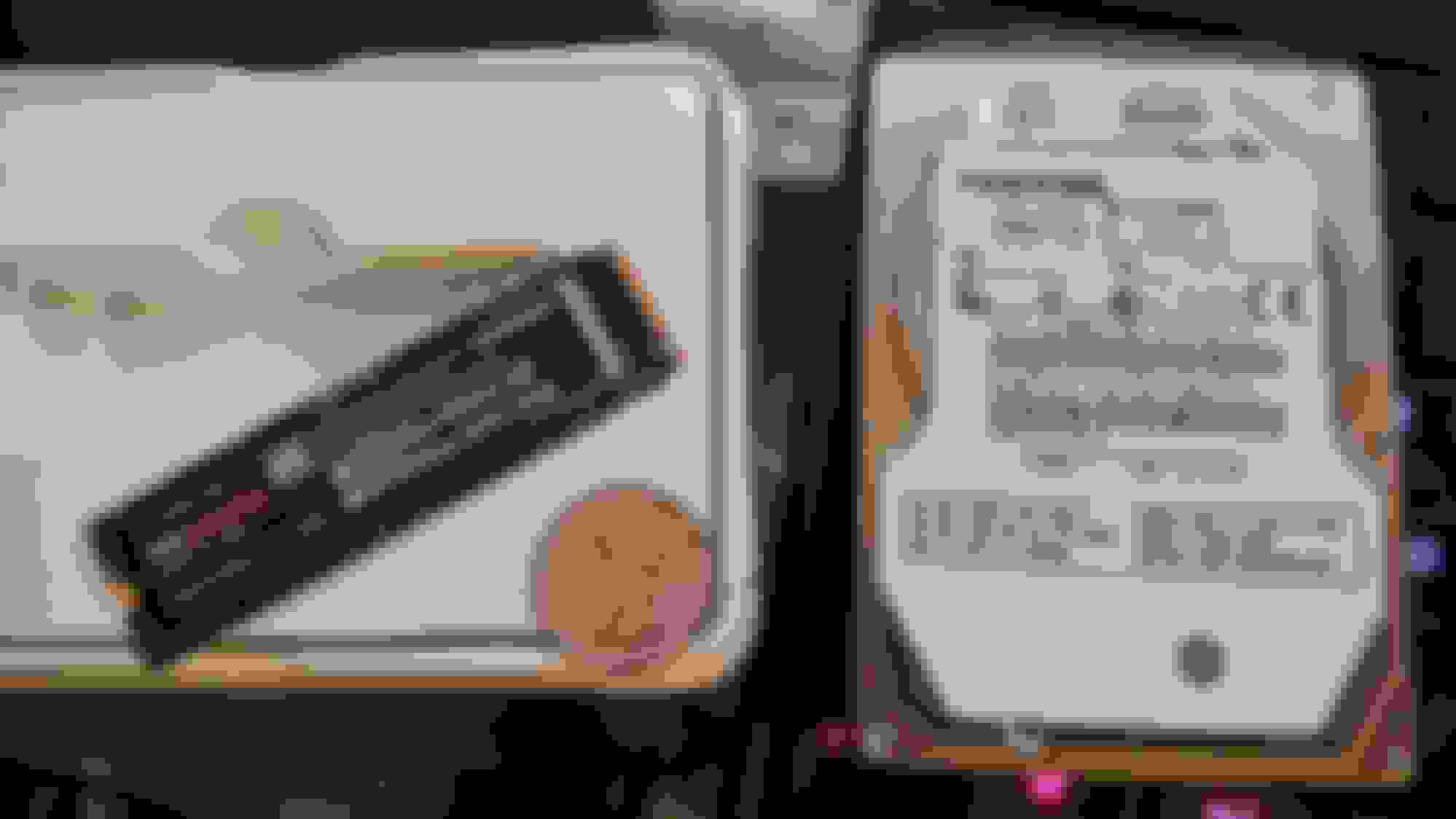
But it could also have what's known as an M.2 drive that looks something like this, and is much smaller in size and usually attached directly to the motherboard.
Either one or both could contain all of your system files. Some business systems run multiple drives for redundancy set up in a Raid Array. Your pc properties will only show one drive as each drive is mirrored while in use thus the redundancy, depends on the raid configuration used.
An example from my collection of parts, here you see an old Toshiba HDD taken from one of my laptops, 2.5" typical laptop size, to the left of it a 2TB Samsung M.2 SSD that lays directly onto the motherboard instead of having a side socket as the other may have. That particular M.2 SSD is one version, smaller version pictured above, there are many more variations still. One would look right at it and not know it was actually a disk drive, one might think it was just another memory chip or something.
Those are the only options I can think of that may have happened. Your old data didn't magically jump onto the new drive so it's either on another drive still in the old pc or you simply mixed up the drives and put the old one back in.
If you could take an internal pic of your old laptop main board, both sides, it would help to determine if the extra drive theory is plausible. Some of those corporate built units M.2 drives are soldered in and not removable but easily identified. Or... you could just take the new blank drive back out and see if it still boots up into the operating system. That will prove there is another drive in the old laptop.
the 2015 computer currently has a HD in it with a 2021 date on it. the 2021 machine has a HD in it with 2014 date.
the old machine works. the new one does not.
there is only one HD in each machine. both mother boards are identical.
the only difference between the two is the old one has a cracked housing and bad charging port, the new one is new.
the other strange thing is the working one will not recognize an external hard drive.
Suggest you take them to someone that knows what they're doing to get it sorted out. If you'd like to, I'll sort it out for just the cost to ship it all back.
i opened the laptops back up before and swapped the hard drives back into their respective computers.
the old machine still works, and the new machine now has win 10 in it and a few programs.
while i had the old one apart i plastiwelded the case back together, and cobbled the charge port to semi work until my nephew get home in February.
he is the family computer wiz, as he is studying computers and IT in college.
he is currently in Okinawa to spend thanksgiving, christmas, and new years day mother, step father, and younger brothers. than off to Tailand for his cousins wedding and an asia tour with my brother and sister, and two cousins.
the one thing i missed about the hard drives is operating speed. the newer one is 7200 RPM the old one is only 5400 rpm.
i think that may have been the conflict why the old drive would not work in the new machine.
the one thing i missed about the hard drives is operating speed. the newer one is 7200 RPM the old one is only 5400 rpm.
i think that may have been the conflict why the old drive would not work in the new machine.
I haven't used a HDD in at least 10 years. I've converted them all over to SSD. The speed increase just doing that alone is insane. Have the family wiz kid upgrade your laptop with an SSD and you'll be blown away how much faster it'll be.
These hdd's came out of the last 3 laptops I had/have, the 1st thing I do with all of them if I don't get a good deal on one that already has an SSD is clone the hdd over to one and pop it in. Don't know why I keep these, got an electronics junk drawer full of cables, hdd's an older SSD, misc connectors, cables, power supplies, memory sticks, cpu's, gpu's etc........ Just can't bring my self to throw anything away that still works no matter how old it is. Hell I even still have the 13 original floppy disks to upgrade Windows 3.11 to Windows 95.
Yes those floppies still work. I bought a usb external A: drive and loaded it up in vmware one day just to reminisce.
Tom, the Drive just works on the Mother Board. Check out the numbers and see. Anyway your probably gonna need a new 12 Puter soon.
If you have reset the puter it will need updates which will most likely come to it if you set the settings to accept them. Microsoft has
been sending out B.S. updates lately and screwing with us. Just reset and move on.
Rezvani's Latest Post-Apocalyptic Monster Is a Ford F-150 Raptor Underneath
Slideshow: Called the Fortress, the 850-horsepower pickup combines Raptor underpinnings with military-inspired features, survival equipment, and a starting price of $285,000.








 and why I keep using it.