



Posting Pictures

Thread Starter
|
Laughing Gas

Joined: Jul 2007
Posts: 1,100
Likes: 2
Posting Pictures
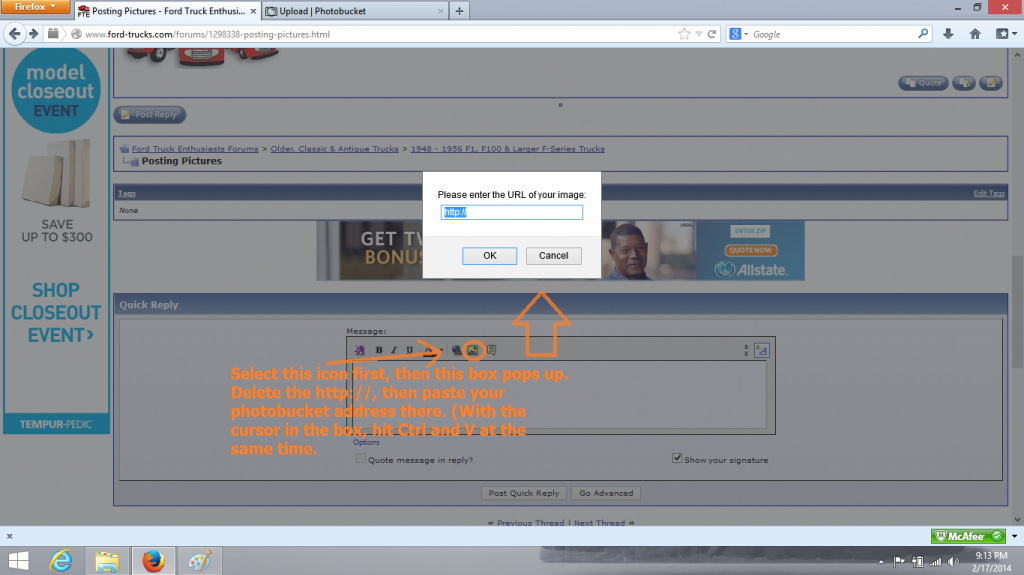
Has this forum made any changes in the last six months to make "posting pictures" easier? I have tried several timess but without the help of fellow members, I always ended up giving up. I have some parts I would like to post pictures of in hopes of identifying what they are. I already tried photo bucket but cant get them from threre to here. In some other sites, I just start the post, click on my computer documents to select a picture, and bang, its posted. Thanks?

Hotshot


Joined: Jan 2001
Posts: 16,894
Likes: 3,135
From: SE Wisc. (the Rust Belt)
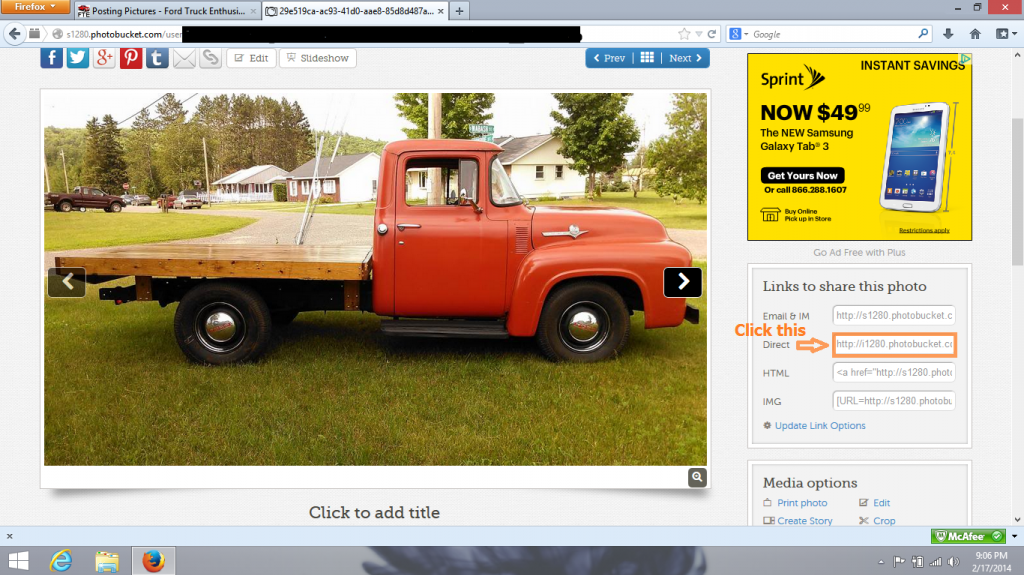
For $20 you can become a supporter, by doing so you can upload pictures directly from your computer. I became a supporter after years of resisting because I never had a problem posting pictures from my own web site but it's a lot easier just to be able to upload them from my computer directly. Also, I save space on my server, I use FTE's space for that now.
Thread Starter
|
Laughing Gas
Joined: Jul 2007
Posts: 1,100
Likes: 2
Cat906, Its been awhile since I did it, but I think the process you explain is different than I remember. I will try this. Thats an awesome truck you posted. Yours? I have two 56 F-100s I have been working on for years. I just came across a 56 F-350 that I put a dual axel under and adaptors on the front for duals. Its going to be a flatbed something like yours. Did you insure yours as a flatbed or a stake side? When I applied for insurance, the stake bed was much cheaper than a flatbed. Only difference being "stake pockets". Made a very significant difference in the premium. I will try posting the way you explained. Have to sign up for photo bucket again. Thanks
Postmaster
Joined: Aug 2003
Posts: 3,222
Likes: 6
From: Houston
If you can't do Photobucket then pay the $20, not only do you lose all the ads, you are able to use the paper clip at the top of the "Go Advanced" posting where you can upload pics from your computer. Just make sure the photo isn't too big. Works very easy.
Thread Starter
|
Laughing Gas
Joined: Jul 2007
Posts: 1,100
Likes: 2
Trending Topics
Thread Starter
|
Laughing Gas
Joined: Jul 2007
Posts: 1,100
Likes: 2
FTE Stories
Ford Trucks for Ford Truck Enthusiasts

Top 10 Fords at 2026 Carlisle Ford Nationals
Joe Kucinski
3 Best / 3 Worst Parts of Modern Ford Ownership
Brett Foote
10 Amazing Upgrades That Solve Common Ford Truck Owner Headaches
Pouria Savadkouei
Every 2026 Ford Engine Explained
Brett Foote
10 Ugly Ford Trucks That We Still Kinda Love
Joe Kucinski
10 Things Every Truck Owner NEEDS (2026 Edition)
Michael S. Palmer
Rezvani's Latest Post-Apocalyptic Monster Is a Ford F-150 Raptor Underneath
Verdad Gallardo
Top 10 Most Expensive Ford Trucks Ever Sold on Bring a Trailer
Joe Kucinski
2027 Ford Super Duty Buyer's Guide (Every Model, Engine, & Package)
Brett Foote
Senior User
Joined: Mar 2013
Posts: 131
Likes: 0
From: Upper Peninsula
I can't seem to open your link, but I think that's an error on my computer as I have trouble with everyone else's, too. Are you running a Mac? I have no use for apple operating systems, so if you are, I can't help you. Sorry. Otherwise I'm not sure why that wouldn't work for you.
Anyway, yes, that's my truck. She's a '56 F250. I have it registered as an historic vehicle, so the insurance and registration was dirt cheap. Where I live, there's so much salt on the roads during winter and then residual salt in the spring that she'll only be on the road from June to maybe October. So she spends most of her time in hibernation in the garage
Anyway, yes, that's my truck. She's a '56 F250. I have it registered as an historic vehicle, so the insurance and registration was dirt cheap. Where I live, there's so much salt on the roads during winter and then residual salt in the spring that she'll only be on the road from June to maybe October. So she spends most of her time in hibernation in the garage

Thread
Thread Starter
Forum
Replies
Last Post
HILLBILLY BOB
1948 - 1956 F1, F100 & Larger F-Series Trucks
1
Jan 25, 2015 11:14 AM
jason85351
1980 - 1986 Bullnose F100, F150 & Larger F-Series Trucks
2
Jun 23, 2008 10:10 PM