


What went wrong with my post?


Thread Starter
|
Senior User
Joined: Feb 2009
Posts: 316
Likes: 0
From: Ridgefield, Washington
What went wrong with my post?
Hello.
I wrote an introduction of my truck, attached some pictures from my album and clicked on submit. Have no idea where it all went (if anywhere) but my work and pictures didn't post any place that I am able to find.
I haven't posted in a long time and have never posted pictures so I really am not too surprised I wasn't successful.
I wrote an introduction of my truck, attached some pictures from my album and clicked on submit. Have no idea where it all went (if anywhere) but my work and pictures didn't post any place that I am able to find.
I haven't posted in a long time and have never posted pictures so I really am not too surprised I wasn't successful.
Post Fiend
Joined: Sep 2006
Posts: 14,325
Likes: 14
From: Island Southeast Alaska
Could we see some pictures? Here is how.
But I got ta say becoming a supporter is the fastest and easiest way to post pics right from
your whatever pad/cell thing or home computer.
Few of us look in the users Gallery or album as you can see by your recent visitors.
Quote:
Originally Posted by 76f350spercamprspeal
Welcome to FTE, Best Damn Forum EVER!
------------------------
Here's How to Post Pictures:
1. Login to FTE.
2.Click User CP (In the Top Left Hand Corner)
3.(On the Left, There will be a list, The 5th Option Down, will say "Pictures & Albums) Click That.
4.Then, Click Add Album, Enter a title, and description, if ya want to.
5. Click Upload Pictures, Then click Browse, Locate the Files of your truck. (You can add 3 files at a time)
5. Click Upload.
6. Add a description to the individual pictures, then click save.
7. Add more files if ya want.
8. Click The Picture you want to post, it will give you two codes at the bottom, Right Click The Second one (It say's BB Code, Then Say's [IMG]http:blahblahblah...[/IMG])
Then, Once that is highlighted, Right Click, Then Copy, Then Paste it into your post.
You can add up to 30 Images in one FTE Post.
If, Ya need any help, Don't hesitate to ask.
Quote:
Originally Posted by old_dan
You can also go to the "Garage" tab and start an album right here on FTE. After you post pictures to an album, we can look in your album, but you'll also be able to "insert a picture" by pasting in a link to the picture in your album.
It seems awkward, but whenever you "insert a picture" to one of these threads, the forum is looking for the picture somewhere on the web (which is always available) rather than from somewhere on your hard drive (which isn't always available).
Quote:
Originally Posted By Jolly Roger Joe
Welcome to FTE!
Go to Image hosting, free photo sharing & video sharing at Photobucket and sign up for a free account. Then create an album for your truck. Upload any pics you want to post on FTE to that album. Have this album open on your computer when you want to post pics on FTE.
While you're making a post on FTE, select the pic you want to post from your Photobucket album. When the large version of the pic is open, right mouse click on it and select "View Image Info". The image info will be highlighted and will look something like this:
The best photos and videos | Photobucket
Copy that highlighted info (right click / copy).
When you have the spot in your post where you want the pic to be placed, select the "Insert Image" icon at the top of the post (looks like a mountain) and paste (right click / paste) the image info you copied in the highlighted box (just shows "http://" when it opens).
Your pic will be placed in the post.
Hope that helps.
Here's a tutorial Bob put together: https://www.ford-trucks.com/forums/67...-pictures.html Bob's link is not working. Can someone in the know tell me why?
How to upload pictures to the FTE Forums. - YouTube. Thanks Sam Rusty_Old_F250. Best we can find is that this video was done by Gundown64
But I got ta say becoming a supporter is the fastest and easiest way to post pics right from
your whatever pad/cell thing or home computer.
Few of us look in the users Gallery or album as you can see by your recent visitors.
Quote:
Originally Posted by 76f350spercamprspeal
Welcome to FTE, Best Damn Forum EVER!
------------------------
Here's How to Post Pictures:
1. Login to FTE.
2.Click User CP (In the Top Left Hand Corner)
3.(On the Left, There will be a list, The 5th Option Down, will say "Pictures & Albums) Click That.
4.Then, Click Add Album, Enter a title, and description, if ya want to.
5. Click Upload Pictures, Then click Browse, Locate the Files of your truck. (You can add 3 files at a time)
5. Click Upload.
6. Add a description to the individual pictures, then click save.
7. Add more files if ya want.
8. Click The Picture you want to post, it will give you two codes at the bottom, Right Click The Second one (It say's BB Code, Then Say's [IMG]http:blahblahblah...[/IMG])
Then, Once that is highlighted, Right Click, Then Copy, Then Paste it into your post.
You can add up to 30 Images in one FTE Post.
If, Ya need any help, Don't hesitate to ask.
Quote:
Originally Posted by old_dan
You can also go to the "Garage" tab and start an album right here on FTE. After you post pictures to an album, we can look in your album, but you'll also be able to "insert a picture" by pasting in a link to the picture in your album.
It seems awkward, but whenever you "insert a picture" to one of these threads, the forum is looking for the picture somewhere on the web (which is always available) rather than from somewhere on your hard drive (which isn't always available).
Quote:
Originally Posted By Jolly Roger Joe
Welcome to FTE!
Go to Image hosting, free photo sharing & video sharing at Photobucket and sign up for a free account. Then create an album for your truck. Upload any pics you want to post on FTE to that album. Have this album open on your computer when you want to post pics on FTE.
While you're making a post on FTE, select the pic you want to post from your Photobucket album. When the large version of the pic is open, right mouse click on it and select "View Image Info". The image info will be highlighted and will look something like this:
The best photos and videos | Photobucket
Copy that highlighted info (right click / copy).
When you have the spot in your post where you want the pic to be placed, select the "Insert Image" icon at the top of the post (looks like a mountain) and paste (right click / paste) the image info you copied in the highlighted box (just shows "http://" when it opens).
Your pic will be placed in the post.
Hope that helps.
Here's a tutorial Bob put together: https://www.ford-trucks.com/forums/67...-pictures.html Bob's link is not working. Can someone in the know tell me why?
How to upload pictures to the FTE Forums. - YouTube. Thanks Sam Rusty_Old_F250. Best we can find is that this video was done by Gundown64
Thread Starter
|
Senior User
Joined: Feb 2009
Posts: 316
Likes: 0
From: Ridgefield, Washington
Thank you Arctic. I actually had just printed off your post and followed the directions to the best of my ability. I was successful in building the album, highlighting the pictures and using the BB code box to cut and paste.....then all went wrong from there.
Post Fiend
Joined: Sep 2006
Posts: 14,325
Likes: 14
From: Island Southeast Alaska
That's a nice looking truck. Ya could put yer location in under yer join date so we know where yer from. Do this under yer user cp up top of this page.
And yes stuff gets lost in hyper space for sure. Being a supporter ya really
shouldn't be having problems. It's prolly just a site gremlin.
Welcome to the site Bud
And yes stuff gets lost in hyper space for sure. Being a supporter ya really
shouldn't be having problems. It's prolly just a site gremlin.
Welcome to the site Bud
Elder User
Joined: Aug 2012
Posts: 538
Likes: 1
From: Australia
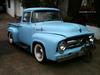
Hi, this should be one of your pictures I hope. Nice looking truck.

I could not get the larger picture unfortunately. To post a picture that is in an album/profile etc, right click on it and if it says copy image URL, click on that and then paste using the mountain looking icon. To get a good size picture though, it needs to be a large picture, not a thumbnail or small photo.
I think the site may have bad days, several times recently, if I replied to a post, it would not go to the top of the posts page, but stay where it was in the index. It would say that I had replied but not go to the top as a new reply.
Axracer started some discussion here a little while ago about doing a reply or post and for some reason it would just disappear while typing. It certainly has happened to me and others. One suggestion was, if you are doing a long reply or post, do it as a word document then copy and paste it into here. That way, if it disappeared, you would be able to copy and paste it again.
I could not get the larger picture unfortunately. To post a picture that is in an album/profile etc, right click on it and if it says copy image URL, click on that and then paste using the mountain looking icon. To get a good size picture though, it needs to be a large picture, not a thumbnail or small photo.
I think the site may have bad days, several times recently, if I replied to a post, it would not go to the top of the posts page, but stay where it was in the index. It would say that I had replied but not go to the top as a new reply.
Axracer started some discussion here a little while ago about doing a reply or post and for some reason it would just disappear while typing. It certainly has happened to me and others. One suggestion was, if you are doing a long reply or post, do it as a word document then copy and paste it into here. That way, if it disappeared, you would be able to copy and paste it again.
Thread Starter
|
Senior User
Joined: Feb 2009
Posts: 316
Likes: 0
From: Ridgefield, Washington
Lost Pictures
Hi Aus,
I don't know how you found the picture but glad you were able to and I will follow your instructions to attempt a new post.
I do have trouble navigating some areas of this forum but really am glad to be a part of it.
Thank you very much.
Fred
I don't know how you found the picture but glad you were able to and I will follow your instructions to attempt a new post.
I do have trouble navigating some areas of this forum but really am glad to be a part of it.
Thank you very much.
Fred
Elder User
Joined: Aug 2012
Posts: 538
Likes: 1
From: Australia
Fred, I imagine you should fit in here real well, with that good looking truck. Did you build it yourself or buy it done? My truck looked like it does when I bought it although I have had some mechanical work done to it to bring it up to speed. That truck of yours looks like it was an old work/farm truck alright with the heavy duty rear bumper and is that a chute in the tailgate? Very nice indeed.
I hope my suggestions are of some help to you, posting pictures or a thread can be a trial sometimes. Even today, I didn't follow my own advice and as I was just about finished a reply it disappeared. You can be sure when I did it again it was as a word document and copied in. This site seems very touchy, and if you touch a wrong key, it will highlight the entire post and if you press a key before you realise, it just disappears.
I hope my suggestions are of some help to you, posting pictures or a thread can be a trial sometimes. Even today, I didn't follow my own advice and as I was just about finished a reply it disappeared. You can be sure when I did it again it was as a word document and copied in. This site seems very touchy, and if you touch a wrong key, it will highlight the entire post and if you press a key before you realise, it just disappears.

Thread
Thread Starter
Forum
Replies
Last Post
fabieber
1948 - 1956 F1, F100 & Larger F-Series Trucks
11
Mar 15, 2014 11:37 PM
tip49
1948 - 1956 F1, F100 & Larger F-Series Trucks
6
Nov 15, 2013 12:12 PM
1918ALF
1987 - 1996 F150 & Larger F-Series Trucks
10
Aug 27, 2013 07:47 AM
Gear Up
1948 - 1956 F1, F100 & Larger F-Series Trucks
9
Apr 15, 2013 09:58 PM







