


Dome light inoperative


Thread Starter
|
New User
Joined: Jul 2013
Posts: 13
Likes: 0
Dome light inoperative
Hi, guys.
I have been fiddling with this for a while. My dome light circuit doesn't work. I have voltage at the fuse, and voltage at the door jamb switch (green/yellow) and blue. My test light works when I touch the fuse. It does not work when I connect to green/yellow or blue. I thought maybe bad ground, so ran a ground straight off battery negative. No dice. I had an electrician/mechanic friend take a look at this, and he got the same symptom. Also measured voltage but no current on green/yellow. I am using EVTM for this year.
The passenger side door jamb switch measures and operates correctly.
The only thing I can think of to do is to run a wire straight out of the fusebox, cut all wires to door switch, and run new wire thru it. Does this make sense? It seems like there is a short or wiring problem somewhere that I could look for forever.
The other thing is that the male ends of the existing door switch got mangled, so I have to replace them with something. Does anyone know what these are called or where I might find them? The only description I have is "cylindrical tube connector".
I have a new door switch, which terminates in female connectors. So I'm not sure what kind of terminal to plug into it. Any info appreciated. Thanks.
1987 Ford E350 6.9L Diesel Van
I have been fiddling with this for a while. My dome light circuit doesn't work. I have voltage at the fuse, and voltage at the door jamb switch (green/yellow) and blue. My test light works when I touch the fuse. It does not work when I connect to green/yellow or blue. I thought maybe bad ground, so ran a ground straight off battery negative. No dice. I had an electrician/mechanic friend take a look at this, and he got the same symptom. Also measured voltage but no current on green/yellow. I am using EVTM for this year.
The passenger side door jamb switch measures and operates correctly.
The only thing I can think of to do is to run a wire straight out of the fusebox, cut all wires to door switch, and run new wire thru it. Does this make sense? It seems like there is a short or wiring problem somewhere that I could look for forever.
The other thing is that the male ends of the existing door switch got mangled, so I have to replace them with something. Does anyone know what these are called or where I might find them? The only description I have is "cylindrical tube connector".
I have a new door switch, which terminates in female connectors. So I'm not sure what kind of terminal to plug into it. Any info appreciated. Thanks.
1987 Ford E350 6.9L Diesel Van

Fleet Owner


Joined: Aug 2010
Posts: 21,253
Likes: 1,656
From: Reynoldsburg, Ohio
Most Ford door pin switch connectors are pretty much all the same---visit a scrap yard along with a pair of side cuts and help yourself.
OR here's a link to one of the Motorcraft connector replacement identifiers: http://www.fordtechservice.dealercon...torcatalog.pdf Check page 15, p/n WPT-213. That connector will have a Dorman or similar cross over part number, probably much much less expensive than a Motorcraft branded part.
Hope this partially helps!
OR here's a link to one of the Motorcraft connector replacement identifiers: http://www.fordtechservice.dealercon...torcatalog.pdf Check page 15, p/n WPT-213. That connector will have a Dorman or similar cross over part number, probably much much less expensive than a Motorcraft branded part.
Hope this partially helps!
Thread Starter
|
New User
Joined: Jul 2013
Posts: 13
Likes: 0
Mystery solved!
Gentlemen, thank you for your suggestions, much appreciated. You guys put me on the right track. First, as far as the light switch, I had already replaced the switch and receptacle because it was a little melted, and one wire was backing out of the thing (barely making contact). The suggestion to check it made me go back to verify wiring.
I had been extremely careful to match wire color to wire color as I was installing this. However, it never occurred to me that the part could be wired incorrectly. My pictures aren't great, but they should be good enough to prove my point. You can see from the diagram that the IGN position is supposed to be black, but the switch receptacle, as I received it, had yellow/black in this position. DN position is supposed to be yellow/black, but instead had orange/black in this position. I corrected these to coincide with the diagram.
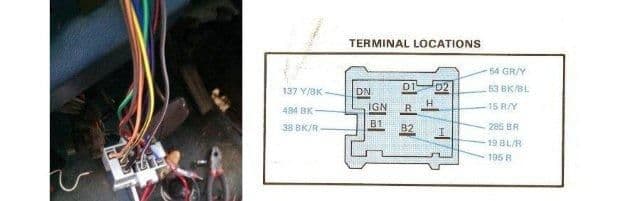
So, I guess the lesson is: If you have to replace your light switch connector, CHECK THE WIRING on the new part, as it may be wrong.
After doing this, I started checking voltages again. 12V was never getting to the light switch. I pulled the fuse box and examined it closely. I checked the voltage on the back of the box, at the green/yellow wire, and nothing was getting through. I pulled the fuse and looked at the connector INSIDE.It was rusted almost solid. I cleaned it off as best I could and normal function was restored. The switch worked correctly, as well as the door jamb switch (right and left). All allowed correct dome light operation.
So, I guess the lesson there is that if you're having weird electrical problems that cause you to check fuses, REMOVE THEM AND LOOK INSIDE AT THE CONTACTS. Because you're only looking at the edge of the contact (not the wide part of it), it may not be obvious that there is corrosion. It doesn't turn green like a copper contact, and if it is rusted, it just turns dark brown and you may not see it if you're not looking inside.
I would replace this contact if I could get one, but it appears to be like searching for the holy grail. Next best option I could find was the Radio Shack brand of deoxit, which I will try on all the connectors to clean as much as possible. Here's a link to this swell stuff:
RadioShack® Anti-Corrosive Lubricant Spray - RadioShack.com
Also, thanks to the poster who provided the doc for the door jamb switch connector. I think you were correct that I need to get this during the next trip to the wrecking yard, as I couldn't find an exact match in the doc, and this is probably a part that nobody would normally ever need (since it's protected inside the door). I soldered it back together for the moment, but will replace when I can get my grubby little hands on another.
Anyway, thanks again, as you guys helped me to "pound out this little gremlin". Have a good one,
Steve
I had been extremely careful to match wire color to wire color as I was installing this. However, it never occurred to me that the part could be wired incorrectly. My pictures aren't great, but they should be good enough to prove my point. You can see from the diagram that the IGN position is supposed to be black, but the switch receptacle, as I received it, had yellow/black in this position. DN position is supposed to be yellow/black, but instead had orange/black in this position. I corrected these to coincide with the diagram.
So, I guess the lesson is: If you have to replace your light switch connector, CHECK THE WIRING on the new part, as it may be wrong.
After doing this, I started checking voltages again. 12V was never getting to the light switch. I pulled the fuse box and examined it closely. I checked the voltage on the back of the box, at the green/yellow wire, and nothing was getting through. I pulled the fuse and looked at the connector INSIDE.It was rusted almost solid. I cleaned it off as best I could and normal function was restored. The switch worked correctly, as well as the door jamb switch (right and left). All allowed correct dome light operation.
So, I guess the lesson there is that if you're having weird electrical problems that cause you to check fuses, REMOVE THEM AND LOOK INSIDE AT THE CONTACTS. Because you're only looking at the edge of the contact (not the wide part of it), it may not be obvious that there is corrosion. It doesn't turn green like a copper contact, and if it is rusted, it just turns dark brown and you may not see it if you're not looking inside.
I would replace this contact if I could get one, but it appears to be like searching for the holy grail. Next best option I could find was the Radio Shack brand of deoxit, which I will try on all the connectors to clean as much as possible. Here's a link to this swell stuff:
RadioShack® Anti-Corrosive Lubricant Spray - RadioShack.com
Also, thanks to the poster who provided the doc for the door jamb switch connector. I think you were correct that I need to get this during the next trip to the wrecking yard, as I couldn't find an exact match in the doc, and this is probably a part that nobody would normally ever need (since it's protected inside the door). I soldered it back together for the moment, but will replace when I can get my grubby little hands on another.
Anyway, thanks again, as you guys helped me to "pound out this little gremlin". Have a good one,
Steve

Thread
Thread Starter
Forum
Replies
Last Post
landers0440
1973 - 1979 F-100 & Larger F-Series Trucks
3
Apr 15, 2019 09:10 AM
Thipdar
1967 - 1972 F-100 & Larger F-Series Trucks
21
Jan 27, 2018 05:49 AM
pancake
Electrical Systems/Wiring
3
May 5, 2005 08:58 PM







