


Western Jr. Mirror

Elder User
Joined: Jun 2012
Posts: 522
Likes: 0
Will need a picture or reference to a "western jr. mirror" I may have a couple but I have no clue what to call them.

Posting Guru

Joined: Jan 2000
Posts: 2,281
Likes: 4
From: colbert washington
OBP look at the beging of this forum. Under read first about mirrors NumbersDummy has supplied picture breakdown of these mirrors for reference.

Post Fiend
Joined: Sep 2006
Posts: 14,325
Likes: 14
From: Island Southeast Alaska
Could we see some pictures? Here is how.
But I got ta say becoming a supporter is the fastest and easiest way to post pics right from
your whatever pad/cell thing or home computer.
Few of us look in the users Gallery or album as you can see by your recent visitors.
Quote:
Originally Posted by 76f350spercamprspeal
Welcome to FTE, Best Damn Forum EVER!
------------------------
Here's How to Post Pictures:
1. Login to FTE.
2.Click User CP (In the Top Left Hand Corner)
3.(On the Left, There will be a list, The 5th Option Down, will say "Pictures & Albums) Click That.
4.Then, Click Add Album, Enter a title, and description, if ya want to.
5. Click Upload Pictures, Then click Browse, Locate the Files of your truck. (You can add 3 files at a time)
5. Click Upload.
6. Add a description to the individual pictures, then click save.
7. Add more files if ya want.
8. Click The Picture you want to post, it will give you two codes at the bottom, Right Click The Second one (It say's BB Code, Then Say's [IMG]http:blahblahblah...[/IMG])
Then, Once that is highlighted, Right Click, Then Copy, Then Paste it into your post.
You can add up to 30 Images in one FTE Post.
If, Ya need any help, Don't hesitate to ask.
Quote:
Originally Posted by old_dan
You can also go to the "Garage" tab and start an album right here on FTE. After you post pictures to an album, we can look in your album, but you'll also be able to "insert a picture" by pasting in a link to the picture in your album.
It seems awkward, but whenever you "insert a picture" to one of these threads, the forum is looking for the picture somewhere on the web (which is always available) rather than from somewhere on your hard drive (which isn't always available).
Quote:
Originally Posted By Jolly Roger Joe
Welcome to FTE!
Go to Image hosting, free photo sharing & video sharing at Photobucket and sign up for a free account. Then create an album for your truck. Upload any pics you want to post on FTE to that album. Have this album open on your computer when you want to post pics on FTE.
While you're making a post on FTE, select the pic you want to post from your Photobucket album. When the large version of the pic is open, right mouse click on it and select "View Image Info". The image info will be highlighted and will look something like this:
The best photos and videos | Photobucket
Copy that highlighted info (right click / copy).
When you have the spot in your post where you want the pic to be placed, select the "Insert Image" icon at the top of the post (looks like a mountain) and paste (right click / paste) the image info you copied in the highlighted box (just shows "http://" when it opens).
Your pic will be placed in the post.
Hope that helps.
Here's a tutorial Bob put together: https://www.ford-trucks.com/forums/67...-pictures.html
But I got ta say becoming a supporter is the fastest and easiest way to post pics right from
your whatever pad/cell thing or home computer.
Few of us look in the users Gallery or album as you can see by your recent visitors.
Quote:
Originally Posted by 76f350spercamprspeal
Welcome to FTE, Best Damn Forum EVER!
------------------------
Here's How to Post Pictures:
1. Login to FTE.
2.Click User CP (In the Top Left Hand Corner)
3.(On the Left, There will be a list, The 5th Option Down, will say "Pictures & Albums) Click That.
4.Then, Click Add Album, Enter a title, and description, if ya want to.
5. Click Upload Pictures, Then click Browse, Locate the Files of your truck. (You can add 3 files at a time)
5. Click Upload.
6. Add a description to the individual pictures, then click save.
7. Add more files if ya want.
8. Click The Picture you want to post, it will give you two codes at the bottom, Right Click The Second one (It say's BB Code, Then Say's [IMG]http:blahblahblah...[/IMG])
Then, Once that is highlighted, Right Click, Then Copy, Then Paste it into your post.
You can add up to 30 Images in one FTE Post.
If, Ya need any help, Don't hesitate to ask.
Quote:
Originally Posted by old_dan
You can also go to the "Garage" tab and start an album right here on FTE. After you post pictures to an album, we can look in your album, but you'll also be able to "insert a picture" by pasting in a link to the picture in your album.
It seems awkward, but whenever you "insert a picture" to one of these threads, the forum is looking for the picture somewhere on the web (which is always available) rather than from somewhere on your hard drive (which isn't always available).
Quote:
Originally Posted By Jolly Roger Joe
Welcome to FTE!
Go to Image hosting, free photo sharing & video sharing at Photobucket and sign up for a free account. Then create an album for your truck. Upload any pics you want to post on FTE to that album. Have this album open on your computer when you want to post pics on FTE.
While you're making a post on FTE, select the pic you want to post from your Photobucket album. When the large version of the pic is open, right mouse click on it and select "View Image Info". The image info will be highlighted and will look something like this:
The best photos and videos | Photobucket
Copy that highlighted info (right click / copy).
When you have the spot in your post where you want the pic to be placed, select the "Insert Image" icon at the top of the post (looks like a mountain) and paste (right click / paste) the image info you copied in the highlighted box (just shows "http://" when it opens).
Your pic will be placed in the post.
Hope that helps.
Here's a tutorial Bob put together: https://www.ford-trucks.com/forums/67...-pictures.html

Lead Gopher


Joined: Aug 2012
Posts: 10,057
Likes: 1,612
From: Seattle

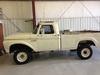
Nerksa bought the one from RustFreeClassics.com. The link is still active, but the truck has sold.
1966 F250 Custom Cab original survivor 352 4 speed
Looks like drivers side mirror took the hit.
1966 F250 Custom Cab original survivor 352 4 speed
Looks like drivers side mirror took the hit.
Post Fiend
Joined: Sep 2006
Posts: 14,325
Likes: 14
From: Island Southeast Alaska
This one? Mirrors seem okay here.
Did this happen after ya bought it.
Damn nice truck.
I have an F350, A 66 I am parting.
Did this happen after ya bought it.
Damn nice truck.
I have an F350, A 66 I am parting.
Trending Topics
Lead Gopher
Joined: Aug 2012
Posts: 10,057
Likes: 1,612
From: Seattle
If you look at the backside of that mirror you can see a blob of gray showing through, looks like a Cobra snake. I'm thinking that's where it took the hit.
Check out his album here.
https://www.ford-trucks.com/forums/m...4x4-36584.html
Check out his album here.
https://www.ford-trucks.com/forums/m...4x4-36584.html
FTE Stories
Ford Trucks for Ford Truck Enthusiasts

Rezvani's Latest Post-Apocalytic Monster Is a Ford F-150 Raptor Underneath
Verdad Gallardo
Top 10 Most Expensive Ford Trucks Ever Sold on Bring a Trailer
Joe Kucinski
2027 Ford Super Duty Buyer's Guide (Every Model, Engine, & Package)
Brett Foote
Top 10 Ford Truck Tragedies
Joe Kucinski
AEV FXL Super Duty - the Super Duty Raptor Ford Doesn't Make
Brett Foote
Lobo Vs Lobo: Proof the F-150 Lobo Should Be Even Lower!
Michael S. Palmer
Ford's 2001 Explorer Sportsman Concept Looks For a New Home
Verdad Gallardo
10 Best Ford Truck Engines We Miss the Most!
Joe Kucinski
2026 Shelby F-150 Off-Road: Better Than a Raptor R?
Brett Foote
Lead Gopher
Joined: Aug 2012
Posts: 10,057
Likes: 1,612
From: Seattle
And did you see the picture of the mirror I posted? Looks like the correct mirror? I just bought one on eBay for $35 that was painted Wimbledon white and is minty except for one nick in the paint so they are out there. I'll help look.
http://www.ebay.com/itm/251314007085...84.m1497.l2649
I'm getting as bad as ND where I edit posts too often...
And notice how the rivet heads are not painted. Not sure how they did that unless it was assembled after the pieces were painted. Tiny detail...
http://www.ebay.com/itm/251314007085...84.m1497.l2649
I'm getting as bad as ND where I edit posts too often...
And notice how the rivet heads are not painted. Not sure how they did that unless it was assembled after the pieces were painted. Tiny detail...

Lead Gopher
Joined: Aug 2012
Posts: 10,057
Likes: 1,612
From: Seattle
In his post number 9 the word is
That is the truck
It's not too hard to keep track of them. There's not that many left.
1966 F250 4x4 that are authentic? I've personally seen probably less than 50 in my lifetime despite loving them since a very young age. Some are on newer incorrect frames. Many claim to be 1966 4x4 but the VIN is F25 instead of F26 and it's obviously a converted 2x4. Beds that have been swapped out. This last one is not a huge deal as long as you don't butcher the frame needlessly. But, this yellow truck looks authentic to me as does the white one.
That is the truck
It's not too hard to keep track of them. There's not that many left.
1966 F250 4x4 that are authentic? I've personally seen probably less than 50 in my lifetime despite loving them since a very young age. Some are on newer incorrect frames. Many claim to be 1966 4x4 but the VIN is F25 instead of F26 and it's obviously a converted 2x4. Beds that have been swapped out. This last one is not a huge deal as long as you don't butcher the frame needlessly. But, this yellow truck looks authentic to me as does the white one.
Post Fiend
Joined: Sep 2006
Posts: 14,325
Likes: 14
From: Island Southeast Alaska
Look at how the bed lines up to the cab on the Yellow one.
That aint right. We are debating it in the Yellow truck thread.
But Ya, I thing it's is a factory set up. Just beat to heck.
Here's the link to it
https://www.ford-trucks.com/forums/1...this-66-a.html
That aint right. We are debating it in the Yellow truck thread.
But Ya, I thing it's is a factory set up. Just beat to heck.
Here's the link to it
https://www.ford-trucks.com/forums/1...this-66-a.html
Thread Starter
|
Junior User
Joined: Mar 2013
Posts: 78
Likes: 0
Authentic
The white one is authentic all the numbers match and yes it does look like the "wrong bed" description is appropriate. Lots written in previous posts on these configurations. The gentleman who operates Rustfree classics was very fair, efficient and lived up to his word. I bought and had mine delivered without ever seeing it personally. Buyer beware..... Not recommending for everyone but it worked for me and I was happy to be into my truck with two phone calls.