






New potential rodder

Thread Starter
|
Senior User
Joined: Apr 2011
Posts: 345
Likes: 0
New potential rodder
Hey guys,
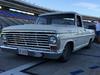
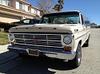
I need some help. I'm debating buying my friends 67 f100 I want it bad. And have started to save the $$$ for it.
I have never seen a 67-72 in person but I have seen a 54 - 60 - and many 73-79
I fit nice in a 73 and up but couldn't sit in a 54 with butter and a shoe horn, I'm 6 foot 4
Also It has a 300ci engine daily drives which is awesome for me while I aquire parts.
My concerns are can I fit in it ? Cause if I go to Cali to get it I want to fit lol also will the 460 I want to put in it fit ? And if it will what is the best year for 460 to use. I have a 1989 EFI converted to carb but not sure if that's the best option, I'd love some help on this
I find many young kids are not in the hot rod scene I feel this is unacceptable I really want to be part of the culture!!!
Aaron
I need some help. I'm debating buying my friends 67 f100 I want it bad. And have started to save the $$$ for it.
I have never seen a 67-72 in person but I have seen a 54 - 60 - and many 73-79
I fit nice in a 73 and up but couldn't sit in a 54 with butter and a shoe horn, I'm 6 foot 4
Also It has a 300ci engine daily drives which is awesome for me while I aquire parts.
My concerns are can I fit in it ? Cause if I go to Cali to get it I want to fit lol also will the 460 I want to put in it fit ? And if it will what is the best year for 460 to use. I have a 1989 EFI converted to carb but not sure if that's the best option, I'd love some help on this
I find many young kids are not in the hot rod scene I feel this is unacceptable I really want to be part of the culture!!!
Aaron

Laughing Gas
Joined: May 2007
Posts: 960
Likes: 10
From: Victoria (North Saanich)
Yes it will take a 460 - my neighbor is a young guy (also a heavy diesel mechanic) and he just built a seriously insane 460 and put it in his 68. His biggest problem is he lowered his and had to buy new headers that exit over the frame because the first ones he bought and fitted only have about one inch of ground clearance.
I'm 6'4" and 251 (as of this morning) and hell yes I can drive my 69.
I'm 6'4" and 251 (as of this morning) and hell yes I can drive my 69.

Ford Parts Specialist
Joined: Nov 2006
Posts: 88,826
Likes: 787
From: Simi Valley, CA

I'm 6-5, 300 lbs and 68 years old (the OP didn't say how old he is). While the 1967/72 cab is roomier than 1966 and earlier, it can be somewhat tight if back and/or knees affected with arthritis. 
Trending Topics
Thread Starter
|
Senior User
Joined: Apr 2011
Posts: 345
Likes: 0
Sorry to hear that it is a real shame when your in pain, I fd a stupid thing now not sure how to deal with it I bought the block crank pistons and heads and valves for a 460 BBF and now it's sitting in my jeep with no where to work on it WTF how do I post pics of it 
No engine stand
No engine hoist
No garage to use (I live on the second floor of my apartment building)
Clearly I have no brain lol
No engine stand
No engine hoist
No garage to use (I live on the second floor of my apartment building)
Clearly I have no brain lol
FTE Stories
Ford Trucks for Ford Truck Enthusiasts

Top 10 Fords at 2026 Carlisle Ford Nationals
Joe Kucinski
3 Best / 3 Worst Parts of Modern Ford Ownership
Brett Foote
10 Amazing Upgrades That Solve Common Ford Truck Owner Headaches
Pouria Savadkouei
Every 2026 Ford Engine Explained
Brett Foote
10 Ugly Ford Trucks That We Still Kinda Love
Joe Kucinski
10 Things Every Truck Owner NEEDS (2026 Edition)
Michael S. Palmer
Rezvani's Latest Post-Apocalyptic Monster Is a Ford F-150 Raptor Underneath
Verdad Gallardo
Top 10 Most Expensive Ford Trucks Ever Sold on Bring a Trailer
Joe Kucinski
2027 Ford Super Duty Buyer's Guide (Every Model, Engine, & Package)
Brett Foote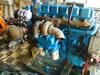
Cargo Master

Joined: Feb 2003
Posts: 2,341
Likes: 5
From: Sacramento
The cab has essentially the same amount of foot room from 67-97.
It even has the 130 Amp Taurus alternator on it! A 460 is an easy swap. It would be my 2nd choice for gasser engine in mine. First is a 400/4V.
It even has the 130 Amp Taurus alternator on it! A 460 is an easy swap. It would be my 2nd choice for gasser engine in mine. First is a 400/4V.
Ford Parts Specialist
Joined: Nov 2006
Posts: 88,826
Likes: 787
From: Simi Valley, CA
You won't find a 400 (or a 351M) with a 4V carb unless someone installed an aftermarket 4V manifold. These two engines were only available with 2V carbs, regardless of what they were installed in.


Post Fiend
Joined: Sep 2006
Posts: 14,325
Likes: 14
From: Island Southeast Alaska
Could we see some pictures? Here is how.
But I got ta say becoming a supporter is the fastest and easiest way to post pics right from
your whatever pad/cell thing or home computer.
Few of us look in the users Gallery or album as you can see by your recent visitors.
Quote:
Originally Posted by 76f350spercamprspeal
Welcome to FTE, Best Damn Forum EVER!
------------------------
Here's How to Post Pictures:
1. Login to FTE.
2.Click User CP (In the Top Left Hand Corner)
3.(On the Left, There will be a list, The 5th Option Down, will say "Pictures & Albums) Click That.
4.Then, Click Add Album, Enter a title, and description, if ya want to.
5. Click Upload Pictures, Then click Browse, Locate the Files of your truck. (You can add 3 files at a time)
5. Click Upload.
6. Add a description to the individual pictures, then click save.
7. Add more files if ya want.
8. Click The Picture you want to post, it will give you two codes at the bottom, Right Click The Second one (It say's BB Code, Then Say's [IMG]http:blahblahblah...[/IMG])
Then, Once that is highlighted, Right Click, Then Copy, Then Paste it into your post.
You can add up to 30 Images in one FTE Post.
If, Ya need any help, Don't hesitate to ask.
Quote:
Originally Posted by old_dan
You can also go to the "Garage" tab and start an album right here on FTE. After you post pictures to an album, we can look in your album, but you'll also be able to "insert a picture" by pasting in a link to the picture in your album.
It seems awkward, but whenever you "insert a picture" to one of these threads, the forum is looking for the picture somewhere on the web (which is always available) rather than from somewhere on your hard drive (which isn't always available).
Quote:
Originally Posted By Jolly Roger Joe
Welcome to FTE!
Go to Image hosting, free photo sharing & video sharing at Photobucket and sign up for a free account. Then create an album for your truck. Upload any pics you want to post on FTE to that album. Have this album open on your computer when you want to post pics on FTE.
While you're making a post on FTE, select the pic you want to post from your Photobucket album. When the large version of the pic is open, right mouse click on it and select "View Image Info". The image info will be highlighted and will look something like this:
The best photos and videos | Photobucket
Copy that highlighted info (right click / copy).
When you have the spot in your post where you want the pic to be placed, select the "Insert Image" icon at the top of the post (looks like a mountain) and paste (right click / paste) the image info you copied in the highlighted box (just shows "http://" when it opens).
Your pic will be placed in the post.
Hope that helps.
Here's a tutorial Bob put together: https://www.ford-trucks.com/forums/67...-pictures.html
But I got ta say becoming a supporter is the fastest and easiest way to post pics right from
your whatever pad/cell thing or home computer.
Few of us look in the users Gallery or album as you can see by your recent visitors.
Quote:
Originally Posted by 76f350spercamprspeal
Welcome to FTE, Best Damn Forum EVER!
------------------------
Here's How to Post Pictures:
1. Login to FTE.
2.Click User CP (In the Top Left Hand Corner)
3.(On the Left, There will be a list, The 5th Option Down, will say "Pictures & Albums) Click That.
4.Then, Click Add Album, Enter a title, and description, if ya want to.
5. Click Upload Pictures, Then click Browse, Locate the Files of your truck. (You can add 3 files at a time)
5. Click Upload.
6. Add a description to the individual pictures, then click save.
7. Add more files if ya want.
8. Click The Picture you want to post, it will give you two codes at the bottom, Right Click The Second one (It say's BB Code, Then Say's [IMG]http:blahblahblah...[/IMG])
Then, Once that is highlighted, Right Click, Then Copy, Then Paste it into your post.
You can add up to 30 Images in one FTE Post.
If, Ya need any help, Don't hesitate to ask.
Quote:
Originally Posted by old_dan
You can also go to the "Garage" tab and start an album right here on FTE. After you post pictures to an album, we can look in your album, but you'll also be able to "insert a picture" by pasting in a link to the picture in your album.
It seems awkward, but whenever you "insert a picture" to one of these threads, the forum is looking for the picture somewhere on the web (which is always available) rather than from somewhere on your hard drive (which isn't always available).
Quote:
Originally Posted By Jolly Roger Joe
Welcome to FTE!
Go to Image hosting, free photo sharing & video sharing at Photobucket and sign up for a free account. Then create an album for your truck. Upload any pics you want to post on FTE to that album. Have this album open on your computer when you want to post pics on FTE.
While you're making a post on FTE, select the pic you want to post from your Photobucket album. When the large version of the pic is open, right mouse click on it and select "View Image Info". The image info will be highlighted and will look something like this:
The best photos and videos | Photobucket
Copy that highlighted info (right click / copy).
When you have the spot in your post where you want the pic to be placed, select the "Insert Image" icon at the top of the post (looks like a mountain) and paste (right click / paste) the image info you copied in the highlighted box (just shows "http://" when it opens).
Your pic will be placed in the post.
Hope that helps.
Here's a tutorial Bob put together: https://www.ford-trucks.com/forums/67...-pictures.html

Hotshot


Joined: Mar 2013
Posts: 14,255
Likes: 199
From: Phoenix, Az.
If you mean Edelbrock 4V heads cool. If you mean factory Ford 351C 4V heads than don't. Their ports are huge and meant for higher RPM. Plus way more compression ratio than current 91 octane can support. The trick to 351C,351M,and 400's is factory 351C 2V heads. They flow tons better than m and 400 smog heads. And workable compression ratio.
Cargo Master
Joined: Feb 2003
Posts: 2,341
Likes: 5
From: Sacramento
A couple things I really dont like on the particular truck in question, are the grille is from a 72, and the door gaps(even though the latches glide smoooothly closed). Besides 4 wheel drum brakes and no power steering.

Thread
Thread Starter
Forum
Replies
Last Post
1989lariat
Big Block V8 - 385 Series (6.1/370, 7.0/429, 7.5/460)
1
Dec 30, 2014 02:56 PM
Raider50
1948 - 1956 F1, F100 & Larger F-Series Trucks
17
Mar 12, 2008 09:17 PM
b1gr3d
1948 - 1956 F1, F100 & Larger F-Series Trucks
33
Oct 17, 2004 01:10 AM