




Just Joined.......
Thread Starter
|
Senior User
Joined: Oct 2012
Posts: 218
Likes: 1
From: Kamloops, BC Canada
Just Joined.......
Afternoon All,
I've been lurking for some time now, and I have to say, you've helped me a bunch already. I've learned a whole bunch about my truck just by listening to your successes and failures with your own.
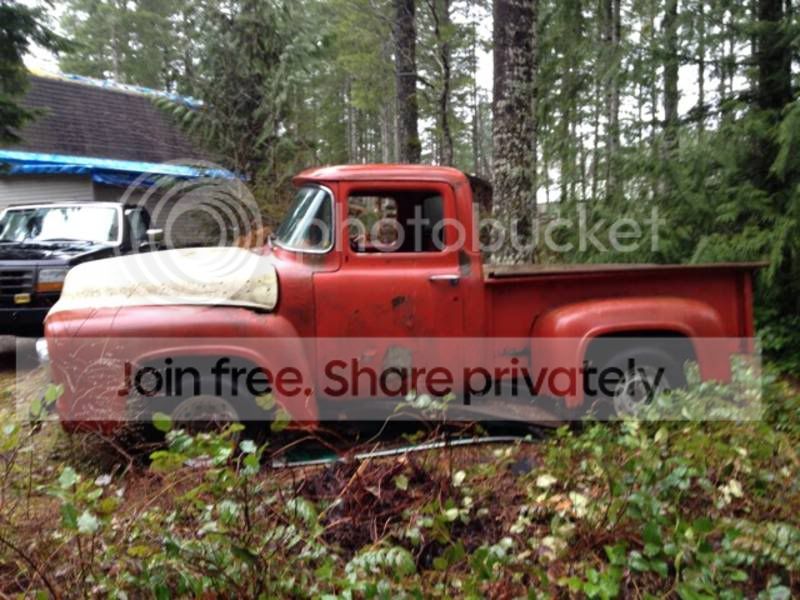
I'm new to the old Ford restoration process, but not new to restoring vehicles. About a year ago, I finished restoring my '70 Olds Cutlass to very near stock condition. I got the bug again recently, and bought an incredibly rusted 56 F100, a truck I have loved the lines of since I was a kid. My dad is semi retired, and we share a love and background in the automotive field, so we decided to take on another project.
I'm going to be one of those darkside guys, I guess. There will be a 5.0 Coyote engine going in with a 5 speed Tremec tranny (which I could only afford due to an unexpected windfall). Anyway, just wanted to say hello, I'll post some pics as soon as I figure out how to use this site. Better with wrenches than computers, I guess.
Bruce
I've been lurking for some time now, and I have to say, you've helped me a bunch already. I've learned a whole bunch about my truck just by listening to your successes and failures with your own.
I'm new to the old Ford restoration process, but not new to restoring vehicles. About a year ago, I finished restoring my '70 Olds Cutlass to very near stock condition. I got the bug again recently, and bought an incredibly rusted 56 F100, a truck I have loved the lines of since I was a kid. My dad is semi retired, and we share a love and background in the automotive field, so we decided to take on another project.
I'm going to be one of those darkside guys, I guess. There will be a 5.0 Coyote engine going in with a 5 speed Tremec tranny (which I could only afford due to an unexpected windfall). Anyway, just wanted to say hello, I'll post some pics as soon as I figure out how to use this site. Better with wrenches than computers, I guess.
Bruce

Lead Driver
Joined: Jul 2011
Posts: 6,599
Likes: 34
From: Rockingham, VA
Welcome to FTE!  We love pictures, it feeds our addiction.
Here's one way to post pics:
Go to Photobucket and sign up for a free account. Then create an album for your truck. Upload any pics you want to post on FTE to that album. Have this album open on your computer when you want to post pics on FTE.
While you're making a post on FTE, select the pic you want to post from your Photobucket album. When the large version of the pic is open, right mouse click on it and select "View Image Info". The image info will be highlighted and will look something like this:
http://i285.photobucket.com/albums/l...ghtsafter1.jpg
Copy that highlighted info (right click / copy).
When you have the spot in your post where you want the pic to be placed, select the "Insert Image" icon at the top of the post (looks like a mountain) and paste (right click / paste) the image info you copied in the highlighted box (just shows "http://" when it opens).
Your pic will be placed in the post.
Hope that helps.
We love pictures, it feeds our addiction.Here's one way to post pics:
Go to Photobucket and sign up for a free account. Then create an album for your truck. Upload any pics you want to post on FTE to that album. Have this album open on your computer when you want to post pics on FTE.
While you're making a post on FTE, select the pic you want to post from your Photobucket album. When the large version of the pic is open, right mouse click on it and select "View Image Info". The image info will be highlighted and will look something like this:
http://i285.photobucket.com/albums/l...ghtsafter1.jpg
Copy that highlighted info (right click / copy).
When you have the spot in your post where you want the pic to be placed, select the "Insert Image" icon at the top of the post (looks like a mountain)
and paste (right click / paste) the image info you copied in the highlighted box (just shows "http://" when it opens).Your pic will be placed in the post.
Hope that helps.
Thread Starter
|
Senior User
Joined: Oct 2012
Posts: 218
Likes: 1
From: Kamloops, BC Canada
Thanks for the welcome, I have seen the build threads, and I agree with the comment
about the talent on the forum.....impressive.
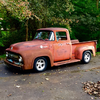
Here's my first attempt at a post, I guess you could say I rescued it, not much good left....
http://i1327.photobucket.com/albums/...psf65f0e64.jpg
about the talent on the forum.....impressive.
Here's my first attempt at a post, I guess you could say I rescued it, not much good left....
http://i1327.photobucket.com/albums/...psf65f0e64.jpg
FTE fan
Joined: Dec 2006
Posts: 3,674
Likes: 11
From: paradise, northern calif.

Id just like to give you a warm FTE welcome, Im not doin much do to my truck lately do to health stuff, so following what others are doin fills that void untill I can get back under mine. That said Im very much looking forward to watching your build. As you probably already know there is nothing we cant learn to do with the help of others

Senior User
Joined: Feb 2011
Posts: 195
Likes: 0
From: Cypress, TX
Welcome to FTE Bruce! There are many friendly folks here with a wealth of knowledge and a love of the old iron! Thanks for sharing the pic of your '56 and your plans for her. Coyote 5.0 and a Tremec 5 speed will be an awesome combination. Looking forward to watching your progress.
Trending Topics
Lead Driver
Joined: Jul 2011
Posts: 6,599
Likes: 34
From: Rockingham, VA
FTE Stories
Ford Trucks for Ford Truck Enthusiasts

3 Best / 3 Worst Parts of Modern Ford Ownership
Brett Foote
10 Amazing Upgrades That Solve Common Ford Truck Owner Headaches
Pouria Savadkouei
Every 2026 Ford Engine Explained
Brett Foote
10 Ugly Ford Trucks That We Still Kinda Love
Joe Kucinski
10 Things Every Truck Owner NEEDS (2026 Edition)
Michael S. Palmer
Rezvani's Latest Post-Apocalyptic Monster Is a Ford F-150 Raptor Underneath
Verdad Gallardo
Top 10 Most Expensive Ford Trucks Ever Sold on Bring a Trailer
Joe Kucinski
2027 Ford Super Duty Buyer's Guide (Every Model, Engine, & Package)
Brett Foote
Top 10 Ford Truck Tragedies
Joe Kucinski




Roast em' if you got 'em


Joined: Mar 2005
Posts: 22,014
Likes: 9,967
From: Rio Rancho, NM
Welcome to the board!!
We're glad you found our little neck of the net. There's lot of nice folks here who are more than willing to give advice, etc. If you really want some responses just post a thread an ask for our opinion...LOL....we love sharing our opinions.
Do you still have the Cutlass? I've always liked those cars
Bobby
We're glad you found our little neck of the net. There's lot of nice folks here who are more than willing to give advice, etc. If you really want some responses just post a thread an ask for our opinion...LOL....we love sharing our opinions.
Do you still have the Cutlass? I've always liked those cars
Bobby
Thread Starter
|
Senior User
Joined: Oct 2012
Posts: 218
Likes: 1
From: Kamloops, BC Canada
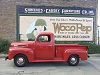
Thanks for all the welcomes, I have lots of pics, and will post them as I go, or start
a build thread. Still have the Cutlass, too much into it to sell, so I have to keep it
forever now. It's my daily driver in the summer months.
http://i1327.photobucket.com/albums/...psac67cf20.jpg
a build thread. Still have the Cutlass, too much into it to sell, so I have to keep it
forever now. It's my daily driver in the summer months.
http://i1327.photobucket.com/albums/...psac67cf20.jpg



Post Fiend
Joined: Sep 2006
Posts: 14,325
Likes: 14
From: Island Southeast Alaska
Quote:
Originally Posted by 76f350spercamprspeal
Welcome to FTE, Best Damn Forum EVER!
------------------------
Here's How to Post Pictures:
1. Login to FTE.
2.Click User CP (In the Top Left Hand Corner)
3.(On the Left, There will be a list, The 5th Option Down, will say "Pictures & Albums) Click That.
4.Then, Click Add Album, Enter a title, and description, if ya want to.
5. Click Upload Pictures, Then click Browse, Locate the Files of your truck. (You can add 3 files at a time)
5. Click Upload.
6. Add a description to the individual pictures, then click save.
7. Add more files if ya want.
8. Click The Picture you want to post, it will give you two codes at the bottom, Right Click The Second one (It say's BB Code, Then Say's [IMG]http:blahblahblah...[/IMG])
Then, Once that is highlighted, Right Click, Then Copy, Then Paste it into your post.
You can add up to 30 Images in one FTE Post.
If, Ya need any help, Don't hesitate to ask.
Quote:
Originally Posted by old_dan
You can also go to the "Garage" tab and start an album right here on FTE. After you post pictures to an album, we can look in your album, but you'll also be able to "insert a picture" by pasting in a link to the picture in your album.
It seems awkward, but whenever you "insert a picture" to one of these threads, the forum is looking for the picture somewhere on the web (which is always available) rather than from somewhere on your hard drive (which isn't always available).
Quote:
Originally Posted By Jolly Roger Joe
Welcome to FTE!
Go to Image hosting, free photo sharing & video sharing at Photobucket and sign up for a free account. Then create an album for your truck. Upload any pics you want to post on FTE to that album. Have this album open on your computer when you want to post pics on FTE.
While you're making a post on FTE, select the pic you want to post from your Photobucket album. When the large version of the pic is open, right mouse click on it and select "View Image Info". The image info will be highlighted and will look something like this:
http://i285.photobucket.com/albums/l...ghtsafter1.jpg
Copy that highlighted info (right click / copy).
When you have the spot in your post where you want the pic to be placed, select the "Insert Image" icon at the top of the post (looks like a mountain) and paste (right click / paste) the image info you copied in the highlighted box (just shows "http://" when it opens).
Your pic will be placed in the post.
Hope that helps.
Here's a tutorial Bob put together: https://www.ford-trucks.com/forums/67...-pictures.html
Originally Posted by 76f350spercamprspeal
Welcome to FTE, Best Damn Forum EVER!
------------------------
Here's How to Post Pictures:
1. Login to FTE.
2.Click User CP (In the Top Left Hand Corner)
3.(On the Left, There will be a list, The 5th Option Down, will say "Pictures & Albums) Click That.
4.Then, Click Add Album, Enter a title, and description, if ya want to.
5. Click Upload Pictures, Then click Browse, Locate the Files of your truck. (You can add 3 files at a time)
5. Click Upload.
6. Add a description to the individual pictures, then click save.
7. Add more files if ya want.
8. Click The Picture you want to post, it will give you two codes at the bottom, Right Click The Second one (It say's BB Code, Then Say's [IMG]http:blahblahblah...[/IMG])
Then, Once that is highlighted, Right Click, Then Copy, Then Paste it into your post.
You can add up to 30 Images in one FTE Post.
If, Ya need any help, Don't hesitate to ask.
Quote:
Originally Posted by old_dan
You can also go to the "Garage" tab and start an album right here on FTE. After you post pictures to an album, we can look in your album, but you'll also be able to "insert a picture" by pasting in a link to the picture in your album.
It seems awkward, but whenever you "insert a picture" to one of these threads, the forum is looking for the picture somewhere on the web (which is always available) rather than from somewhere on your hard drive (which isn't always available).
Quote:
Originally Posted By Jolly Roger Joe
Welcome to FTE!
Go to Image hosting, free photo sharing & video sharing at Photobucket and sign up for a free account. Then create an album for your truck. Upload any pics you want to post on FTE to that album. Have this album open on your computer when you want to post pics on FTE.
While you're making a post on FTE, select the pic you want to post from your Photobucket album. When the large version of the pic is open, right mouse click on it and select "View Image Info". The image info will be highlighted and will look something like this:
http://i285.photobucket.com/albums/l...ghtsafter1.jpg
Copy that highlighted info (right click / copy).
When you have the spot in your post where you want the pic to be placed, select the "Insert Image" icon at the top of the post (looks like a mountain) and paste (right click / paste) the image info you copied in the highlighted box (just shows "http://" when it opens).
Your pic will be placed in the post.
Hope that helps.
Here's a tutorial Bob put together: https://www.ford-trucks.com/forums/67...-pictures.html