


WIF sensor location
Thread Starter
|
Junior User
Joined: Jun 2011
Posts: 87
Likes: 0
WIF sensor location
i have changed my fuel filters 2 times and tommorrow im changing them again alog with my oil
my wif light comes on every time i start my truck even after i drain the water so
do i maybe have a loose wire?
i have read to spray brake cleaner in the housing to clean it.
do i need to scrub anything or just spray it?
any help would be great
Robert
my wif light comes on every time i start my truck even after i drain the water so
do i maybe have a loose wire?
i have read to spray brake cleaner in the housing to clean it.
do i need to scrub anything or just spray it?
any help would be great
Robert

FTE Legend


Joined: Jul 2005
Posts: 65,938
Likes: 1,432
From: Millersville, MD

https://www.ford-trucks.com/forums/8...lter-hfcm.html
Read this ...... lots of info here. Suggest you take a look at the Tech Folder at the top of the 6.0 forum forum.
Read this ...... lots of info here. Suggest you take a look at the Tech Folder at the top of the 6.0 forum forum.
Thread Starter
|
Junior User
Joined: Jun 2011
Posts: 87
Likes: 0
i guess i didnt say that like i wanted to
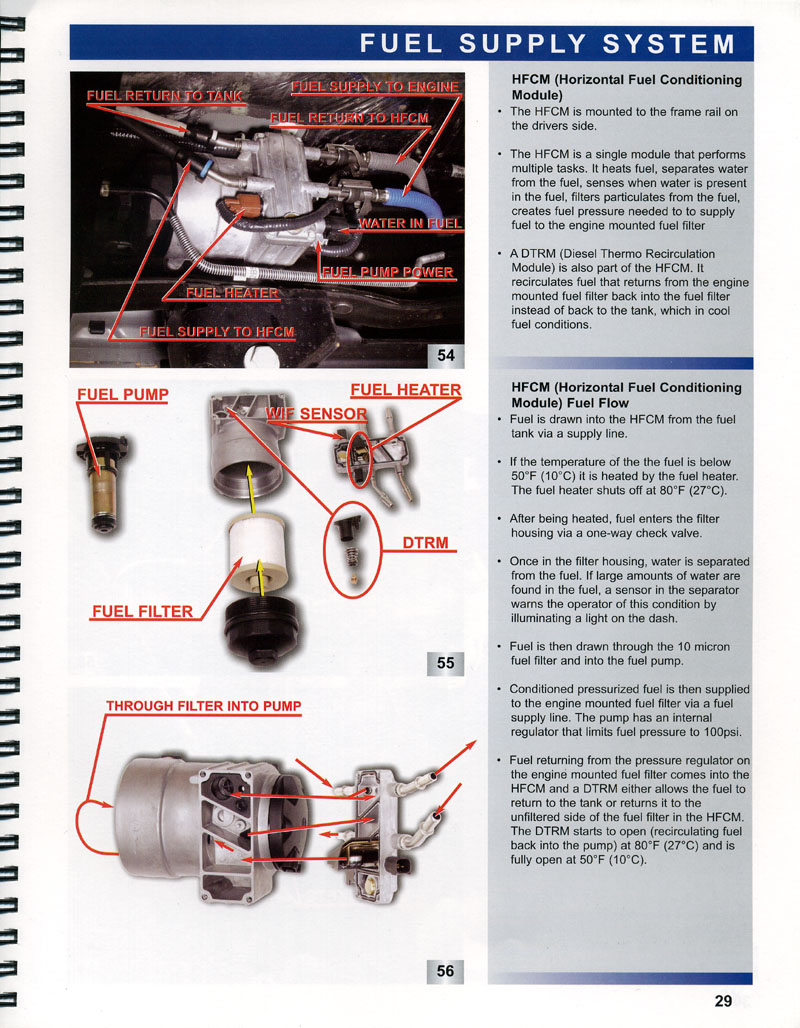
i know where the lower filter is and i know the sensor is there but wasnt sure which part was the sensor that i needed to clean
i have looked at the tech folder today and in the past but still dont know EXACTLY what the sensor is
i know where the lower filter is and i know the sensor is there but wasnt sure which part was the sensor that i needed to clean
i have looked at the tech folder today and in the past but still dont know EXACTLY what the sensor is

Tuned
Joined: Aug 2008
Posts: 301
Likes: 3
The sensor is located on the HFCM cover. While lying under the drivers side of the truck looking at the HFCM, the sensor will be the wire on the right side of the cover down at the bottom. Not sure how to clean it, but it will come out with the cover so maybe remove the cover and try to clean it. When getting a new cover you get a new sensor so that's an option as well.
Are you draining the fuel / water from the drain plug, or are you thinking you're getting the water out just by the filter?
Are you draining the fuel / water from the drain plug, or are you thinking you're getting the water out just by the filter?
Hotshot
Joined: Apr 2010
Posts: 19,071
Likes: 240
From: Saratoga Springs,UT
yes the sensor probably all junked up
try this it might have what you want
HFCM REMOVAL AND DISSASEBLY
https://www.ford-trucks.com/forums/a...6&d=1324481833
Well it wasnt really what I wanted to give ya
Thread Starter
|
Junior User
Joined: Jun 2011
Posts: 87
Likes: 0
well Blade what did you wanna give me? lol
i have a loose plug down there but i was assuming it was the heater plug you all have spoke of
so one of the others are the wif plug
i have a loose plug down there but i was assuming it was the heater plug you all have spoke of
so one of the others are the wif plug
Trending Topics
Hotshot
Joined: Apr 2010
Posts: 19,071
Likes: 240
From: Saratoga Springs,UT
I thought I had a Pic of one all torn apart
But if you look in the Link I posted at the Second Pic Down the arrow points to the WIF Drain and see how the Housing around that area kinda Square thats where the sensor is and thats the area that needs to be opened up and Cleaned Out
I will keep looking for the better pic and will post if I find it
But if you look in the Link I posted at the Second Pic Down the arrow points to the WIF Drain and see how the Housing around that area kinda Square thats where the sensor is and thats the area that needs to be opened up and Cleaned Out
I will keep looking for the better pic and will post if I find it
FTE Stories
Ford Trucks for Ford Truck Enthusiasts

3 Best / 3 Worst Parts of Modern Ford Ownership
Brett Foote
10 Amazing Upgrades That Solve Common Ford Truck Owner Headaches
Pouria Savadkouei
Every 2026 Ford Engine Explained
Brett Foote
10 Ugly Ford Trucks That We Still Kinda Love
Joe Kucinski
10 Things Every Truck Owner NEEDS (2026 Edition)
Michael S. Palmer
Rezvani's Latest Post-Apocalyptic Monster Is a Ford F-150 Raptor Underneath
Verdad Gallardo
Top 10 Most Expensive Ford Trucks Ever Sold on Bring a Trailer
Joe Kucinski
2027 Ford Super Duty Buyer's Guide (Every Model, Engine, & Package)
Brett Foote
Top 10 Ford Truck Tragedies
Joe Kucinski
Hotshot
Joined: Apr 2010
Posts: 19,071
Likes: 240
From: Saratoga Springs,UT
ISSUE:
Some 2003-2005 F-Super Duty vehicles built prior to 9/22/2004, 2003-2005 Excursion vehicles built prior to 1/10/2005, and 2004-2005 E-Series vehicles built prior to 9/16/2004 and equipped with a 6.0L diesel engine, may exhibit an intermittent / flickering water in fuel (WIF) lamp. The intermittent condition may be more prominent while turning corners, braking, or during uphill/downhill driving.
Some 2003-2007 F-Super Duty and 2003-2005 Excursion vehicles may exhibit a continuous WIF lamp on, even without the presence of water, due to debris in the reservoir or corrosion on the WIF sensor pins located in the manifold. Some 2003-2007 F-Super Duty and 2003-2005 Excursion vehicles may exhibit both intermittent / flickering and continuous WIF due to corrosion and the lack of new calibration.
ACTION:
Use the following Service Procedure based upon the customers symptom.
SERVICE PROCEDURE
Some 2003-2005 F-Super Duty vehicles built prior to 9/22/2004, 2003-2005 Excursion vehicles built prior to 1/10/2005, and 2004-2005 E-Series vehicles built prior to 9/16/2004 and equipped with a 6.0L diesel engine, may exhibit an intermittent / flickering water in fuel (WIF) lamp. The intermittent condition may be more prominent while turning corners, braking, or during uphill/downhill driving.
Some 2003-2007 F-Super Duty and 2003-2005 Excursion vehicles may exhibit a continuous WIF lamp on, even without the presence of water, due to debris in the reservoir or corrosion on the WIF sensor pins located in the manifold. Some 2003-2007 F-Super Duty and 2003-2005 Excursion vehicles may exhibit both intermittent / flickering and continuous WIF due to corrosion and the lack of new calibration.
ACTION:
Use the following Service Procedure based upon the customers symptom.
SERVICE PROCEDURE
- For intermittent / flickering WIF lamp condition reprogram the powertrain control module (PCM) to the latest calibration using the IDS release B32.11 or higher. Calibration files may also be obtained at Motorcraft.
- If the WIF lamp continuously illuminates without the presence of water, this may be due to corrosion on the sensor pins or sediment build up in the water reservoir.
- Drain the horizontal fuel conditioning module (HFCM) reservoir and look for significant corrosion debris or sediment in the fluid drained from the reservoir. Remove the WIF sensor and inspect for corrosion on the pins. Remove the WIF Senor by first disconnecting the electrical connector, then using channel locks, rotate the WIF sensor at least 45 degrees counterclockwise. If there is corrosion / sediment on the pins, proceed to Step b. If there is not, refer to PC/ED lead diagnostics and do not proceed with the TSB.
- If corrosion on the pins is causing the WIF lamp to illuminate, replace the WIF sensor with service kit, following the WIF sensor installation instructions in the kit.
- If there was significant corrosion debris or sediment drained from the reservoir, clean the housing of the HFCM of any debris following the HFCM cleaning procedure. It is not necessary to replace the Manifold or HFCM assembly.
- Vehicles with both an intermittent and continuous WIF light due to corrosion are to follow actions 1 and 2 as described above, referring to the vehicle built dates and application.
- Disconnect both battery ground cables. Refer to Workshop Manual, Section 414-01.
- Raise and support the vehicle. Refer to Workshop Manual, Section 100-02.
- Disconnect the fuel pump, heater, water in fuel electrical connectors from HFCM (Figure 1).
https://www.ford-trucks.com/forums/pi...ictureid=23515
Figure 1 - Article 06-22-12 - Disconnect HFCM electrical harness from main vehicle harness.
- Disconnect the fuel hoses from HFCM.
- Remove the fuel hose retaining clips and discard. Disconnect the fuel hoses closest to the engine (Figure 2 Number 1).
https://www.ford-trucks.com/forums/pi...ictureid=23513
Figure 2 - Article 06-22-12 - Press in the retaining clips and release the fuel hoses closest to the fuel tank (Figure 3 Number 2).
https://www.ford-trucks.com/forums/pi...ictureid=23513
Figure 3 - Article 06-22-12
- Remove the fuel hose retaining clips and discard. Disconnect the fuel hoses closest to the engine (Figure 2 Number 1).
- Remove the screws and the fuel manifold cover (Figure 4).
https://www.ford-trucks.com/forums/pi...ictureid=23509
Figure 4 - Article 06-22-12 - Clean debris from the HFCM water reservoir housing (max 25 psi air).
- Install the manifold cover and screws and torque to 44lb-in (5 N-m) (Figure 5).
https://www.ford-trucks.com/forums/pi...ictureid=23510
Figure 5 - Article 06-22-12 - Reconnect/reinstall fuel lines.
- Verify that there are no fuel leaks from the HFCM.
Fleet Mechanic

Joined: Oct 2006
Posts: 1,351
Likes: 242
From: North Florida
i have changed my fuel filters 2 times and tommorrow im changing them again alog with my oil
my wif light comes on every time i start my truck even after i drain the water so
do i maybe have a loose wire?
i have read to spray brake cleaner in the housing to clean it.
do i need to scrub anything or just spray it?
any help would be great
Robert
my wif light comes on every time i start my truck even after i drain the water so
do i maybe have a loose wire?
i have read to spray brake cleaner in the housing to clean it.
do i need to scrub anything or just spray it?
any help would be great
Robert
Hotshot
Joined: Apr 2010
Posts: 19,071
Likes: 240
From: Saratoga Springs,UT
Don't use brake cleaner. Use carb cleaner. Using heat, bend the last 1/2 inch of the spray straw 90 degrees. Stick the straw into the drain hole, with the spray directed toward the front of the truck and spray. This should flush the gunk out through the drain hole. I had a problem with my WIF light and this fixed it. Since then, I do this each time I change the filter. BTW, this was not my idea. Just one more money saving idea that I learned on FTE.
I like it^^^^
Good Preventative maintenance
I'm hitting easy street


Joined: Nov 2009
Posts: 6,395
Likes: 27
From: Central Oregon
And here is a thread on what just might be in there!!!
https://www.ford-trucks.com/forums/1...e-red-goo.html
https://www.ford-trucks.com/forums/1...e-red-goo.html