




AE (AutoEnginuity) Beginner-Advanced!

Thread Starter
|
Hotshot


Joined: Jan 2011
Posts: 18,849
Likes: 179
From: Puget Sound
AE (AutoEnginuity) Beginner-Advanced!
OK.... I just ripped the yellow tape yesterday and I have a shiny new AE package with the Ford bundle. I have not used this software before, so I don't even pretend to know much about it yet. I am, however, reasonably well versed in computers and I will share what I learn as I go. I know how to ferret out answers to tough questions, so if you have a stumper (with the software) - please feel free to ask me and we can learn it together. If you want to know how to troubleshoot the engine, that's not my field of expertise - you're better off checking the links here [LINK].
Late edit, March 4th. You will see some techno-babble here, but this is a "one size fits all" thread, so readers are encouraged to ignore anything that doesn't pertain to them specifically.
What I've learned so far:
Late edit, March 4th. You will see some techno-babble here, but this is a "one size fits all" thread, so readers are encouraged to ignore anything that doesn't pertain to them specifically.
What I've learned so far:
- Insert the CD into a computer with a CD player, then select and copy all files to a USB thumb drive if you need to install this on a netbook or any other computer without a CD drive. I had an inexpensive small-capacity thumb drive lying around for such an occasion, so I will keep this thumb drive in the box with the disk. There is no copy protection on the disk because the activation code and the security dongle take care of their copyrights.
- There is no problem installing this USB version of the ProLine Connector (OBDII-USB interface) on multiple computers. I have already intalled it on my mondo-laptop and the netbook.
- The security dongle is not a USB storage device per se, it is hardware like a mouse or keyboard. The security dongle can be bypassed to talk to the OBDII interface, but you (and I) don't want a piece of that. It cannot be bypassed in any usable way for the software to function, so it's not worth the effort to look into it. These guys did their homework.
- The Activation screen asks for all kinds of information and it can be a little confusing. Just put in the Activation Code that came in the box and be done with it. The rest of the stuff on the screen is for a non-USB adaptor.
- Many portable devices like PDAs and the like won't work with this. If you are really amped up to use a hand-held device to talk to your vehicle, do your homework.
- If you dig deep enough into "Help", there are instructions on how to change your registry for the AutoEnginuity scanner. DANGER, Will Robinson! DANGER! If you are not versed on registry backups and how to recover from a boogered registry, don't even go there. I know what I'm doing in the registry and their instructions left out important information. I can't stress enough how tinkering around and making a mistake in the registry can leave you with a useless box that needs an Operating System install.
Thread Starter
|
Hotshot
Joined: Jan 2011
Posts: 18,849
Likes: 179
From: Puget Sound
With a little more thought, reading, and planning on my part:
- I'd like to keep this thread clean with software/hardware experiences/questions. Engine questions would link out to other threads.
- Many people have older laptops than mine, with weak batteries. Connecting the laptop power adaptor through the cigarette lighter can cause a condition called "Ground Loop" and this will make weird readings in the software - possibly even causing weird things to occur in the vehicle. If you use the vehicle to power your laptop/netbook, you would need an inverter with an isolated ground. I have a 150-watt inverter with an isolated ground that plugs into the cigarette lighter and my netbook uses far less than this. My mondo-laptop power supply saps more than 150 watts (read the power adaptor input current draw), so that inverter won't work for the big laptop. Volts times Amps = Watts. 120 Volts input times 1.5 Amp draw = 180 Watts for my big laptop power adaptor.
- Many tests I will be conducting involve a KOEO (Key On, Engine Off) state. Some tests require the engine to be stone-cold (no warmup period) after being parked overnight. I have new batteries in the truck but Key On will fire up the glow plugs, start the fuel pump and vacuum, energize many circuits, and the ProLine adaptor will all add up to a heavy draw. I plan to have the 10-amp battery charger hooked up and plugged in while I go through the learning phase. Just for safety (and I might be **** here), if you have the battery charger on the vehicle and your laptop plugged into house current, use the same power outlet. I have two outlets within reach of my truck, but they might be on separate circuits - with the risk of having a 240-volt difference between the truck and the laptop.

Posting Guru
Joined: Mar 2011
Posts: 1,037
Likes: 0
From: Florida

Thought I'd post this here to make those looking at purchasing a computer for AE aware of this type of option.
For AE (and vag-com) I use an Asus EEE slate which runs windows 7 and has two usb ports. A big reason for purchasing this type of unit was to run the vehicle diagnostic programs.
I've found it easier to handle in the vehicle than a laptop and it's nice not having to hunt for the pointer and use a touchpad mouse. Everything can be done with the stylus or finger.
No CD drive so I just copied the disk to a thumb drive and installed the software via that.
Tugly I thought this might be an appropriate hardware experience but let me know if you want this out of your thread and I'll delete the post.
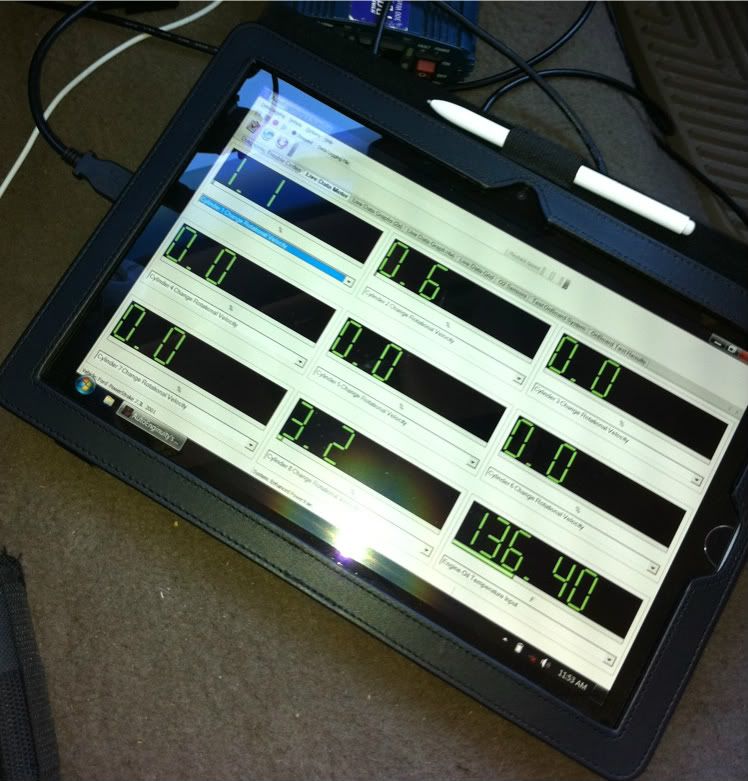
For AE (and vag-com) I use an Asus EEE slate which runs windows 7 and has two usb ports. A big reason for purchasing this type of unit was to run the vehicle diagnostic programs.
I've found it easier to handle in the vehicle than a laptop and it's nice not having to hunt for the pointer and use a touchpad mouse. Everything can be done with the stylus or finger.
No CD drive so I just copied the disk to a thumb drive and installed the software via that.
Tugly I thought this might be an appropriate hardware experience but let me know if you want this out of your thread and I'll delete the post.
Thread Starter
|
Hotshot
Joined: Jan 2011
Posts: 18,849
Likes: 179
From: Puget Sound
Thought I'd post this here to make those looking at purchasing a computer for AE aware of this type of option.
For AE (and vag-com) I use an Asus EEE slate which runs windows 7 and has two usb ports. A big reason for purchasing this type of unit was to run the vehicle diagnostic programs.
I've found it easier to handle in the vehicle than a laptop and it's nice not having to hunt for the pointer and use a touchpad mouse. Everything can be done with the stylus or finger.
No CD drive so I just copied the disk to a thumb drive and installed the software via that.
Tugly I thought this might be an appropriate hardware experience but let me know if you want this out of your thread and I'll delete the post.
For AE (and vag-com) I use an Asus EEE slate which runs windows 7 and has two usb ports. A big reason for purchasing this type of unit was to run the vehicle diagnostic programs.
I've found it easier to handle in the vehicle than a laptop and it's nice not having to hunt for the pointer and use a touchpad mouse. Everything can be done with the stylus or finger.
No CD drive so I just copied the disk to a thumb drive and installed the software via that.
Tugly I thought this might be an appropriate hardware experience but let me know if you want this out of your thread and I'll delete the post.
Absolutely perfect! I'm hoping to get plenty of software/hardware info in here. The touchpad can be a bit cumbersome, but greasy mitts on the touchscreen can have drawbacks as well. Cleaning a touchscreen with harsh solvents is a no-no - as is touching the screen with harsh solvents on your hands or gloves. A disposable screen protector would be in order, or a jug-o-Goop and a roll of paper towels "on hand" next to the computer.
Netbooks: These screens can be small and limiting - as mine is. There are tricks you can do to get more info on the screen.
This video is in Hi-Def. For those with good internet speed, open'er up!
Stinky Injectors.MP4 - YouTube
Trending Topics
Posting Guru
Joined: Mar 2011
Posts: 1,037
Likes: 0
From: Florida
Yeah I typically use the stylus but it won't be white for long. Used to use my work laptop but I don't think they care for oil and diesel on that! Luckily it was stolen before IT saw it.
FTE Stories
Ford Trucks for Ford Truck Enthusiasts

Top 6 Best Deals Available on New Fords & Lincolns Right Now
Brett Foote
This Hennessey Takes the Expedition Tremor's Off-Roading Capability to the Next Level
Verdad Gallardo
Top 10 Fords at 2026 Carlisle Ford Nationals
Joe Kucinski
3 Best / 3 Worst Parts of Modern Ford Ownership
Brett Foote
10 Amazing Upgrades That Solve Common Ford Truck Owner Headaches
Pouria Savadkouei
Every 2026 Ford Engine Explained
Brett Foote
10 Ugly Ford Trucks That We Still Kinda Love
Joe Kucinski
10 Things Every Truck Owner NEEDS (2026 Edition)
Michael S. Palmer
Rezvani's Latest Post-Apocalyptic Monster Is a Ford F-150 Raptor Underneath
Verdad Gallardo

Thread Starter
|
Hotshot
Joined: Jan 2011
Posts: 18,849
Likes: 179
From: Puget Sound
As for the healthy sound of the injectors, I agree. For a reference, 3 and 7 were replaced this summer and I can't hear any difference between them and the others. 7 and 8 sounded a little different because of their location from the microphones. The microphones are stereo, so I get the full effect by placing my head between the computer speakers.
Thread Starter
|
Hotshot
Joined: Jan 2011
Posts: 18,849
Likes: 179
From: Puget Sound
Now I laughed out loud. "Mine sound like that! Does that mean my injectors are stinky?"
One other tidbit: I clicked on the "wiper test". Almost $900 bucks worth of hardware and software to interface with the truck, and there I am - "Look at that! I can turn on the wipers from here!" I am such a goober.
"Mine sound like that! Does that mean my injectors are stinky?"One other tidbit: I clicked on the "wiper test". Almost $900 bucks worth of hardware and software to interface with the truck, and there I am - "Look at that! I can turn on the wipers from here!" I am such a goober.

Thread Starter
|
Hotshot
Joined: Jan 2011
Posts: 18,849
Likes: 179
From: Puget Sound
When I told the software to connect to the truck and the Vehicle Selection window popped up, I tried to get fancy by putting too much information in the fields and things got weird. I then put in Ford - 2000 - Powerstroke 7.3L and the rest of the settings knew what to do without my interference.
In the Communications Configuration, I uncheck the box for Automatically Connect on Launch. This is the only way to play back a previously recorded session. This also means I have to tell the software to connect to the truck, but I prefer having choices.
Oh, this is interesting: All Technical Service Bulletins to date are stored in the software bundle. If a trouble code pops up, all related TSBs will be listed in the popup. Very cool.
In the Communications Configuration, I uncheck the box for Automatically Connect on Launch. This is the only way to play back a previously recorded session. This also means I have to tell the software to connect to the truck, but I prefer having choices.
Oh, this is interesting: All Technical Service Bulletins to date are stored in the software bundle. If a trouble code pops up, all related TSBs will be listed in the popup. Very cool.

Hotshot


Joined: Nov 2006
Posts: 11,288
Likes: 269
From: North of Greenville
OK, now... you've let the cat's head out of the bag... might as well go ahead and let the rest of him out for us to see.
What I'm talking about are the Registry details which were left out of the AE instructions that you caught and prevented from causing a big mistake...
Do tell, now... what were those details and exactly what did you do to compensate for AE's lack of instruction?
What I'm talking about are the Registry details which were left out of the AE instructions that you caught and prevented from causing a big mistake...
Do tell, now... what were those details and exactly what did you do to compensate for AE's lack of instruction?