





it won't be long now
Thread Starter
|
old and in the way


Joined: Jul 1997
Posts: 5,921
Likes: 1,052
From: Lovely Hueytown Alabama

it won't be long now
still working on getting the frame prepped... maybe smear some bondo on Saturday... if the hurricane doesn't keep us away from it...
john

john

Elder User
Joined: Sep 2004
Posts: 863
Likes: 2
From: Grain Valley Mo.
John....FYI....I was looking at catalog for POR 15 and saw they now have bondo that can be baked in a oven. It seems like you were talking about powder coating your frame but bondo couldn't take the heat.
_______________
XFM
_______________
XFM

Post Fiend

Joined: Feb 2001
Posts: 6,328
Likes: 124
From: Iowa
"still working on getting the frame prepped... maybe smear some bondo on Saturday... if the hurricane doesn't keep us away from it..."
john
Hey Johnny Lightning
Gonna use the ol' hurricane excuse again this year are we? That darned Mother Nature sure slows a guy up don't she?
And not that you asked, but I am taking the truck for a ride today. Afraid the calipers are gonna sieze if I don't.
john
Hey Johnny Lightning
Gonna use the ol' hurricane excuse again this year are we? That darned Mother Nature sure slows a guy up don't she?
And not that you asked, but I am taking the truck for a ride today. Afraid the calipers are gonna sieze if I don't.

Elder User
Joined: Aug 2003
Posts: 628
Likes: 0
From: High Park, Toronto

The frame looks as close t finished as Damn i sto swearin'... can you stand the sense of completion?
BTW - do you live beside a park? Nice side yeard there!
Enjoy.
GW
BTW - do you live beside a park? Nice side yeard there!
Enjoy.
GW
Trending Topics

Postmaster
Joined: Mar 2000
Posts: 3,730
Likes: 13
From: Waynesville, OH
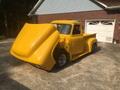
How'd you get the frame to cantilever out like that without the front bending down to the ground? Especially with that massive IFS you cobbled in there. And I thought your frame rotisserie had a stand on both ends. Maybe that's one of those trick photographs, eh?
FTE Stories
Ford Trucks for Ford Truck Enthusiasts

Top 10 Most Expensive Ford Trucks Ever Sold on Bring a Trailer
Joe Kucinski
2027 Ford Super Duty Buyer's Guide (Every Model, Engine, & Package)
Brett Foote
Top 10 Ford Truck Tragedies
Joe Kucinski
AEV FXL Super Duty - the Super Duty Raptor Ford Doesn't Make
Brett Foote
Lobo Vs Lobo: Proof the F-150 Lobo Should Be Even Lower!
Michael S. Palmer
Ford's 2001 Explorer Sportsman Concept Looks For a New Home
Verdad Gallardo
10 Best Ford Truck Engines We Miss the Most!
Joe Kucinski
2026 Shelby F-150 Off-Road: Better Than a Raptor R?
Brett Foote
2027 Super Duty Carhartt Package First Look: 12 Things You NEED to Know!
Michael S. Palmer
Postmaster
Joined: Mar 2000
Posts: 3,730
Likes: 13
From: Waynesville, OH
Originally Posted by NDspeed
wow how did you attach a photo?
did you make that frame stand yourself? and if so are you going to get rid of it once you get the frame rolling?
did you make that frame stand yourself? and if so are you going to get rid of it once you get the frame rolling?
... As far as attaching a photo, here are some instructions I posted a while ago. I believe they are still valid. You may need to have a certain number of posts before you can set up your gallery and insert pictures. It's been so long since I only had a few posts, I can't remember those details.
================================================== ========
To insert an image, the text in your post has to look like this:
[IMG]URL[/IMG]
The URL has to start with http:// for the FTE server to recognize it. The actual text that goes where the letters URL are above indicates precisely where on the Internet your picture is located.
OK, so now you are saying, how do I get the text that tells the server exactly where my picture is stored? Well, there are several ways to do it, but here is one fairly straightforward way for images in your FTE gallery.
1. Go to your gallery.
2. In your gallery, click on the number 2 below the image you want to include in your post. This will bring up the full size version of the picture on your screen.
3. RIGHT-click anywhere on the picture. A menu will pop up that has several options. Choose the Properties option.
4. Another window will now pop up showing a bunch of properties for the image - including the URL we want. Triple-click on the URL to select the whole thing, or, highlight the whole URL using the normal way you'd highlight any text with your mouse. Press CTRL-C to copy the URL text.
5. Click Cancel (or OK) to close the image properties box.
6. Exit your gallery.
7. Start your post in the normal way (post reply button when you are in a thread, or new topic button from the forum page).
8. Click on the Insert Image button (the mountains).
9. Remember the URL you copied from your gallery using CTRL-C? Well, now press CTRL-V to paste that URL text into the pop-up dialog box.
10. Click OK to exit the pop-up box and you're done.
Print out the instructions above and give it a try. If it works, do it about a dozen times until you can remember it without having to follow the instructions.
By the way, you can use the same method for any image on the Internet. As long as you can see the image full-size (not a little thumbnail version), you can right-click on it to get it's properties, copy the URL as described above, and paste it into the Insert Image dialog box. I find that opening a second browser window allows me to work with image URL's in one while I'm doing my post in the second one. Let us know if this works for you.

Thread Starter
|
old and in the way
Joined: Jul 1997
Posts: 5,921
Likes: 1,052
From: Lovely Hueytown Alabama
John, who cares about the frame, we want to know what mods you going to make to the frame stand. LOL....
let's pimp my rotessirie !!!!!!
plans are for 21" stagecoach wheels
and a nice 18 foot long neon under the middle rail
can't decide on the number of video screens... maybe two on each end
and at least 6 subs along the center
might use that trick cameleon paint and some japanese graphics on the rails
haven't figured out where to put the megaphone to make it really annoying
Well, did the "paint experts" sway you to use a certain type of paint? Grey if I remember correct?
Sherwin Williams Sunfire Urethane in a medium/dark gray metallic..
How'd you get the frame to cantilever out like that without the front bending down to the ground? Especially with that massive IFS you cobbled in there. And I thought your frame rotisserie had a stand on both ends. Maybe that's one of those trick photographs, eh?
oh great moderatoress... cantilever is a trick of simple magic... I just will it to do that... actually I washed the complete frame down with a concoction of all the free samples of Mark Martin's sponsors product... "sand HARD"
do you live beside a park? Nice side yard there!
no park... everything on this side of the road is the front yard and in the following shot one side... grass is my master... the area across the road is part of the 4 acres my 70+ year old neighbor owns/cuts (or does it own him)

and just so George doesn't start trying to levitate his frame... you can see the full pig roasting frame...
I was looking at catalog for POR 15 and saw they now have bondo that can be baked in a oven. It seems like you were talking about powder coating your frame but bondo couldn't take the heat.
I studied that hard but none of the 'coaters' could guarantee that it wouldn't pop out... the bondo's heat range is close to the cook temp... I didn't want to take the chance... with bondo and urethane it will look slick enough for me..
did you make that frame stand yourself? and if so are you going to get rid of it once you get the frame rolling?
I did not build it... a good friend, benevolent welder buddy did and GAVE IT TO ME !! so I qualify for the "you suck" award... don't plan on disposing of it but it will be available for locals to use if they need.. it breaks down into a small pile so it won't be hard to store...
later,
john
let's pimp my rotessirie !!!!!!
plans are for 21" stagecoach wheels
and a nice 18 foot long neon under the middle rail
can't decide on the number of video screens... maybe two on each end
and at least 6 subs along the center
might use that trick cameleon paint and some japanese graphics on the rails
haven't figured out where to put the megaphone to make it really annoying
Well, did the "paint experts" sway you to use a certain type of paint? Grey if I remember correct?
Sherwin Williams Sunfire Urethane in a medium/dark gray metallic..
How'd you get the frame to cantilever out like that without the front bending down to the ground? Especially with that massive IFS you cobbled in there. And I thought your frame rotisserie had a stand on both ends. Maybe that's one of those trick photographs, eh?
oh great moderatoress... cantilever is a trick of simple magic... I just will it to do that... actually I washed the complete frame down with a concoction of all the free samples of Mark Martin's sponsors product... "sand HARD"
do you live beside a park? Nice side yard there!
no park... everything on this side of the road is the front yard and in the following shot one side... grass is my master... the area across the road is part of the 4 acres my 70+ year old neighbor owns/cuts (or does it own him)
and just so George doesn't start trying to levitate his frame... you can see the full pig roasting frame...
I was looking at catalog for POR 15 and saw they now have bondo that can be baked in a oven. It seems like you were talking about powder coating your frame but bondo couldn't take the heat.
I studied that hard but none of the 'coaters' could guarantee that it wouldn't pop out... the bondo's heat range is close to the cook temp... I didn't want to take the chance... with bondo and urethane it will look slick enough for me..
did you make that frame stand yourself? and if so are you going to get rid of it once you get the frame rolling?
I did not build it... a good friend, benevolent welder buddy did and GAVE IT TO ME !! so I qualify for the "you suck" award... don't plan on disposing of it but it will be available for locals to use if they need.. it breaks down into a small pile so it won't be hard to store...
later,
john
Last edited by jniolon; Jul 8, 2005 at 05:15 PM.


Elder User
Joined: Mar 2003
Posts: 558
Likes: 0
From: Limestone, TN
John
Somehow I am confused..... I thought you were futher along than this. I thought I remember reading about an IFS install, Mustang gas tank install, truck moving about the neighborhood on a trailer....must be someone else I was thinking about.
Anyway that frame slow cooker looks really good, and I am sure the truck will look great when it is done.
God Bless
Bill
Somehow I am confused.....
I thought you were futher along than this. I thought I remember reading about an IFS install, Mustang gas tank install, truck moving about the neighborhood on a trailer....must be someone else I was thinking about. Anyway that frame slow cooker looks really good, and I am sure the truck will look great when it is done.
God Bless
Bill