








Hello..New Guy Intro

Thread Starter
|
New User
Joined: Feb 2014
Posts: 17
Likes: 0
Hello..New Guy Intro
Hows it going everyone. I have heard some great things about this Forum and its post have been a huge help so far. Helped me find some wheels for the ole girl already.
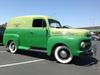
Just picked up another project that my wife is thrilled about 52' F5 that is complete and original with 39k miles. Was a local Parks and Rec Truck. The guy who had it bought it from them when he retired. Has original widowmakers but found a buddy that has 7 wheels that are locking style off the right year Studebaker M15 that was lug centering.
Anyways, plan is to get it completely operational and then enjoy the crap out of it and worry about paint later.
Will
Just picked up another project that my wife is thrilled about
52' F5 that is complete and original with 39k miles. Was a local Parks and Rec Truck. The guy who had it bought it from them when he retired. Has original widowmakers but found a buddy that has 7 wheels that are locking style off the right year Studebaker M15 that was lug centering. Anyways, plan is to get it completely operational and then enjoy the crap out of it and worry about paint later.
Will
Marmon-Herrington Man


Joined: Jul 2005
Posts: 11,986
Likes: 446
From: Central Illinois

Welcome Will. Glad to see another big truck being saved. But sorry to see an M15 as the wheel donor since I love them too. If you score the M15 wheels make sure they are the 20" option and not the 17" option. The 17" Budd #44820s supplied on many/most M15s won't clear your rear drums. Good luck with it, and pictures are always appreciated here. Stu
Thread Starter
|
New User
Joined: Feb 2014
Posts: 17
Likes: 0
The M15 wheels are 20's. He is in the process of mustang 2 front clip and chopping it up to pickup size. Sad, but saved me scrapping truck due to budget and cost of going any other direction.
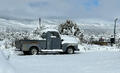
I am in the Land of Confusion (Kansas). Trying to get pics up but I think my pictures are too big, wont load them for some reason. Only pics I have so far are where I found the ole girl and 1 officially loaded and headed home. The 4' snow drifts have prevented any others.
Thanks for the welcome!!!
I am in the Land of Confusion (Kansas). Trying to get pics up but I think my pictures are too big, wont load them for some reason. Only pics I have so far are where I found the ole girl and 1 officially loaded and headed home. The 4' snow drifts have prevented any others.
Thanks for the welcome!!!
Trending Topics
Lead Driver

Joined: Nov 2002
Posts: 9,688
Likes: 1,255
From: Jefferson City, MO
Welcome to FTE!
We love pictures of all types. Looking forward to seeing your truck. Sounds like you have a great plan and already have the widowmakers taken care of. That's awesome. Sorry about the Studebaker though.
We love pictures of all types. Looking forward to seeing your truck. Sounds like you have a great plan and already have the widowmakers taken care of. That's awesome. Sorry about the Studebaker though.
FTE Stories
Ford Trucks for Ford Truck Enthusiasts

Top 10 Fords at 2026 Carlisle Ford Nationals
Joe Kucinski
3 Best / 3 Worst Parts of Modern Ford Ownership
Brett Foote
10 Amazing Upgrades That Solve Common Ford Truck Owner Headaches
Pouria Savadkouei
Every 2026 Ford Engine Explained
Brett Foote
10 Ugly Ford Trucks That We Still Kinda Love
Joe Kucinski
10 Things Every Truck Owner NEEDS (2026 Edition)
Michael S. Palmer
Rezvani's Latest Post-Apocalyptic Monster Is a Ford F-150 Raptor Underneath
Verdad Gallardo
Top 10 Most Expensive Ford Trucks Ever Sold on Bring a Trailer
Joe Kucinski
2027 Ford Super Duty Buyer's Guide (Every Model, Engine, & Package)
Brett Foote

Thread Starter
|
New User
Joined: Feb 2014
Posts: 17
Likes: 0
Where is the best place to get brake parts? I havent got them apart yet but will be putting shoes and cylinders and all the other goodies NEW on before I drive this thing.
Also, have you guys found a good place to get the tires for the original wheels that wont need a loan to buy?
Also, have you guys found a good place to get the tires for the original wheels that wont need a loan to buy?

Post Fiend
Joined: Sep 2006
Posts: 14,325
Likes: 14
From: Island Southeast Alaska
Here ya go
Could we see some pictures? Here is how.
But I got ta say becoming a supporter is the fastest and easiest way to post pics right from
your whatever pad/cell thing or home computer.
Few of us look in the users Gallery or album as you can see by your recent visitors.
Quote:
Originally Posted by 76f350spercamprspeal
Welcome to FTE, Best Damn Forum EVER!
------------------------
Here's How to Post Pictures:
1. Login to FTE.
2.Click User CP (In the Top Left Hand Corner)
3.(On the Left, There will be a list, The 5th Option Down, will say "Pictures & Albums) Click That.
4.Then, Click Add Album, Enter a title, and description, if ya want to.
5. Click Upload Pictures, Then click Browse, Locate the Files of your truck. (You can add 3 files at a time)
5. Click Upload.
6. Add a description to the individual pictures, then click save.
7. Add more files if ya want.
8. Click The Picture you want to post, it will give you two codes at the bottom, Right Click The Second one (It say's BB Code, Then Say's [IMG]http:blahblahblah...[/IMG])
Then, Once that is highlighted, Right Click, Then Copy, Then Paste it into your post.
You can add up to 30 Images in one FTE Post.
If, Ya need any help, Don't hesitate to ask.
Quote:
Originally Posted by old_dan
You can also go to the "Garage" tab and start an album right here on FTE. After you post pictures to an album, we can look in your album, but you'll also be able to "insert a picture" by pasting in a link to the picture in your album.
It seems awkward, but whenever you "insert a picture" to one of these threads, the forum is looking for the picture somewhere on the web (which is always available) rather than from somewhere on your hard drive (which isn't always available).
Quote:
Originally Posted By Jolly Roger Joe
Welcome to FTE!
Go to Image hosting, free photo sharing & video sharing at Photobucket and sign up for a free account. Then create an album for your truck. Upload any pics you want to post on FTE to that album. Have this album open on your computer when you want to post pics on FTE.
While you're making a post on FTE, select the pic you want to post from your Photobucket album. When the large version of the pic is open, right mouse click on it and select "View Image Info". The image info will be highlighted and will look something like this:
The best photos and videos | Photobucket
Copy that highlighted info (right click / copy).
When you have the spot in your post where you want the pic to be placed, select the "Insert Image" icon at the top of the post (looks like a mountain) and paste (right click / paste) the image info you copied in the highlighted box (just shows "http://" when it opens).
Your pic will be placed in the post.
Hope that helps.
Here's a tutorial Bob put together: https://www.ford-trucks.com/forums/67...-pictures.html Bob's link is not working. Can someone in the know tell me why?
How to upload pictures to the FTE Forums. - YouTube. Thanks Sam Rusty_Old_F250. Best we can find is that this video was done by Gundown64
But I got ta say becoming a supporter is the fastest and easiest way to post pics right from
your whatever pad/cell thing or home computer.
Few of us look in the users Gallery or album as you can see by your recent visitors.
Quote:
Originally Posted by 76f350spercamprspeal
Welcome to FTE, Best Damn Forum EVER!
------------------------
Here's How to Post Pictures:
1. Login to FTE.
2.Click User CP (In the Top Left Hand Corner)
3.(On the Left, There will be a list, The 5th Option Down, will say "Pictures & Albums) Click That.
4.Then, Click Add Album, Enter a title, and description, if ya want to.
5. Click Upload Pictures, Then click Browse, Locate the Files of your truck. (You can add 3 files at a time)
5. Click Upload.
6. Add a description to the individual pictures, then click save.
7. Add more files if ya want.
8. Click The Picture you want to post, it will give you two codes at the bottom, Right Click The Second one (It say's BB Code, Then Say's [IMG]http:blahblahblah...[/IMG])
Then, Once that is highlighted, Right Click, Then Copy, Then Paste it into your post.
You can add up to 30 Images in one FTE Post.
If, Ya need any help, Don't hesitate to ask.
Quote:
Originally Posted by old_dan
You can also go to the "Garage" tab and start an album right here on FTE. After you post pictures to an album, we can look in your album, but you'll also be able to "insert a picture" by pasting in a link to the picture in your album.
It seems awkward, but whenever you "insert a picture" to one of these threads, the forum is looking for the picture somewhere on the web (which is always available) rather than from somewhere on your hard drive (which isn't always available).
Quote:
Originally Posted By Jolly Roger Joe
Welcome to FTE!
Go to Image hosting, free photo sharing & video sharing at Photobucket and sign up for a free account. Then create an album for your truck. Upload any pics you want to post on FTE to that album. Have this album open on your computer when you want to post pics on FTE.
While you're making a post on FTE, select the pic you want to post from your Photobucket album. When the large version of the pic is open, right mouse click on it and select "View Image Info". The image info will be highlighted and will look something like this:
The best photos and videos | Photobucket
Copy that highlighted info (right click / copy).
When you have the spot in your post where you want the pic to be placed, select the "Insert Image" icon at the top of the post (looks like a mountain) and paste (right click / paste) the image info you copied in the highlighted box (just shows "http://" when it opens).
Your pic will be placed in the post.
Hope that helps.
Here's a tutorial Bob put together: https://www.ford-trucks.com/forums/67...-pictures.html Bob's link is not working. Can someone in the know tell me why?
How to upload pictures to the FTE Forums. - YouTube. Thanks Sam Rusty_Old_F250. Best we can find is that this video was done by Gundown64