


custom frame choices

Thread Starter
|
Cross-Country

Joined: Feb 2013
Posts: 70
Likes: 19
From: puyallup
custom frame choices
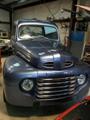
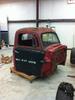
So I have a 1950 ford F1 and it has a 70 nova front clip and the stock rear end with a 350/350 combo.
My plan is to ditch the 350/350 for a 428 cj and a top loader.
So the rear clip has to go but the nova clip is to wide as the wheels rub when I try to lower it.
So I`m thinking full frame replacement and a narrower front suspension to be able to tuck the wheels in and slam it.
Does anybody have any suggestions besides Art Morrison?
Nearly had a heart attack looking at their prices!
My plan is to ditch the 350/350 for a 428 cj and a top loader.
So the rear clip has to go but the nova clip is to wide as the wheels rub when I try to lower it.
So I`m thinking full frame replacement and a narrower front suspension to be able to tuck the wheels in and slam it.
Does anybody have any suggestions besides Art Morrison?
Nearly had a heart attack looking at their prices!
Logistics Pro
Joined: May 2010
Posts: 3,793
Likes: 19
From: Austin
Hey Jabber,
I think TCI makes a chassis as well - but it's high as well.
Though I have to say after adding Mustang II IFS & Explorer rear end - it might have been cheaper to buy the nice TCI full chassis.
Post some pics of your '50 so we can see what you are working with.
I've got a '50 as well.
Ben in Austin
1950 F1 i
I think TCI makes a chassis as well - but it's high as well.
Though I have to say after adding Mustang II IFS & Explorer rear end - it might have been cheaper to buy the nice TCI full chassis.
Post some pics of your '50 so we can see what you are working with.
I've got a '50 as well.
Ben in Austin
1950 F1 i
Logistics Pro
Joined: May 2010
Posts: 3,793
Likes: 19
From: Austin
Hey Jabber,
They make posting pics a little interesting. The easiest way is to pay $20 & join - then you get a paperclip icon & can post directly from your harddrive or network. The other method has you posting to a third party photo site & then linking back to that.
Good luck over there. Look forward to seeing your truck!
Ben in Austin
1950 F1
They make posting pics a little interesting. The easiest way is to pay $20 & join - then you get a paperclip icon & can post directly from your harddrive or network. The other method has you posting to a third party photo site & then linking back to that.
Good luck over there. Look forward to seeing your truck!
Ben in Austin
1950 F1

Post Fiend
Joined: Sep 2006
Posts: 14,325
Likes: 14
From: Island Southeast Alaska
Could we see some pictures? Here is how.
But I got ta say becoming a supporter is the fastest and easiest way to post pics right from
your whatever pad/cell thing or home computer.
Few of us look in the users Gallery or album as you can see by your recent visitors.
Quote:
Originally Posted by 76f350spercamprspeal
Welcome to FTE, Best Damn Forum EVER!
------------------------
Here's How to Post Pictures:
1. Login to FTE.
2.Click User CP (In the Top Left Hand Corner)
3.(On the Left, There will be a list, The 5th Option Down, will say "Pictures & Albums) Click That.
4.Then, Click Add Album, Enter a title, and description, if ya want to.
5. Click Upload Pictures, Then click Browse, Locate the Files of your truck. (You can add 3 files at a time)
5. Click Upload.
6. Add a description to the individual pictures, then click save.
7. Add more files if ya want.
8. Click The Picture you want to post, it will give you two codes at the bottom, Right Click The Second one (It say's BB Code, Then Say's [IMG]http:blahblahblah...[/IMG])
Then, Once that is highlighted, Right Click, Then Copy, Then Paste it into your post.
You can add up to 30 Images in one FTE Post.
If, Ya need any help, Don't hesitate to ask.
Quote:
Originally Posted by old_dan
You can also go to the "Garage" tab and start an album right here on FTE. After you post pictures to an album, we can look in your album, but you'll also be able to "insert a picture" by pasting in a link to the picture in your album.
It seems awkward, but whenever you "insert a picture" to one of these threads, the forum is looking for the picture somewhere on the web (which is always available) rather than from somewhere on your hard drive (which isn't always available).
Quote:
Originally Posted By Jolly Roger Joe
Welcome to FTE!
Go to Image hosting, free photo sharing & video sharing at Photobucket and sign up for a free account. Then create an album for your truck. Upload any pics you want to post on FTE to that album. Have this album open on your computer when you want to post pics on FTE.
While you're making a post on FTE, select the pic you want to post from your Photobucket album. When the large version of the pic is open, right mouse click on it and select "View Image Info". The image info will be highlighted and will look something like this:
The best photos and videos | Photobucket
Copy that highlighted info (right click / copy).
When you have the spot in your post where you want the pic to be placed, select the "Insert Image" icon at the top of the post (looks like a mountain) and paste (right click / paste) the image info you copied in the highlighted box (just shows "http://" when it opens).
Your pic will be placed in the post.
Hope that helps.
Here's a tutorial Bob put together: https://www.ford-trucks.com/forums/67...-pictures.html Bob's link is not working. Can someone in the know tell me why?
How to upload pictures to the FTE Forums. - YouTube. Thanks Sam Rusty_Old_F250. Best we can find is that this video was done by Gundown64
But I got ta say becoming a supporter is the fastest and easiest way to post pics right from
your whatever pad/cell thing or home computer.
Few of us look in the users Gallery or album as you can see by your recent visitors.
Quote:
Originally Posted by 76f350spercamprspeal
Welcome to FTE, Best Damn Forum EVER!
------------------------
Here's How to Post Pictures:
1. Login to FTE.
2.Click User CP (In the Top Left Hand Corner)
3.(On the Left, There will be a list, The 5th Option Down, will say "Pictures & Albums) Click That.
4.Then, Click Add Album, Enter a title, and description, if ya want to.
5. Click Upload Pictures, Then click Browse, Locate the Files of your truck. (You can add 3 files at a time)
5. Click Upload.
6. Add a description to the individual pictures, then click save.
7. Add more files if ya want.
8. Click The Picture you want to post, it will give you two codes at the bottom, Right Click The Second one (It say's BB Code, Then Say's [IMG]http:blahblahblah...[/IMG])
Then, Once that is highlighted, Right Click, Then Copy, Then Paste it into your post.
You can add up to 30 Images in one FTE Post.
If, Ya need any help, Don't hesitate to ask.
Quote:
Originally Posted by old_dan
You can also go to the "Garage" tab and start an album right here on FTE. After you post pictures to an album, we can look in your album, but you'll also be able to "insert a picture" by pasting in a link to the picture in your album.
It seems awkward, but whenever you "insert a picture" to one of these threads, the forum is looking for the picture somewhere on the web (which is always available) rather than from somewhere on your hard drive (which isn't always available).
Quote:
Originally Posted By Jolly Roger Joe
Welcome to FTE!
Go to Image hosting, free photo sharing & video sharing at Photobucket and sign up for a free account. Then create an album for your truck. Upload any pics you want to post on FTE to that album. Have this album open on your computer when you want to post pics on FTE.
While you're making a post on FTE, select the pic you want to post from your Photobucket album. When the large version of the pic is open, right mouse click on it and select "View Image Info". The image info will be highlighted and will look something like this:
The best photos and videos | Photobucket
Copy that highlighted info (right click / copy).
When you have the spot in your post where you want the pic to be placed, select the "Insert Image" icon at the top of the post (looks like a mountain) and paste (right click / paste) the image info you copied in the highlighted box (just shows "http://" when it opens).
Your pic will be placed in the post.
Hope that helps.
Here's a tutorial Bob put together: https://www.ford-trucks.com/forums/67...-pictures.html Bob's link is not working. Can someone in the know tell me why?
How to upload pictures to the FTE Forums. - YouTube. Thanks Sam Rusty_Old_F250. Best we can find is that this video was done by Gundown64

Mountain Pass


Joined: Oct 2013
Posts: 104
Likes: 77
From: Chanhassen, Minnesota

I bought a TCI frame in June for my 55 F 100. Paid $9012 and recieved frame with rear leaf, 460/C6 mounts, SS brake lines, power brake w/ booster, power steering rack, 4 wheel disc, 3:50 posi, front and rear sway bars. The rear axle assy is a new Currie unit. Freight to Iowa was $ 700. I looked at Fatman frame but was a used 9 inch rear. The reason I went with a new frame was one for safety and another was all the engineering was done. I just got done building a T bucket from ground up and found myself redoing a lot of things on the frame such as brackets, body mounts, running brake and fuel lines. Install a bracket or mount and it would be in way of something else. The new TCI frame has the new updated front suspension that the Dec. 13 Street Rodder had an article on.

Fleet Mechanic

Joined: Sep 2004
Posts: 1,674
Likes: 2
From: Rowland Heights
Talk or email Steve Stillwell at TCI and see what Steve can do for you on this.
Mention my name Ed Oe
Sales Representative:
Steve Stillwell:
800-984-6259
ext. 246
steve@totalcostinvolved.com
Mention my name Ed Oe
Sales Representative:
Steve Stillwell:
800-984-6259
ext. 246
steve@totalcostinvolved.com
Trending Topics
Mountain Pass
Joined: Oct 2013
Posts: 104
Likes: 77
From: Chanhassen, Minnesota
What I was trying to say in my post was I wanted a frame already engineered and built so I would not have to do all of the welding and fabricating that was involved with building the T bucket. No problem what so ever with the TCI frame or customer service.
FTE Stories
Ford Trucks for Ford Truck Enthusiasts

Top 10 Fords at 2026 Carlisle Ford Nationals
Joe Kucinski
3 Best / 3 Worst Parts of Modern Ford Ownership
Brett Foote
10 Amazing Upgrades That Solve Common Ford Truck Owner Headaches
Pouria Savadkouei
Every 2026 Ford Engine Explained
Brett Foote
10 Ugly Ford Trucks That We Still Kinda Love
Joe Kucinski
10 Things Every Truck Owner NEEDS (2026 Edition)
Michael S. Palmer
Rezvani's Latest Post-Apocalyptic Monster Is a Ford F-150 Raptor Underneath
Verdad Gallardo
Top 10 Most Expensive Ford Trucks Ever Sold on Bring a Trailer
Joe Kucinski
2027 Ford Super Duty Buyer's Guide (Every Model, Engine, & Package)
Brett Foote
Thread Starter
|
Cross-Country
Joined: Feb 2013
Posts: 70
Likes: 19
From: puyallup

Mountain Pass

Joined: Jun 2012
Posts: 247
Likes: 12
From: Walker, LA
If you don't want to get involved in welding and whatnot take a look at chassis engineering....they offer a complete bolt in front clip. I know myself and a few others installed this and it is of high quality. I'm a novice welder and didn't trust myself on welding to that extent and on something that important safety-wise.

Thread
Thread Starter
Forum
Replies
Last Post
hillcogolfer
1948 - 1956 F1, F100 & Larger F-Series Trucks
9
Jul 8, 2018 07:01 PM
Blue50F-1
1948 - 1956 F1, F100 & Larger F-Series Trucks
17
Jul 4, 2016 01:41 PM
VineMan
1948 - 1956 F1, F100 & Larger F-Series Trucks
14
Aug 21, 2014 01:00 PM
havi
1948 - 1956 F1, F100 & Larger F-Series Trucks
5
Jul 1, 2006 07:26 PM