When you click on links to various merchants on this site and make a purchase, this can result in this site earning a commission. Affiliate programs and affiliations include, but are not limited to, the eBay Partner Network.
That does seem to have cleaned things up a bit. Probably something got miffed when the theme changed. No more ads now. While I do wish that there was a forum runner app for WP8 I know it'll never happen so this makes things a bit nicer than that damned BB theme.
I've been having an issue with my phone?/ mobile app. When i get an email on my phone to a thread I am subscribed to and I push the link to go to the thread it appears that it tries and then I get a Corrupted Content Error, below this message I get a description of "the page you are trying to view cannot be shown because an error in the data transmission was detected.
If I pick the link to disable the post it works.
This only started when my phone did it's last software update. I have tried reloading the IB app, but too no avail.
I've been having an issue with my phone?/ mobile app. When i get an email on my phone to a thread I am subscribed to and I push the link to go to the thread it appears that it tries and then I get a Corrupted Content Error, below this message I get a description of "the page you are trying to view cannot be shown because an error in the data transmission was detected.
If I pick the link to disable the post it works.
This only started when my phone did it's last software update. I have tried reloading the IB app, but too no avail.
Can you tell me what phone you have? Are you saying when you click the link it opens in the app or your browser? Is there a way you can post a screen shot?
Can you tell me what phone you have? Are you saying when you click the link it opens in the app or your browser? Is there a way you can post a screen shot?
Thanks,
Renee
Samsung Note 3, browser, I believe, when I hit the disable link it opens though the App, I believe.
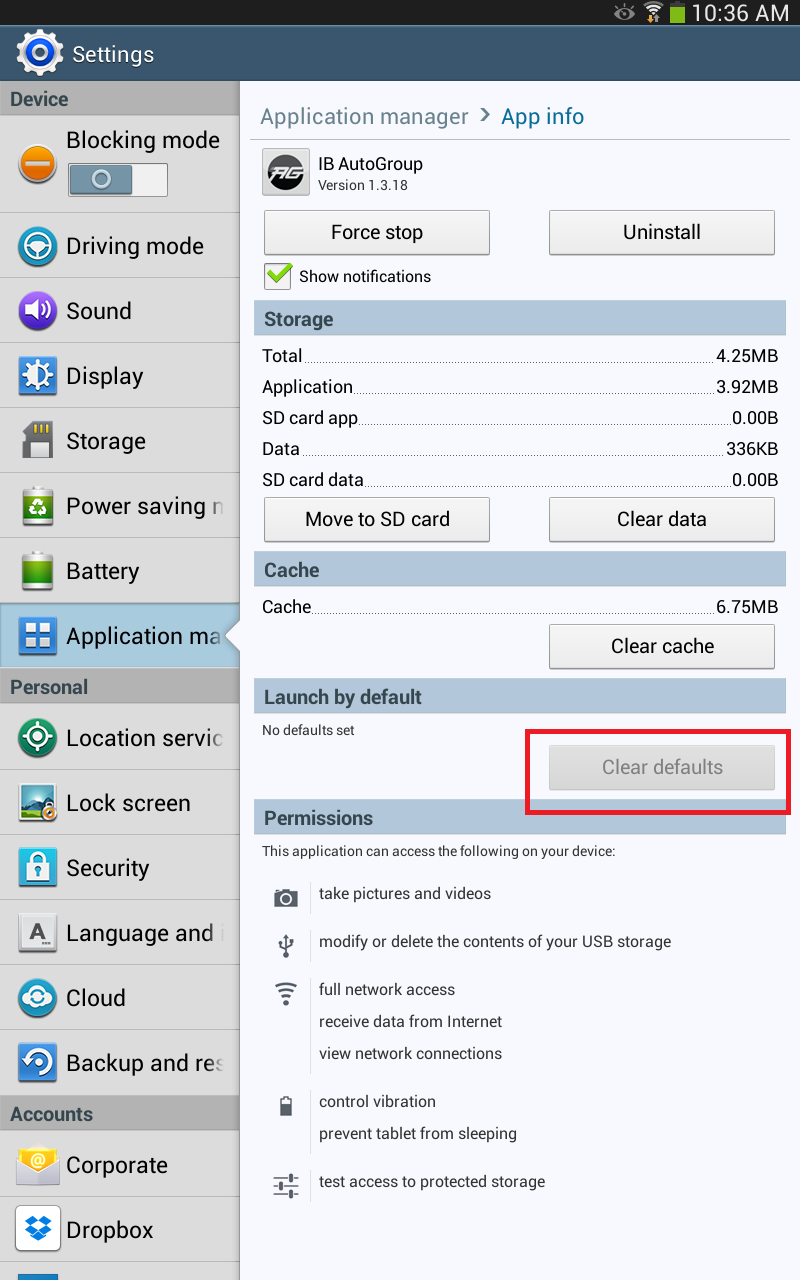
After testing this out on a Note 3, it looks like the app doesn't support opening outside links. I think you probably had your device remember to open anything for Ford-Trucks in the app, so you will need to remove that and open the links in your browser instead. Below is where you go in the settings, then application manager and click on the IB Auto group app and click "clear defaults" and hopefully the new redesigned app will support this feature.
Sorry I took so long, I must have used the disable link the last time. Anyways I followed your directions but the clear defaults button does nothing. It wasn't lit up and didn't appear to do anything.
Thanks for the effort.
Ok,I inherited my first smart phone from my son. It is a motorola electrify. I don't receive a prompt when I go to the nav bar asking me if I would like to view the mobile template. Is there something I need to download to get to the mobile version? Thanks!!
On my phone it doesntd even ask me if I want the mobile version, it just defaults me there after so long. Very irritating, I like the full site better.
On my phone it doesntd even ask me if I want the mobile version, it just defaults me there after so long. Very irritating, I like the full site better.
If you scroll to the bottom of the mobile version it says "View full site" if you click that it will take you back to the full site.
Ok,I inherited my first smart phone from my son. It is a motorola electrify. I don't receive a prompt when I go to the nav bar asking me if I would like to view the mobile template. Is there something I need to download to get to the mobile version? Thanks!!
No, when you go to Ford-trucks.com/forums it should default you to the mobile version. Have you tried that?
I do have to say the mobile site is much better now, but I still prefer using the full site on my phone. Maybe its just because I am used to the full site lol.
Another gripe about mobile site. This is an issue I experience on my Note 4, and S6.
Please put the reply to thread box directly after the last post on the page, instead of after the related posts. Not only is it counter intuitive, it's too easy to quote out of context.
With VB it's too easy to make things over the top.
I think we may be talking about two different inputs. I'm referring to the large blue reply banner which appears after the related thread content (green circle). I'm sure you're speaking of the quick reply at bottom of screen(red circle). I used the green circled button for this reply to see if it was associated to this original thread.
Yes, even with the static reply button in the bottom header, I still look for the blue reply banner directly after the last post on the current page. Sorry, I'm getting old.
This Hennessey Takes the Expedition Tremor's Off-Roading Capability to the Next Level
Slideshow: The VelociRaptor Expedition gains a lift, upgraded suspension, Brembo brakes, and trail-ready equipment while retaining the stock 440-horsepower EcoBoost V6.
Rezvani's Latest Post-Apocalyptic Monster Is a Ford F-150 Raptor Underneath
Slideshow: Called the Fortress, the 850-horsepower pickup combines Raptor underpinnings with military-inspired features, survival equipment, and a starting price of $285,000.