


 [/IMG]
 [/IMG]
 [/IMG]
 [/IMG]

Ford flatbed plans, finally!
Elder User
Joined: Jul 2005
Posts: 739
Likes: 0
From: Morgantown, WV

Hey Bob, In Autocad to save as a good PDF got to plot layout and plot as a PDF, it then actually saves your drawling as a PDF instead of actually printing it. Then just save it wherever you want it instead of scanning it. Much easier.
Oh, and thanks for the drawings and specs.
Oh, and thanks for the drawings and specs.

Thread Starter
|
Hotshot


Joined: Jan 2001
Posts: 16,875
Likes: 3,116
From: SE Wisc. (the Rust Belt)
You know, I really hate it when some one tells me something I didn't know!
I actually use InteliCAD, it works just like AutoCAD but is about 1/10 the price. I didn't know until you mentioned it that it has a .pdf print option, thanks. I didn't even think about looking. I have been using CAD for 10+ years but it's not my main job so I'm not the most proficient person with it. I took an accelerated CAD course about 12 years ago because my employer at the time wanted a back up CAD operator so they paid for the course. After I completed the course the company never had me do any work on the system. I ended up quitting about a year later and didn't start using CAD until about two years later when I started my own business and starting working off of designs of my customers. I forgot 90% of everything I learned in the class. Just recently I took a free beginner CAD course from the local high school held on four Sundays. It helped a lot. I knew the basics but the teacher showed us a lot I didn't know, the main one doing isometric drawings. Just goes to prove, you can always learn something new.
I'll revise my web site page with the new .pdf files as soon as I get time.
Again, thanks.
I actually use InteliCAD, it works just like AutoCAD but is about 1/10 the price. I didn't know until you mentioned it that it has a .pdf print option, thanks. I didn't even think about looking. I have been using CAD for 10+ years but it's not my main job so I'm not the most proficient person with it. I took an accelerated CAD course about 12 years ago because my employer at the time wanted a back up CAD operator so they paid for the course. After I completed the course the company never had me do any work on the system. I ended up quitting about a year later and didn't start using CAD until about two years later when I started my own business and starting working off of designs of my customers. I forgot 90% of everything I learned in the class. Just recently I took a free beginner CAD course from the local high school held on four Sundays. It helped a lot. I knew the basics but the teacher showed us a lot I didn't know, the main one doing isometric drawings. Just goes to prove, you can always learn something new.
I'll revise my web site page with the new .pdf files as soon as I get time.
Again, thanks.
Elder User
Joined: Jul 2005
Posts: 739
Likes: 0
From: Morgantown, WV
Today is my proudest day on FTE. I finally knew something that Bob didn't know.
Just kidding. Seriously though, I am used to using AutoCad - Autodesk 3-D Map 2009, and one of the best tricks was to plot a PDF which actually makes it a PDf file. Just a cool trick. I had to learn this option b/c most small firms don't have CAD, so you would have submit large drawlings or plans to them via a PDF file, so it came in handy a lot. So anytime you make a product/file in CAD and you want to create a PDF it is much easier to plot it instead of trying to scan it.
Now if I could only figure out how to make AutoCad build me a Ford Script bed, that would be cool.
Just kidding. Seriously though, I am used to using AutoCad - Autodesk 3-D Map 2009, and one of the best tricks was to plot a PDF which actually makes it a PDf file. Just a cool trick. I had to learn this option b/c most small firms don't have CAD, so you would have submit large drawlings or plans to them via a PDF file, so it came in handy a lot. So anytime you make a product/file in CAD and you want to create a PDF it is much easier to plot it instead of trying to scan it.
Now if I could only figure out how to make AutoCad build me a Ford Script bed, that would be cool.

Senior User
Joined: May 2008
Posts: 175
Likes: 3
From: Fort Walton Beach, FL
Hey Bob,
(kind of off topic) is the width of the flatbeds the same for the different trucks? (F2/F3 vs F4 vs F5 and up) I understand the length of them is different, but didn't know about width.
One of the reasons I ask is because I have some pictures of an F2/F3 stake bed made by Home page Horkey wood and Parts. I plan on contacting them to see if they would/could make a 9 foot bed for my F4 but I wanted to make sure the width would be the same. The flatbed frame they make is very nice and mimics the "Ford" script bed, only without the "Ford" script.
thanks
David
(kind of off topic) is the width of the flatbeds the same for the different trucks? (F2/F3 vs F4 vs F5 and up) I understand the length of them is different, but didn't know about width.
One of the reasons I ask is because I have some pictures of an F2/F3 stake bed made by Home page Horkey wood and Parts. I plan on contacting them to see if they would/could make a 9 foot bed for my F4 but I wanted to make sure the width would be the same. The flatbed frame they make is very nice and mimics the "Ford" script bed, only without the "Ford" script.
thanks
David
Thread Starter
|
Hotshot
Joined: Jan 2001
Posts: 16,875
Likes: 3,116
From: SE Wisc. (the Rust Belt)
David,
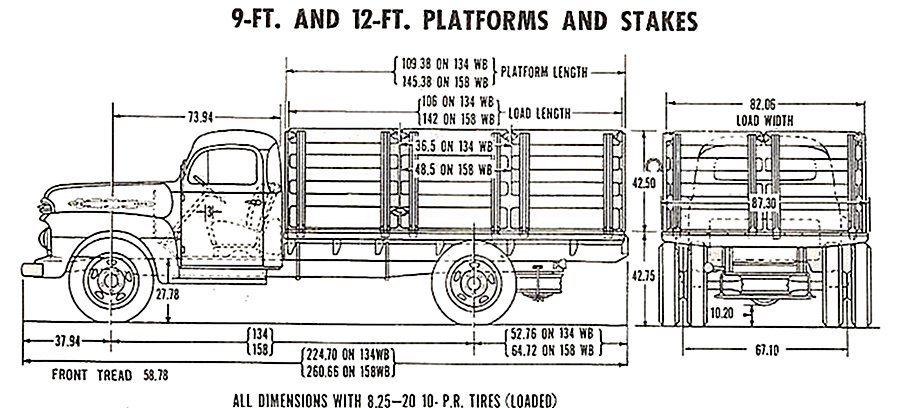
The widths are different:
F-1 flatbed:

F-2 & F-3 flatbed:

F-4 through F-6 flatbeds:
I didn't know Horkey is reproducing flatbeds. I went to their web site and couldn't find anything about them. I wonder if they bought Northern Classics patterns and tooling.
The widths are different:
F-2 & F-3 flatbed:
F-4 through F-6 flatbeds:
I didn't know Horkey is reproducing flatbeds. I went to their web site and couldn't find anything about them. I wonder if they bought Northern Classics patterns and tooling.
Thread Starter
|
Hotshot
Joined: Jan 2001
Posts: 16,875
Likes: 3,116
From: SE Wisc. (the Rust Belt)
I couldn't tell from your pictures if their bed had the Ford script on the back. I know Northern's was an exact copy, licensed by Ford, and they were very protective of their parts. I called them once to see if I could buy just buy the back beam and was told no. I know some were able to buy parts for their stock flatbeds from Northern at one time but they stopped. I think someone told me the stopped selling replacement parts because they got heat from Ford.
Horkey's bed looks nice even if it doesn't have the script. How much are they charging for the F-2 beds?
Horkey's bed looks nice even if it doesn't have the script. How much are they charging for the F-2 beds?
Elder User
Joined: Jul 2005
Posts: 739
Likes: 0
From: Morgantown, WV
David,
Can you PM some details about the bed, turnaround time, price, options, shipping, etc please. Thanks. Or post this info up on this post as well for others. Thanks.
Tanner
Can you PM some details about the bed, turnaround time, price, options, shipping, etc please. Thanks. Or post this info up on this post as well for others. Thanks.
Tanner
FTE Stories
Ford Trucks for Ford Truck Enthusiasts

AEV FXL Super Duty - the Super Duty Raptor Ford Doesn't Make
Brett Foote
Lobo Vs Lobo: Proof the F-150 Lobo Should Be Even Lower!
Michael S. Palmer
Ford's 2001 Explorer Sportsman Concept Looks For a New Home
Verdad Gallardo
10 Best Ford Truck Engines We Miss the Most!
Joe Kucinski
2026 Shelby F-150 Off-Road: Better Than a Raptor R?
Brett Foote
2027 Super Duty Carhartt Package First Look: 12 Things You NEED to Know!
Michael S. Palmer
10 Most Surprising 2026 Ford Truck Features!
Joe Kucinski
Top 10 Ford Trucks Coming to Mecum Indy 2026
Brett Foote
5 Best / 5 Worst Ford Truck Wheels of All Time
Joe Kucinski
Senior User
Joined: May 2008
Posts: 175
Likes: 3
From: Fort Walton Beach, FL
Bob, Tanner:
Let me get back with Horkey's and get the information for you. A good friend of mine originally called them and was sent the pictures so I don't know the cost or anything, but I'll find out and update this post.
Let me get back with Horkey's and get the information for you. A good friend of mine originally called them and was sent the pictures so I don't know the cost or anything, but I'll find out and update this post.

Thread Starter
|
Hotshot
Joined: Jan 2001
Posts: 16,875
Likes: 3,116
From: SE Wisc. (the Rust Belt)
I got lucky, I found the bed for my F-4 for $200 about four years ago. It was in really nice shape. Only has a couple of rust throughs, both underneath where the repairs wont' be visible. The sides, front and back are almost perfect. The real wild thing is after all these years it had every piece of hardware. The unbelievable thing about that is when we were taking the side off to load it on my trailer the wood was so bad most of it turned to powder. I have no idea how all the hardware stayed in tact. It was on a beat up '57 Ch**y when I bought. The guy just bought the truck for the engine for another project he had.
When Northern sold them I think they started at $3000 for the F-1 and up to $4500 for the larger trucks.
When Northern sold them I think they started at $3000 for the F-1 and up to $4500 for the larger trucks.
Elder User
Joined: Jul 2005
Posts: 739
Likes: 0
From: Morgantown, WV
Well that's an insane price if these stakebodies sell for that. I would rather spend $2k on a full metal bed from Mid-Fifty. I have been looking for an original Ford Script locally, but no luck yet. What years did this exact bed come on? I think I have seen them on older model's like 60's and 70's Ford F-350's as an example.

Senior User
Joined: Jul 2004
Posts: 216
Likes: 0
From: North Branch, MI
Bob;
Download this pdfCreator. It installs as a printer then just select it as the printer and print your autocad file to it. It will create it as a pdf and gives you some other options as well.
It's open source software and works great.
Download PDFCreator 0.9.7 - FileHippo.com
Have a great day....
Bob G
Download this pdfCreator. It installs as a printer then just select it as the printer and print your autocad file to it. It will create it as a pdf and gives you some other options as well.
It's open source software and works great.
Download PDFCreator 0.9.7 - FileHippo.com
Have a great day....
Bob G
Thread Starter
|
Hotshot
Joined: Jan 2001
Posts: 16,875
Likes: 3,116
From: SE Wisc. (the Rust Belt)
Well that's an insane price if these stakebodies sell for that. I would rather spend $2k on a full metal bed from Mid-Fifty. I have been looking for an original Ford Script locally, but no luck yet. What years did this exact bed come on? I think I have seen them on older model's like 60's and 70's Ford F-350's as an example.
I think, but don't know for sure, that Ford built Ford branded flatbeds up into the early '60s. I can remember seeing them although they changed to a block letter Ford, probably around '57 because that's when they when to the boxier design body.
Bob;
Download this pdfCreator. It installs as a printer then just select it as the printer and print your autocad file to it. It will create it as a pdf and gives you some other options as well.
It's open source software and works great.
Download PDFCreator 0.9.7 - FileHippo.com
Have a great day....
Bob G
Download this pdfCreator. It installs as a printer then just select it as the printer and print your autocad file to it. It will create it as a pdf and gives you some other options as well.
It's open source software and works great.
Download PDFCreator 0.9.7 - FileHippo.com
Have a great day....
Bob G
I suspect they used the same wood as they used in the pickup boxes, either oak or southern pine, whatever they could get local to their assembly plant.